
You’ve been building your presence on OnlyFans for a while – sharing content, growing your fanbase, and figuring out what works. You run promotions, answer DMs, drop your links everywhere from Instagram to Reddit. You’ve learned a lot about your fans along the way. One thing’s for sure: your audience is never just one type of person.
Some fans find you on their smartphone during a lunch break. Others click your links from a laptop late at night. Some are in the U.S. and speak English, while others speak completely different languages. And every one of them lands on your bio expecting something that works for them.
That’s where GetMy.Link steps in with smart targeting. With just one link, you can automatically send each fan to the right page based on their device, location, or language. For example:
- Mobile users get a page that’s made for phones.
- European fans see your menu with prices in euros.
- Spanish-speaking visitors get your landing page in Spanish.
You can set all that up in seconds.
In this post, we’ll break down how Device, Country, and Language Targeting works inside GetMy.Link – and how to use it to boost clicks, keep fans engaged, and increase your OnlyFans subs.
Why Smart Targeting Matters for Creators
If you’ve been linking your content across platforms (Instagram, TikTok, Telegram, Reddit, X/Twitter), you’ve probably already noticed one thing: not every click is equal.
One fan finds your link while doomscrolling on their phone. Another opens it ready to buy, with their card already out. Someone opens it from a country where OnlyFans is restricted. A new fan lands on your profile, but the page loads in a language they don’t even speak.
And if they all end up on the exact same page?
That’s a lost opportunity.
Smart targeting helps you match the right version of your content to the right fan. It’s a simple idea – but it makes a huge difference. Instead of sending everyone to a generic link, you customize what they see based on their setup. The result is a smoother experience, more engagement, and a much higher chance they’ll subscribe, tip, or buy.
Here’s why it works:
- People convert faster when the content feels personal and relevant. If a page matches their language, device, and region, they’re more likely to trust it – and act.
- Less friction = more fans completing the journey. No confusing layouts, wrong currencies, or pages that won’t open on mobile.
- One smart link replaces dozens of manual ones. No need to share separate URLs for different countries or devices. Just set the rules once and let GetMy.Link handle it.
You might be promoting paid content, selling services, or guiding fans to the right platform – smart targeting makes your link strategy actually work, instead of just hoping people click and figure it out.
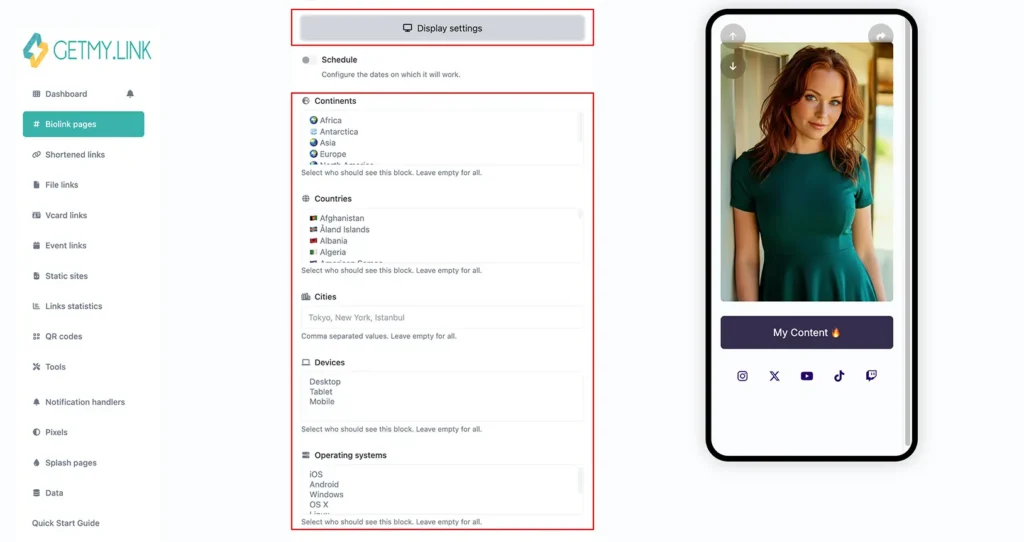
(in the “Display settings” panel of your GetMy.Link biolink block, you can target content by continent, country, city, device type, operating system, browser, and even browser language. These smart targeting features let you show different content to different visitors – all from the same link)
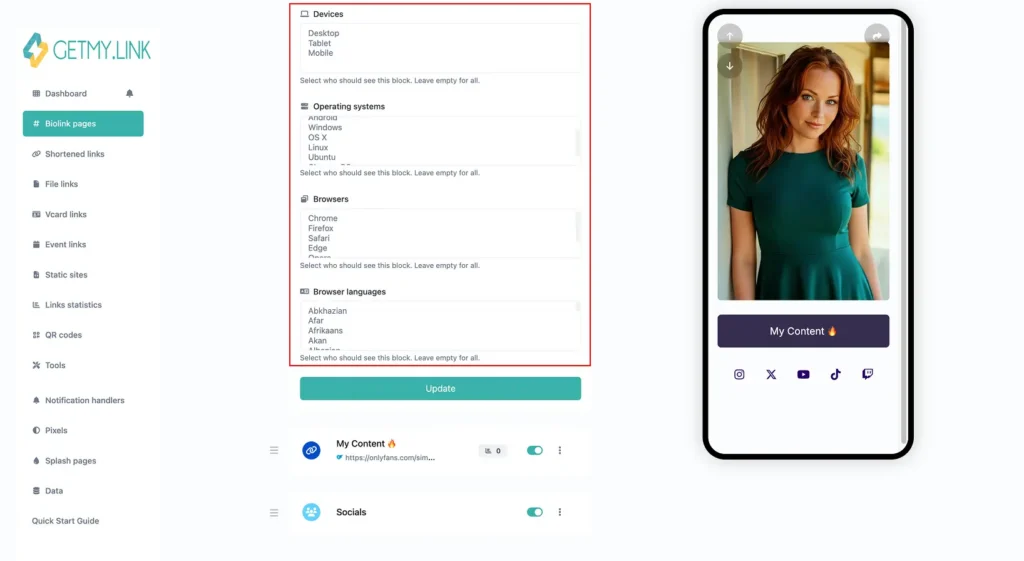
Device Targeting with GetMy.Link
Your biolink page on GetMy.Link is already mobile-optimized – so phone users get a smooth experience by default. But depending on what you’re promoting, sometimes it makes more sense to skip the general biolink and send fans straight to a more specific page.
With device targeting, you can control exactly where each fan lands based on the device they’re using – before they even reach your page.
Instead of showing the same link to everyone, you can set up smart redirects like:
For example:
- Mobile users open a chat window with a flirty auto-greeting – something like:
“Hey babe, what are you really looking for tonight? I’ve been dying to talk to you… here’s a little something from me 😘”
– and along with the message, they get a teasing photo gift to spark that first reply. No heavy videos here – on mobile, speed matters. A photo loads instantly and hits just right, without the risk of buffering or killing the mood. - Tablet and Desktop users get the best of both: a smooth chat interface with the same enticing message, but this time the “gift” is a bold, full-screen 4K teaser video – something that looks especially seductive on a larger screen and leaves a strong first impression.
This isn’t just about where fans land – it’s about how you guide the fantasy.
One OnlyFans creator found a genius (and unforgettable) way to use device targeting to boost tips.
She created two nearly identical animated teaser clips – each showing her standing in a bikini, inviting fans to “tap to tip”. But here’s the twist:
- iPhone users saw an animation where a man’s hand gently brings his phone close and taps it against her bikini line. The moment it touches, that familiar Apple Pay vibration sound plays softly – coming from the panties themselves. On the fabric: a tiny, barely noticeable Apple Pay logo, just enough to register.
- Android users were shown a near-identical version – but with a Google Pay touch. Same movement, same zone, same seductive energy – but this time the sound was that crisp Google Pay chime.
Both clips were paired with a direct link to her tip form – pre-loaded and device-ready.
Same tease, same CTA, but customized down to the device in your fan’s hand. That’s the kind of experience that makes fans feel like it was made for them – and makes them way more likely to pull the trigger.
Country & Location Targeting with GetMy.Link
As a creator, you already know: your audience isn’t just global – it’s wildly inconsistent.
You might have fans in the U.S. (tipping in dollars), and others in Germany (who only really respond to prices shown in euros), and a few in countries where OnlyFans is blocked entirely.
That’s where country targeting comes in.With GetMy.Link, you can automatically redirect fans based on their geolocation – using their IP to send them to the most relevant destination. It takes just seconds to set up, but the impact is huge.
Real-World Scenarios
- 🇺🇸 US fans land on your regular page with USD pricing and English text.
(Same setup works great for Canada, Australia, and other English-speaking countries – just adjust the currency or platform-specific details.) - 🇩🇪 German fans get a localized version with your service menu in euros and translated captions.
(You can do the same across Europe – just swap in the local language and currency per country.)
- 🇦🇪 Fans in the UAE (or other countries where adult content is restricted) are sent to a safe landing page – like your SFW Telegram, a merch store, or a free teaser hub.
(Use this method for fans in Pakistan, China, Saudi Arabia, and any region with adult platform bans. Don’t let the click go to waste.)
Set it up this way for every country where OnlyFans (or similar adult platforms) are blocked. Redirect fans to the next best step instead of a dead end.
You can create as many country-specific redirects as you need, and choose one fallback link for everyone else. This is perfect for creators who want to:
- Localize offers and pricing,
- Stay compliant with local restrictions,
- Boost conversion by showing fans something that feels native to them.
Language Targeting with GetMy.Link
Not every fan speaks English fluently – and even if they technically understand it, they might miss the slang, the innuendos, or the playful tone you’re going for. That disconnect can make them hesitate. Instead of feeling relaxed and ready to spend, they’re mentally translating… and that kills the mood (and the conversion).
When a fan clicks your link and lands on a page in their language, it hits differently. It feels personal. Familiar. Intentional. That kind of detail builds connection – and connection builds conversions.
With language targeting in GetMy.Link, you can redirect fans based on the language setting of their browser or device. That means:
- Spanish speakers get your link page, tip menu, and welcome message fully in Spanish.
And so on – you don’t need to list every language. You get the idea.
Everyone else goes to your default (usually English) version – unless you set up more rules.
Why It Matters
Language targeting is perfect when you want to:
- Convert international fans who might hesitate on an English-only page
- Offer captions, descriptions, or pricing in local language
- Run regional promos or events for specific language groups
- Look more professional and fan-focused – without splitting your audience
Even something simple – like “Hey, guapo 😘 ready to play?” vs. “Hey babe 😘 ready to play?” – can immediately raise your chances of a click or reply.
You don’t need full translations of your entire site. Even just one custom landing page in the fan’s native language can change the game.
Real-World Example
Let’s say your analytics show a spike in Spanish-speaking fans from Mexico – even if they’re spread out across the entire continent. Instead of sending them to your standard English biolink, you create a Spanish version – same structure, same photos, but:
- Text and CTAs are in Spanish
- Your intro message feels native
- The vibe is local, not generic
In GetMy.Link, you set a rule:
If browser language = Spanish → redirect to the Spanish page.
Now every Spanish-speaking fan lands on a version that feels like it was made just for them. That’s power.
Wrapping It All Together
Smart targeting features aren’t about complicating your links – they’re about making one link feel personal for every fan.
With GetMy.Link targeting, you can guide people based on where they are, what they’re using, or what language they speak – without splitting your audience or running ten different campaigns.
It’s smooth. It’s subtle. And it seriously boosts results.
We’ve packed this article with real-world examples – for iPhone and Android users, fans from different countries, speakers of different languages, and more. From teasing tips, geo-reroutes, and native-language greetings – every detail shows how much power is hidden inside just one smart link.
That’s how you build trust, spark connection, and make every fan feel like you made this just for them.
And when fans feel seen?
They click. They stay. And they spend.