
Instagram Stories can feel casual, fast, and low-pressure. For OnlyFans creators, though, they often do a lot of work. Stories are where many creators post teasing selfies, countdowns, behind-the-scenes moments, soft promo, and little hints that push viewers closer to the bio link. That is exactly why screenshot anxiety comes up so often. Once something is posted to a Story, it may disappear from the profile in 24 hours, but that does not mean it disappears from someone else’s phone.
The first thing to know is the most important one: Instagram does not notify you when someone screenshots a regular Story. The same is true for Close Friends Stories, Story Highlights, and screen recordings. Screenshot notifications only appear in a different part of the platform – for disappearing photos or videos sent in DMs and in vanish mode chats.
That changes the way creators should use Instagram. Stories are still useful for attention, teasing, and funnel-building. But they are not a secure place for content that would be a serious problem if saved, reposted, or passed around. That is one reason a layered funnel matters so much. With GetMy.Link, a creator can use the Instagram click as a first step, then guide fans through a more organized page before sending them deeper into paid or more explicit destinations.
Next, let’s look at whether Instagram can tell you who screenshotted your Story, the only time screenshot notifications appear, what fans can still do without your knowledge, and how creators can build a safer path from Instagram to OnlyFans.
Can You See If Someone Screenshots Your Instagram Story?
The short answer is no. Instagram does not tell you when someone screenshots a regular Story, a Close Friends Story, or a Story Highlight. The same is true for screen recordings. If a viewer saves that kind of Story content, you will not get a notification from Instagram. Screenshot alerts are tied to a different part of the app – disappearing photos or videos sent in DMs, and vanish mode chats.
This confuses a lot of people because Stories feel temporary by design. They disappear from the profile after 24 hours, so it is easy to assume Instagram would also warn you if someone saved them. But that is not how the platform works. A Story can be temporary on your page and still be permanent on someone else’s phone the second they take a screenshot or screen recording. That is why creators should treat Stories as short-lived, not protected.
The stakes are even higher when Stories are being used to tease paid content. A soft selfie, lingerie mirror shot, behind-the-scenes clip, countdown sticker, or promo line for customs may feel low-risk in the moment. But if the wrong person saves it, that content can move far beyond the audience it was meant for. The lack of screenshot alerts means you usually will not know it happened.
That is also why a safer funnel helps. Instagram can still do the job of building curiosity, but it should not be the place where your most sensitive content lives. Tools like GetMy.Link are useful here because they let a creator send Story traffic first to a more controlled page, then guide interested fans deeper into paid pages or more direct offers from there.
The Only Time Instagram Does Send a Screenshot Notification
There is one important exception to the rule. Instagram does send a screenshot notification when someone captures a disappearing photo or video in DMs, and it can also notify users if someone screenshots or screen-records content in vanish mode. That is a different feature from Stories, and Instagram’s own Help Center treats it separately.
That distinction matters because a lot of creators mix these features up. Stories, Highlights, and Close Friends Stories may feel personal, but Instagram does not treat them like disappearing chat media. A disappearing photo sent through DMs is designed to be viewed inside a private conversation, and Instagram specifically tracks whether it was seen, replayed, or screenshotted. Stories do not come with that kind of warning system.
For creators balancing promo and privacy, that distinction matters a lot. A public-facing Story might be fine for soft promo, a teaser selfie, or a countdown sticker. But if something feels more sensitive, more personal, or more likely to be misused, it is safer to remember that Stories offer no screenshot alert at all. Instagram’s screenshot warnings only show up in those more private DM-based formats.
That does not mean disappearing DMs are risk-free. It only means Instagram may notify you if a screenshot happens there. A safer mindset is to treat Stories as open teaser space and treat more sensitive material as something that belongs deeper in the funnel, where access is more controlled.
Why Story Screenshots Can Be a Bigger Problem for Creators
For most people, a Story screenshot is just a privacy annoyance. For a creator selling content, it can be much more than that.
Instagram Stories are often where creators post the lighter top layer of their promotion. That might include teasing selfies, lingerie photos, body shots, polls, “new content tonight” reminders, customs menu previews, or hints about what is available behind the bio link. None of that may feel fully explicit. But it can still be valuable content, and once someone saves it, the creator loses control over where it goes next.
That is the real issue. The problem is not only that someone can screenshot a Story. The bigger problem is that Instagram will not tell you when it happens, and the saved image can then be reposted, forwarded, archived, or used out of context without your knowledge. Instagram’s own Help Center is clear that regular Stories do not trigger screenshot notifications, which means creators cannot rely on the platform to monitor that kind of saving for them.
Close Friends Stories do not solve this either. They may limit who can view the Story, but they do not prevent screenshots, and Instagram still does not notify you if someone captures them. The same goes for Highlights. A creator may feel more comfortable posting something to a smaller circle, but technically it can still be saved just as easily.
This matters because Instagram is usually a traffic source, not the place where the most sensitive content should live. If a Story contains too much of the actual value, then a screenshot can strip away the need to click further. But if the Story is only doing the job of teasing, hinting, and creating curiosity, the risk becomes easier to manage.
That is why many creators do better with a layered setup. The Story creates attention. The bio link leads to a cleaner, more controlled page. Then that page moves interested fans toward the creator’s paid content, menu, or private offers. A tool like GetMy.Link fits well into that flow because it gives creators a middle layer between Instagram and the more direct destination, instead of forcing everything into one exposed step.
What Instagram Does Let Creators See
Even though Instagram does not tell you who screenshots your Stories, it does give you a few other signals about how people interact with them.
The most obvious one is Story views. You can open your Story, swipe up, and see exactly who watched it. Instagram also shows engagement such as replies, reactions, link taps, sticker taps, poll answers, and question-box responses. If you use a link sticker in the Story or send people toward the bio link, Instagram can show how many people tapped it.
That information can still be useful for OnlyFans creators because it often tells you who is interested, even if it does not tell you who saved the content. Someone who watches every Story, votes in polls, reacts to selfies, and keeps clicking the link is usually showing much more intent than someone who only watches once.
For example, a creator might notice that one type of Story gets far more replies than another. Maybe teasing mirror selfies create more reactions than countdown graphics. Maybe polls about customs get more taps than general promo posts. That can help shape what kind of content belongs in Stories and what should stay deeper in the funnel.
What Instagram does not show is who screenshotted, screen-recorded, or saved the Story elsewhere. There is no hidden list for business accounts, no extra analytics tab, and no way to see it through Insights. Even if a Story gets a lot of attention, you still cannot tell whether someone captured it.
That is one reason many creators focus less on trying to catch screenshots and more on controlling what appears in Stories in the first place. Instagram can show you who is interested. It cannot show you who is saving the content.
Pro Tip: Pay more attention to who repeatedly interacts with your Stories than to who simply watches them. Those are often the viewers most likely to click deeper into your bio link or paid pages.
How to Protect Your Content If Instagram Won’t Tell You
If Instagram will not alert you when someone screenshots a Story, the safest approach is to build your Story strategy around that reality. Stories can still be useful. They can create attention, warm up traffic, and push viewers toward the next step. But they should not be treated like protected space.
The first rule is simple: do not post anything to Stories that would be a serious problem if it got saved. Instagram itself is clear that Stories disappear from your profile after 24 hours unless you add them to Highlights, but that temporary format does not stop viewers from capturing them on their own devices.
In practice, that usually means keeping Story content in the teaser zone. A cropped selfie, a blurred preview, a countdown, a poll, or a behind-the-scenes moment is usually safer than posting the exact image or clip that holds the real value. If the Story gives away too much, a screenshot can remove part of the reason to click further.
Watermarks can help too. They do not stop screenshots, but they can make reposting less clean and less useful to the person saving the content. Even a simple username overlay across the image can make a difference.
It also helps to avoid reposting the exact same asset across Instagram and your paid platform. If a fan can compare the Story and the premium post side by side and see they are identical, the teaser is doing too much. A safer approach is to let Instagram show the mood, not the full payoff.
Close Friends should be used carefully as well. It may feel more private, but it is still not protected from screenshots. Instagram does not give screenshot alerts there either, so it is better to treat it as a narrower audience, not a secure vault.
This is also where funnel structure starts to matter more. GetMy.Link helps creators add a middle step between Instagram and their premium content. A Story can create curiosity, the bio link can lead to a cleaner page, and that page can then guide fans toward paid subscriptions, custom offers, or other more direct destinations. That extra step gives creators more control over what viewers see first.
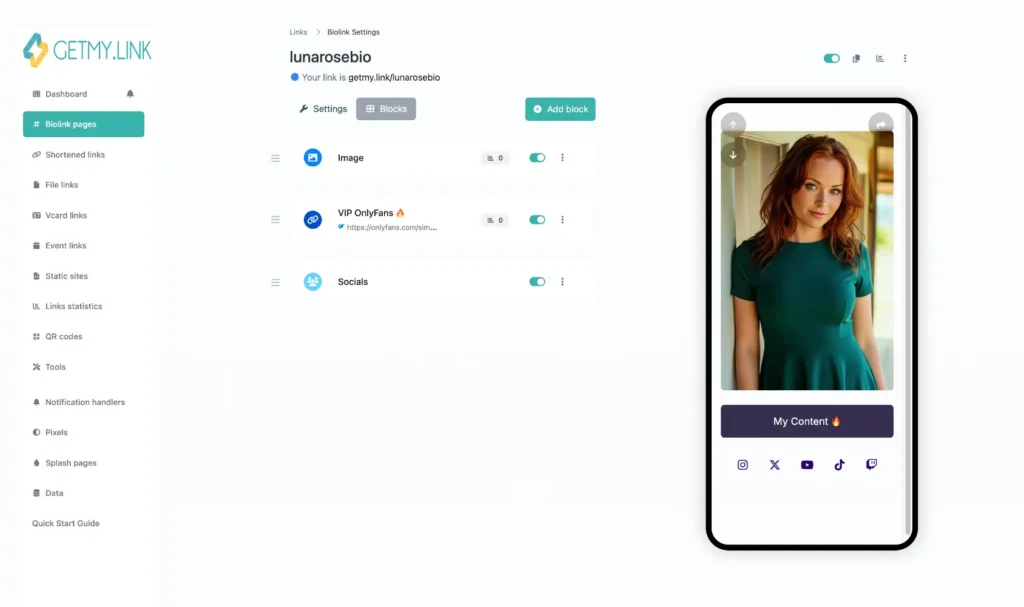
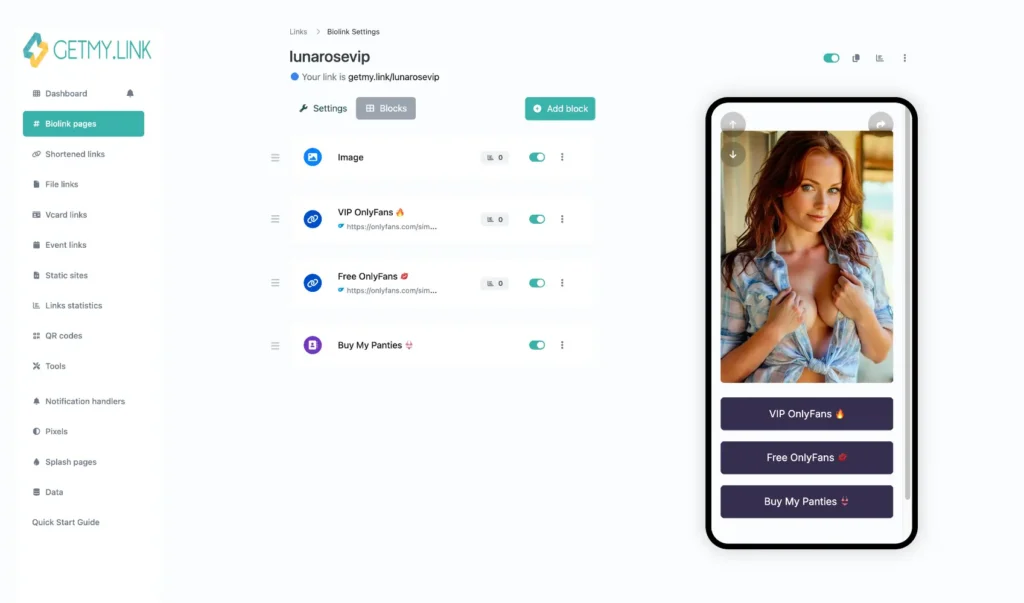
So instead of relying on Stories to carry too much of the sale, creators can use Stories to create curiosity, then send viewers into a safer path. That path might start with a neutral bio page, then move to a fuller set of offers only after the viewer has clicked once more.
Can Third-Party Apps Tell You Who Screenshotted Your Story?
No – if an app claims it can show you who screenshotted your Instagram Story, it should not be trusted.
Instagram’s own screenshot notifications are limited to disappearing photos or videos in DMs and vanish mode chats. That means screenshot detection happens inside those specific Instagram features, not as a broad Story-tracking system that outside apps can access.
In practice, that is why third-party “Story screenshot detector” apps are not worth trusting. Since Instagram does not provide this kind of tracking for regular Stories, these tools have nothing reliable to show. Many of them simply use that promise to push downloads, request extra permissions, or collect login details.
For creators posting teaser content, screenshot anxiety can make those apps look tempting. If you are sharing promo selfies, soft behind-the-scenes Story posts, or teasing previews, it is natural to want a list of who saved them. But an app that promises that kind of visibility is not giving you real protection. At best, it is guessing. At worst, it is collecting account access or pushing you toward risky permissions.
A safer approach is to assume Stories can be saved and build your funnel around that reality. Instagram can still help create interest. Your bio link can still move viewers forward. But the platform will not give you a secret screenshot report, and no outside app can fix that.
Popular Myths About Instagram Story Screenshots
Because Instagram Stories disappear after 24 hours, a lot of creators assume there must be some kind of hidden protection behind them. That has led to plenty of myths about screenshots, especially among creators who use Stories to tease OnlyFans content.
One of the biggest myths is that Close Friends Stories are safer. They are more private in the sense that fewer people can see them, but they are not protected from screenshots. Anyone on the Close Friends list can still save the Story, and Instagram will not notify you if they do.
Another common belief is that screen recordings are different from screenshots. They are not. Instagram does not alert you when someone screen-records a Story either. A viewer can record the entire Story sequence, save it, and you will not see any sign that it happened.
Some creators also think that Story Highlights work differently because they stay on the profile longer. But Highlights follow the same rule. If someone screenshots a Highlight, Instagram does not tell you.
There is also a persistent myth that business or creator accounts get more detailed analytics. They do not. Even with Insights, Instagram only shows Story views, taps, replies, sticker interactions, and similar engagement. There is no hidden section that reveals who saved or screenshotted a Story.
Finally, some people still believe Instagram used to notify for Story screenshots and quietly removed it. That belief comes from a short test Instagram ran in 2018. During that test, some users briefly saw a small star-shaped icon when a Story was screenshotted. But the feature was removed, and Instagram has not brought it back since.
The safest rule for creators is simple: if it appears in a Story, assume someone can save it.
Conclusion
Instagram does not tell you when someone screenshots your Story. That is true for regular Stories, Close Friends Stories, Highlights, and screen recordings. The only place where Instagram sends screenshot notifications is inside disappearing DMs and vanish mode chats.
That means Stories should be treated as teaser space, not safe storage. They are useful for attention, curiosity, and moving viewers toward the next step. But they are not the place for content that would be a serious problem if copied, reposted, or shared.
The safest approach is to assume that anything posted to Stories can be saved. A softer preview, a cropped image, a countdown, or a hint usually works better than giving away too much. Then the bio link can do the next part of the job.
That is where a layered funnel becomes useful. A tool like GetMy.Link gives creators a way to place a cleaner, more controlled page between Instagram and their more direct offers. The Story builds curiosity. The bio link organizes the click. Then interested fans can move deeper into the creator’s paid pages, custom offers, or more private content.
In the end, Instagram works best when it creates interest, not when it carries the entire value of the content on its own.
Leave a Reply