
You’re an adult content creator, and you already know — your job is a lot more than just posting spicy content.
You’re juggling everything: promo links, platform changes, subscriber goals, DMs, custom content requests, daily posts across TikTok, X/Twitter, Instagram, Reddit, Telegram… not to mention trying to keep your top fans happy while finding new ones. Some want soft, others want wild. Some pay monthly, others tip once. It’s a constant balancing act.
And in the middle of all that? You’re expected to somehow know what’s actually working.
Which platform sends the most loyal fans? Which button on your bio page actually gets clicks? Are people even scrolling down to your merch or wish list? Without real data, you’re left guessing — and that means wasted time and missed income.
That’s where GetMy.Link’s built-in analytics change the game. With just a few clicks, you get real insights: how many people are viewing your link page, which buttons they’re tapping, where they’re coming from, and even what devices they use.
This article will walk you through exactly how GetMy.Link analytics work — and how to use them to stop guessing and start growing.
Why Link Analytics Matter (Especially for Adult Creators)
It’s easy to assume that more views equals more money — but that’s not always true. Not all traffic is equal. Some fans click and bounce. Others click, explore, and convert. The difference? Data.
With so many links in play — OnlyFans, Fansly, wishlists, tip jars, request forms, Telegram, Reddit, and more — it’s not always clear where your best traffic is coming from. Are people actually clicking your Reddit link? Is your tip jar even being seen? Does your OnlyFans get more attention from X (Twitter) or TikTok?
That’s the kind of insight analytics give you.
When you track what people are clicking, where they’re coming from, and what device they’re using, you stop flying blind. You can:
- See what content or offer actually gets results
- Understand which platform sends quality traffic (not just random clicks)
- Reorder or rewrite links based on performance
- Drop what’s not working and double down on what is
It’s especially powerful in adult work, where every creator’s audience behaves differently. Some fans will click a 3-day free trial to your VIP OnlyFans page. Others jump at a “free dick rating with paid subscription” promo. One group might’ve discovered you on X, where they saw your hottest collab shots — while another came from TikTok or Instagram after watching your safe-for-work teasers.
Different fans. Different links. Different journeys.
Instead of guessing what might work — your analytics show you what is working.
So if you’re tired of posting everywhere and hoping for the best, it’s time to start tracking. GetMy.Link makes that easy — no tech setup, no external tools. Everything’s already built into your page.
Inside the GetMy.Link Analytics Dashboard
The moment someone clicks your GetMy.Link — your analytics start tracking. No setup. No code. No need to connect outside services.
From your main dashboard, open “Links statistics” in the left-hand menu. You’ll get a clear, visual overview of what’s happening with your links right now — including visits, clicks, referrers, and more.
At the top:
- A graph showing how many people viewed your page and how many actually visited (useful for spotting peaks and patterns over time).
Below that:
- Top countries your traffic is coming from
- Devices and operating systems used (iOS, Android, Windows, etc.)
- Browsers and language settings
- Referrers — where your clicks are coming from (for example, TikTok, X/Twitter, Instagram, or Reddit)
It’s all easy to read — no tech background needed.
You can also change the date range (today, last 7 days, full month) and drill down into individual links or biopages. Want to know which of your short links got the most action last weekend? You’ll see it in a click.
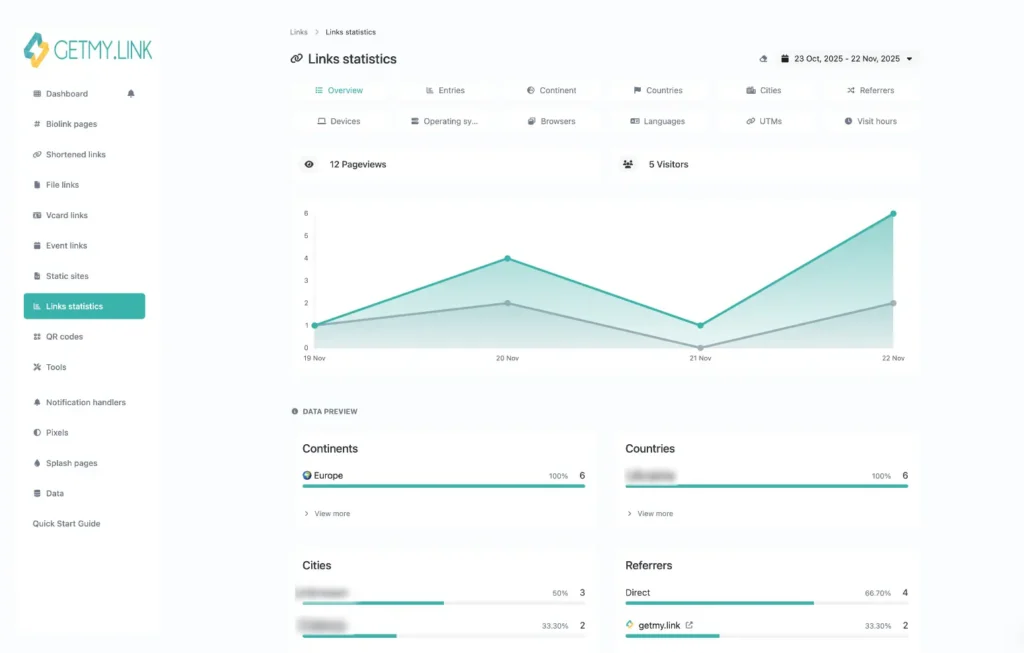
(example of the “Links statistics” dashboard in GetMy.Link)
The Metrics That Actually Matter
GetMy.Link gives you clear, visual link analytics & insights — so you can finally understand what’s working and what’s not. No guesswork. No outside tools.
Let’s break it down. These are the key numbers you’ll see, and how they help you make smarter moves as a creator:
Views & Visitors
- Views = how many times your link page (or short link) was opened
- Visitors = how many unique people came through
Why it matters:
If you’re getting tons of views but low conversions, something’s off — maybe your link labels are confusing, or your best offer is too far down the page. This metric helps you spot those disconnects fast.
Clicks per Link
Each button, block, or file on your page tracks its own clicks. Want to know if your “3-day free trial to your VIP OnlyFans” is working better than your “free dick rating with paid subscription” promo? Now you can see for sure.
Why it matters:
You’ll know exactly which links fans are engaging with — and which ones you might want to rewrite, move higher, or swap out completely.
Top Countries & Cities
See where your visitors are located — by country and even by city.
Why it matters:
When you know where your traffic is coming from, you can adjust your posting time, language, or even tone. A small shift — using region-specific slang, syncing with local peak hours, or tapping into trending formats — can boost clicks and conversions. The more your promos feel relatable to your audience’s context, the better they perform.
Devices & OS
See what fans are using: mobile or desktop? iOS or Android?
Why it matters:
This confirms how your audience actually browses. If you ever add external links or preview pages — knowing how they look on your fans’ screens is key. (Spoiler: it’s almost always mobile.)
Browsers & Languages
What browser are people using and what’s their default language?
Why it matters:
Not the sexiest stat, sure — but it is useful. For example, you’ll quickly see whether your audience mostly speaks English or something else.
Referrers & UTM Tags
See where traffic is coming from — like Instagram (your bio), X/Twitter (your pinned post), or anything you’ve tagged with UTM codes.
Why it matters:
This is gold when you want to compare which promo actually brought fans in. If your SFW TikTok teaser got 300 clicks but your NSFW tweet only 20 — that tells you something.
UTM Tags & Pixels: Hidden Power Tools
If you want to go beyond “what got clicked” and start tracking why or where — UTM tags and pixels are your best friends. Don’t worry, they sound more complicated than they are.
UTM Tags = Track the Source of Every Click
UTMs are little add-ons you can attach to any link in your bio. For example:
?utm_source=instagram&utm_campaign=vip_weekend
What that does:
When someone clicks, GetMy.Link logs where they came from (Instagram), and why you shared that link (to promote your free trial).
Why it matters:
You’ll see exactly which posts, platforms, or promos are bringing real traffic — not just random clicks. That means:
- You can compare completely different platforms where you shared your bio link
- Test different captions and see what performs
- Track the impact of a collab, giveaway, or new offer
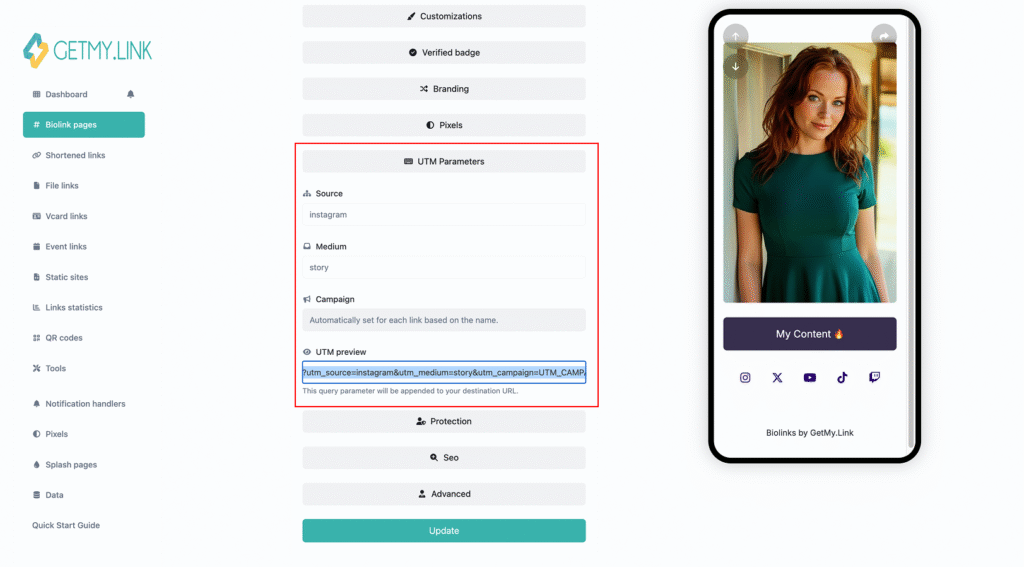
(adding UTM parameters in GetMy.Link)
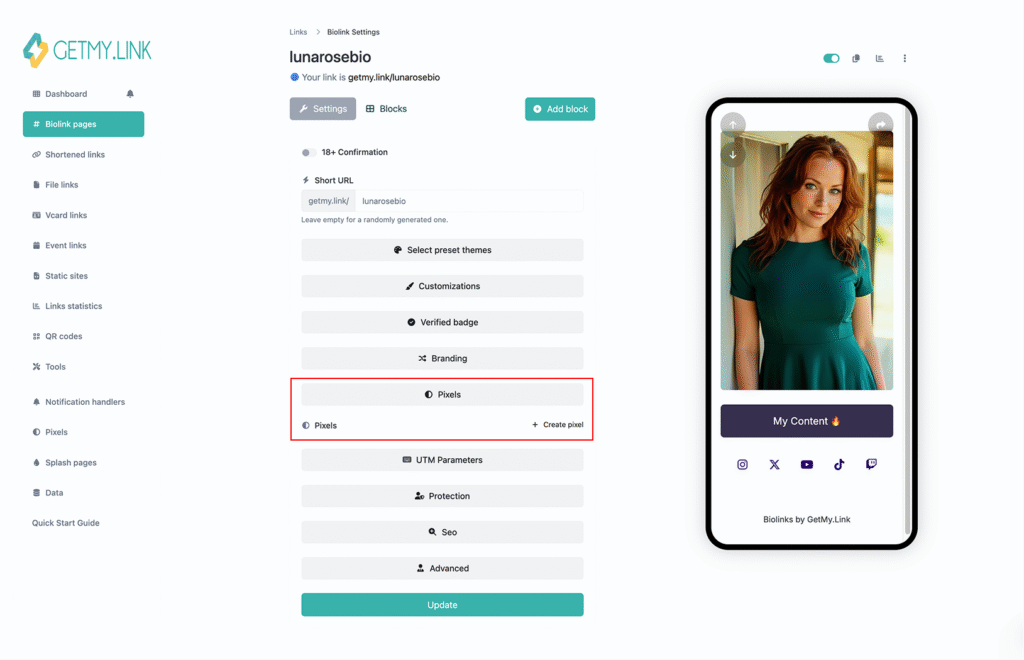
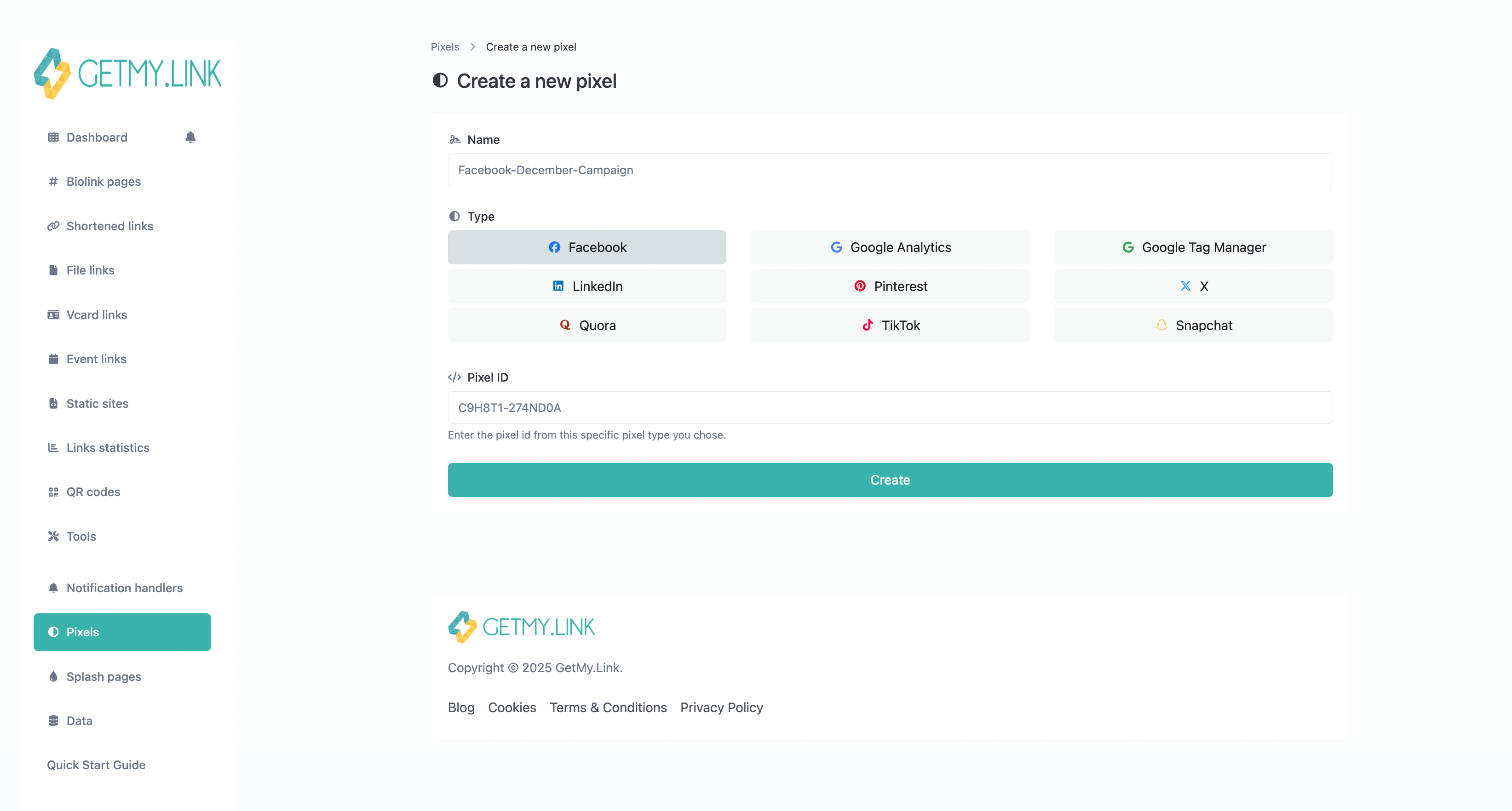
(creating a new pixel in GetMy.Link — choose your platform, then paste your Pixel ID)
Not sure where to find your Pixel ID? Just check your platform’s ads dashboard.
Turning Numbers Into Strategy
Analytics aren’t just there to look pretty — they’re meant to help you do things better. Once you start reading the data, you’ll notice patterns. And those patterns can guide smarter decisions, save you time, and boost your earnings.
Here’s how real creators use GetMy.Link analytics in day-to-day work:
Move What Converts to the Top
If your analytics show that fans mostly click one offer — like “Subscribe and DM me for free hot pic” — but ignore others, bring that link to the very top of your bio page. You’d be surprised how much difference that small move can make.
Fans don’t scroll forever. Put your top-performing content where it’s easiest to tap.
Test Two Versions of the Same Thing
Want to promote a spicy photoset? Try posting it in two different styles — for example:
- One Instagram Story with a “🔥Red Lingerie Tease” caption
- One tweet with a “Wet Look Drop 💦” vibe
Both posts lead to the same exact photoset, but each uses a different UTM tag on the link:
?utm_campaign=red_lingerie_tease
?utm_campaign=wet_look_drop
This lets you track which presentation brings more clicks — even though the destination is the same.
It happens wherever you post that link: social, DMs, Reddit, email, anywhere. Same link. Same content. Different vibes. Measurable results.
See Where It’s Actually Working
Posted your GetMy.Link in your pinned tweet, on your Instagram bio, in your dating profile, and across a bunch of other spots?
Analytics will tell you which one actually drove traffic — and which ones just sat there doing nothing.
That way, you stop wasting effort and focus on what’s really working.
It saves time and energy. Less guessing, more growing.
Understand What Fans Respond To
Do fans react more to “50% off this week” or “Free dick rating with sub”? More to custom offers or limited drops? The answer isn’t in your head — it’s in the click data.
Tailor Content by Audience Location
If a big chunk of your traffic comes from outside your home country, your followers might not be in the same time zone — or even speak the same language. You’ll spot that in the geo/language data.
That’s your chance to:
- Schedule posts to match their peak time
- Use keywords or emojis they vibe with
- Avoid slang or cultural references that don’t translate
Analytics don’t replace creativity — they sharpen it.
You’re still the brand. The look. The fantasy. The voice.
But now you have numbers to back you up — so every link, post, or promo hits harder.
Ready to Use Your Analytics?
The best part is, you don’t need to set anything up. If you’ve got a GetMy.Link page, analytics are already tracking.
So here’s what to do right now:
- From your main dashboard, open “Links statistics” in the left-hand menu
- Set the range to the last 7 days — which links are getting love? Which ones are flat?
- Test something new this week — a fresh caption, a new link order, or a promo with a UTM tag
- Come back in a few days and check the results
- Repeat what worked. Drop what didn’t. That’s growth.
Remember: your energy is limited. Your time is valuable. Analytics help you spend both smarter.
And in a world where every creator is posting more, promoting harder, and juggling five platforms at once — the ones who track are the ones who win.