Every day, creators show up with a new piece of work – and behind each post is a full-stack workflow that spans multiple platforms, formats, and audiences.
A YouTuber might spend the morning filming a long-form video: setting up lights, capturing A-roll and B-roll, recording voiceover, and editing everything into a polished 12-minute upload. But once the video’s live, the work shifts. They post a teaser clip to Instagram Reels and TikTok. A behind-the-scenes still goes to Stories. A community post appears on YouTube with a pinned comment and link. They drop the trailer on X, tag collaborators, and link to the full video. Then they schedule a newsletter blast linking back to the upload. That’s six touchpoints – all from one video.
A streamer starts their day reviewing Discord feedback, then posts a “Going Live at 8PM” teaser on X and a Story to Instagram. An hour before the stream, they drop a promo reel on TikTok and share the day’s Twitch topic on Reddit or their community tab. Then it’s showtime: overlays on, chat open, three hours live on Twitch with real-time Q&A, shoutouts, and community banter. After logging off, they clip a few highlights for YouTube Shorts, post screenshots to their Telegram channel, and share the stream replay across socials.
That’s a full content cycle spanning Twitch plus six other platforms – all in under 12 hours.
An influencer’s day starts with a morning call from a brand manager – there’s a campaign deadline, and they need new deliverables today. By noon, the influencer has shot product photos for Instagram, filmed a try-on video for TikTok, and edited a reel with closed captions and brand mentions. They upload the reel to both platforms, then share a few casual BTS shots in Stories. On X, they post a short thread explaining the brand collab – and pin a reply with a promo code link.
Later that afternoon, they go live on Instagram to answer questions, plug the product again, and direct followers to check the link in bio. Meanwhile, they update their storefront and affiliate dashboard. That evening, they send a Substack to email subscribers with campaign highlights and exclusive links. In DMs, they juggle replies from fans, PR teams, and fellow creators.
By the end of the day, they’ve used eight platforms – each with different link limitations, post types, and formats. And all of them point to something: a brand site, a discount code, a digital download, a subscriber-only offer.
Three creators. Three very different content models. But all of them have one thing in common: they need a way to tie it all together.
That’s where GetMy.Link comes in – a single, customizable page that lets creators share everything in one place and keep their audience moving forward.
One Link, Fully Customized
GetMy.Link isn’t just a static list of buttons – it’s a flexible, fully customizable page that feels like a mini-website. You start with a blank canvas, then add blocks: buttons, images, headlines, embedded videos, product links, contact forms, and more. Each one can be dragged, edited, or hidden at any time.
Creators can personalize everything from colors and fonts to backgrounds, spacing, and SEO tags. Whether you want something minimal and clean, or bright and animated, the editor makes it easy – no design skills needed.
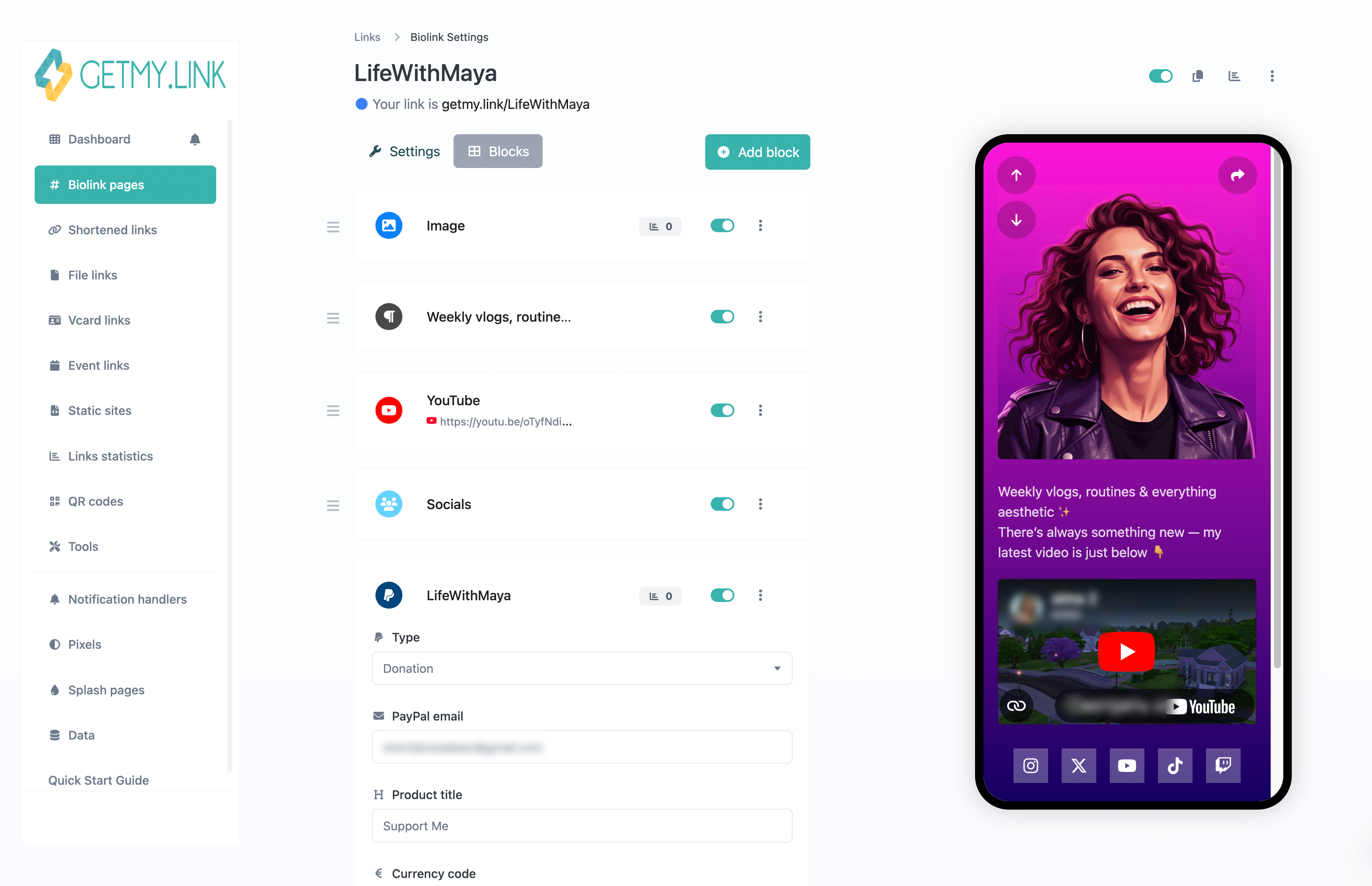
You can upload your avatar, write a short intro, and drop in buttons that link to your shop, video playlist, donation form, Discord, or affiliate promo. The end result feels like a personal homepage – one that works across every device and social app.
More Than Buttons: Add Video, Forms, QR Codes, and More
The power of GetMy.Link comes from its modular blocks. Each block adds a different kind of content – and you can mix and match as many as you need.
Want to embed your latest YouTube video? Drop in a video block.
Need to collect emails for your newsletter? Use the email form block.
Promoting a new track on Spotify? Embed the player directly.
Offering a downloadable bonus for fans? Use the file block with built-in analytics.
There are blocks for:
- Buttons (with icons, styles, and full link control)
- Social links (with smart previews)
- Embedded content (YouTube, TikTok, Spotify, X)
- Image and video galleries
- Tip jars and donation buttons
- Email and phone number collectors
- vCard / digital business card
- QR code generator
- Custom HTML embeds (for advanced use)
Each block is optional – you only add what fits your content. And each one can be restyled, reordered, duplicated, or hidden with a click. Most creators build one or two “main” pages with a few core blocks… but for big campaigns or launches, it’s easy to scale up with richer layouts and deeper links.
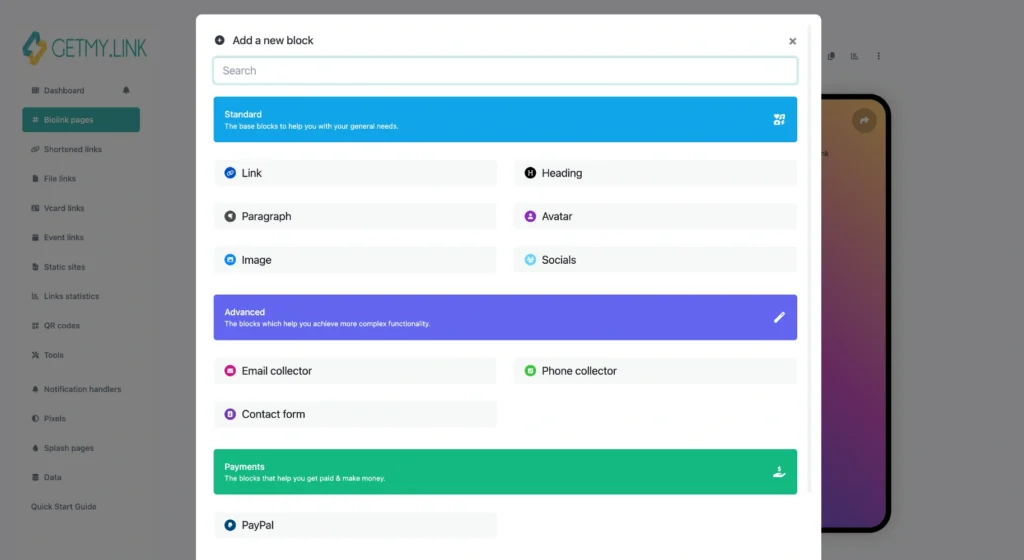
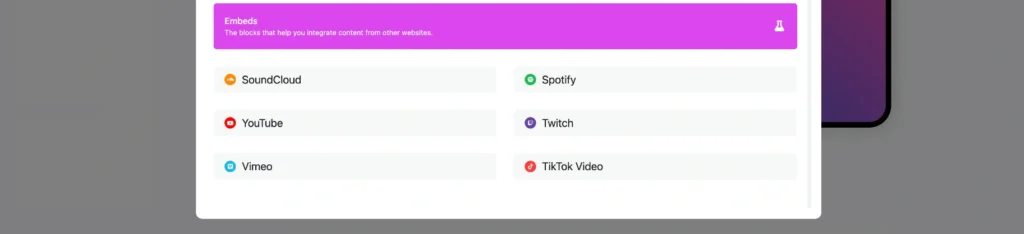
(GetMy.Link block menu with buttons, headings, images, social links, and advanced options like email and phone forms.)
YouTubers: Turn One Link Into a Full Content Hub
Most YouTubers get one link: in their channel bio, in video descriptions, and maybe in pinned comments. But the content they create branches in every direction – playlists, merch, sponsors, behind-the-scenes, mailing lists.
With GetMy.Link, they turn that one link into a flexible hub for everything:
- Feature new uploads at the top with thumbnails and video embeds
- Add buttons for playlists, shorts, or special series
- Link out to affiliate stores, promo codes, or Patreon
- Embed their latest newsletter
- Add tip jars for fans who want to support
- Swap links instantly without editing each video manually
When a new video goes live, creators just update their bio page – not every old description. They can even track which links get the most clicks and where traffic is coming from.
Streamers: Connect the Dots Between Chat, Donations, and Community
Streamers often work with fragmented audiences: viewers on Twitch, followers on TikTok, chat in Discord, clips on YouTube, updates on Telegram or X. Keeping everything connected – and clickable – is a daily challenge.
GetMy.Link helps bring it all together:
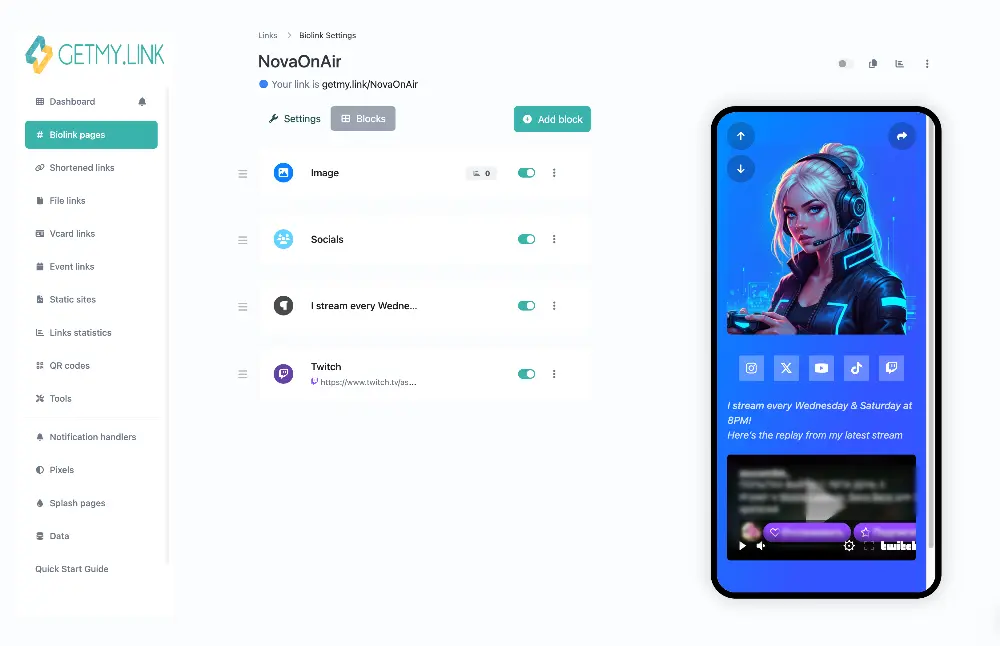
- Share your schedule and update it dynamically without reposting
- Link your donation page, Ko-fi, or PayPal with a styled button
- Embed your stream replay or top highlight
- Drop links to your merch, Discord server, or tip leaderboard
- Feature clips, sponsor links, or shoutouts – even during live broadcasts
- Generate a branded QR code and display it on-screen so viewers watching on a TV or laptop can scan it instantly with their phone
Some streamers even switch their GetMy.Link bio between “Live” and “Offline” modes: one version for during the stream (donate, tip, join chat), another for post-stream (replay, merch, highlights).
Influencers: Centralize Collabs, Promos, and Audience Funnels
Influencers juggle a lot: campaigns, affiliate links, shoutouts, paid content, free content, swipe-ups, stores, bios – often across five or more platforms at once. And each link usually points to a different offer, brand, or destination.
With GetMy.Link, they bring structure to the chaos:
- Feature a hero button with your top brand collab of the week
- Rotate seasonal offers, discount codes, or limited drops
- Link to your Amazon storefront, LTK profile, or curated collections
- Embed TikTok or Instagram posts directly
- Add “Apply to Collab” forms for brands and agencies
- Collect email signups for direct communication
- Use analytics to track which platforms bring the most conversions
- Set a branded domain or create multiple project pages for different niches or sub-brands
Instead of saying “Link in bio” and constantly switching it out, influencers just drop one link – and manage everything from a single dashboard.

Go Beyond Bio Links
GetMy.Link isn’t just a link page – it’s a toolbox for creators who want more control, more flexibility, and more data. Behind the clean design is a powerful set of features built to help creators grow.
Here’s what’s under the hood:
- Projects (Multi-page sites): Create full microsites for special campaigns, brand partnerships, or content series. Each has its own URL and design – great for organizing multiple niches or revenue streams.
- Smart Links & Redirects: Send users to different destinations based on their country, device, or language. You can even set a link to expire after a certain number of clicks or redirect after a deadline.
- Branded QR Codes: Every page or link can generate a high-res QR code – stylized with your colors or logo. Ideal for flyers, stickers, packaging, or live streams where fans watch on larger screens.
- File Sharing & Gated Content: Upload videos, PDFs, ZIP files, or bonus materials. Add download limits or lock access behind a password. Great for freebies, paid downloads, or subscriber-only perks.
- Email & Phone Capture: Add forms that collect emails or phone numbers. You can sync them to your CRM or download the data anytime.
- Payment & Tip Buttons: Accept one-time tips or donations with a PayPal block – fully integrated into the page.
- Pixel Integration: Add Facebook, Google, or TikTok pixels to your pages to retarget visitors or track conversions – no coding required.
- Link Analytics: Track clicks, locations, devices, referrers, and more. See which platforms drive the most traffic and optimize your strategy accordingly.
These tools let creators go beyond just “link in bio” – and start treating every page like a real piece of their funnel.
Want to explore each feature in depth?
We’ve created a full step-by-step guide with screenshots – showing exactly how to use smart links, QR codes, file access, analytics, and more. Every block, every setting – explained.
See What Works – and Where
When you post a video, launch a product, or promote a sponsor, you don’t just want views – you want insights. GetMy.Link gives creators real-time analytics that show exactly how their audience engages with each link, button, and page.
Here’s what you can track:
- Total clicks and unique visitors
- Top-performing links and pages
- Traffic sources – which platform brought the user
- Device breakdown – mobile vs. desktop
- Geolocation – clicks by country and city
- Referral paths – where users came from
- UTM parameters – for campaign-specific tracking
These insights aren’t just numbers – they help creators double down on what works. For example:
- See if TikTok drives more clicks to your store than Instagram
- Compare newsletter signups from YouTube vs. X
- Test different call-to-action phrases and watch the results in real time
You can also connect your GetMy.Link pages to tracking pixels (Facebook, Google Ads, TikTok), allowing you to build remarketing audiences or track conversions from link clicks – without needing to touch code.
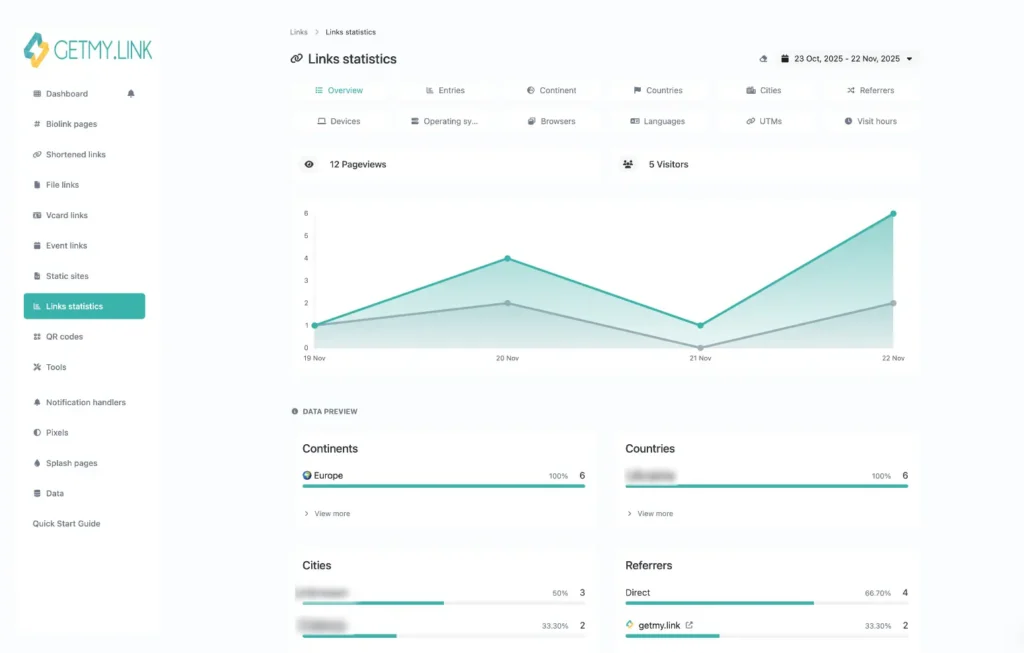
(GetMy.Link analytics panel showing pageviews by date, top countries, cities, and traffic sources.)
Full Control, No Censorship
Creators often deal with strict content policies across platforms. One wrong link, and your page could be flagged or shadowbanned – especially if your content is edgy, suggestive, or behind a paywall.
GetMy.Link is different.
It’s built to give creators full control over what they share – without overstepping or censoring. You can:
- Add a sensitive content warning that visitors must accept before viewing the page
- Set a password for private or invite-only access
- Use neutral preview images and page titles to avoid triggering link filters
- Create clean, brand-safe landing pages even if the final destination is adult-oriented
- Share links to platforms that other bio tools often block (OnlyFans, Fansly, Patreon, etc.) – no takedowns or warnings
While this article focuses on mainstream creators, it’s worth noting: GetMy.Link is 100% adult-friendly and free. That means creators in every niche – from education to entertainment to 18+ – get the same tools, freedom, and safety.
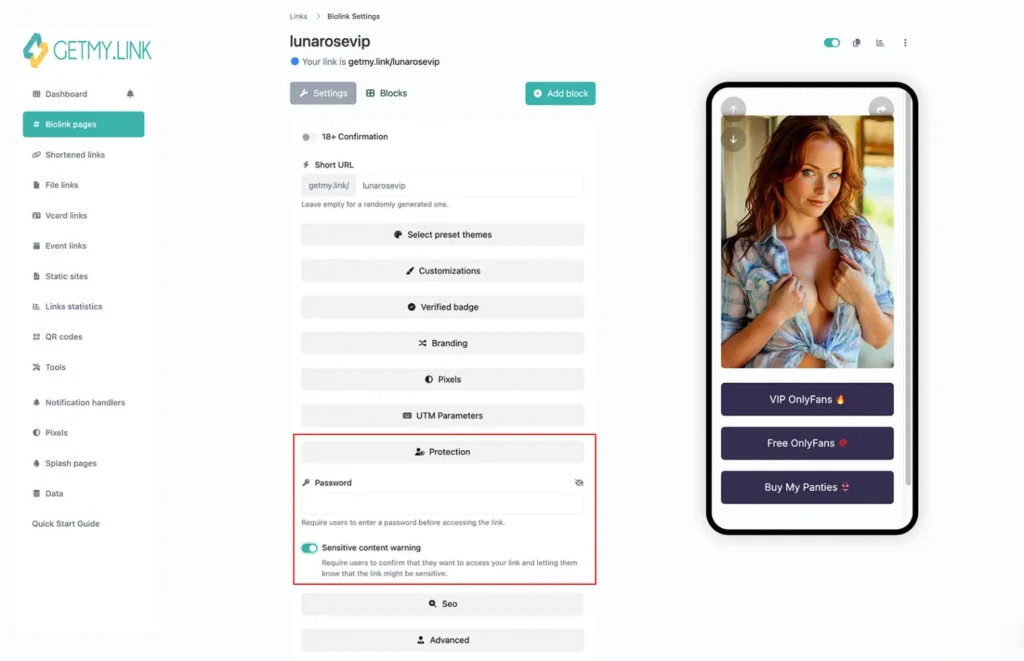
(Biolink settings screen showing password protection and sensitive content warning options.)
Built for Creators – Not Gatekeepers
Most link-in-bio tools offer the basics for free, then lock the useful stuff behind a paywall. You get one page, five links, no branding control – unless you upgrade.
GetMy.Link flips that model.
The platform is completely free to start, with full access to:
- Unlimited bio pages and short links
- Rich content blocks (videos, forms, QR, embeds)
- Advanced features like analytics and redirects
- Branding tools, theme customization, and custom domains
- Pixel integration and file hosting
- NSFW-safe sharing – no forced moderation or link blocks
No forced branding. No pay-to-unlock. No bait-and-switch.
And when you’re ready for more – like multiple workspaces, expanded file storage, or team features – there are affordable pro plans available. But the free tier is more than enough for most creators to run real campaigns, grow audiences, and manage their content with zero friction.
Final Thoughts
Creators don’t just post content – they build ecosystems: platforms, channels, campaigns, drops, communities. And in the middle of it all, there’s usually just one link to make sense of it.
GetMy.Link turns that one link into something powerful:
a branded, flexible, trackable hub that grows with you – and doesn’t get in your way.
It’s free. It’s fully customizable. It plays nice with every type of content, audience, and platform – and yes, it’s adult-friendly too.
If you’ve outgrown basic link tools – or you’re just tired of switching links in your bio every other day – GetMy.Link is worth a try.
Leave a Reply