
Every click on your link tells a story.
Someone was curious enough to tap. Interested enough to check you out. But most of the time, that’s where it ends.
For creators — especially in adult niches — this is the real problem. Traffic comes in waves. A post pops off. A tweet gets shared. A Reddit comment brings clicks. And then… silence. No follow-up. No second chance.
That’s where link retargeting changes the game.
With GetMy.Link, a click doesn’t disappear into the void. It becomes data. It becomes an audience. It becomes an opportunity to reconnect with people who already showed interest — and move them closer to a follow, a subscription, or a paid unlock.
This article breaks down how link retargeting works on GetMy.Link, why it’s especially powerful for adult creators, and how to use tracking pixels to turn one-time visitors into loyal fans. No theory overload. No beginner fluff. Just practical explanations and real use cases that actually fit how creators promote content today.
What Link Retargeting Really Means (and Why It Works)
Link retargeting is simple in concept, but powerful in practice.
When someone clicks a regular link — to OnlyFans, Fansly, a clip store, or any external platform — that click usually disappears. You don’t know who clicked. You can’t follow up. You can’t show them ads later. The moment is gone.
Link retargeting changes that flow.
Instead of sending people directly to a platform, you send them through a GetMy.Link URL first. That link fires a tracking pixel (Facebook, TikTok, Google, X, etc.), and then redirects the user to the final destination. The fan sees no difference. The experience feels instant. But behind the scenes, that click is now recorded.
In practical terms, this means:
– anyone who clicked your link can be added to a custom ad audience
– you can show ads only to people who already showed interest
– you stop spending money on completely cold traffic
(If tracking pixels are unfamiliar, this is the point where it makes sense to pause and quickly learn how Facebook or TikTok pixels work at a basic level — the rest of this article assumes that foundation.)
Why does this work so well?
Because clicking a link is already a micro-commitment. That person didn’t scroll past. They didn’t ignore you. They took action. Retargeting focuses your effort on those people instead of starting from zero every time you promote something new.
For creators, this turns links into entry points, not dead ends. A tweet, a bio link, a Telegram post, or a QR code scan no longer lives for a few minutes — it feeds an audience you can reconnect with later.
Why Link Retargeting Is Especially Important for Adult Creators
Adult creators don’t promote content the same way mainstream influencers do.
There are limits. Platform rules. Shadowbans. Ad restrictions. And a constant need to stay careful with links.
Because of that, most promotion in the adult space looks fragmented. One link in a bio. Another link in a Reddit post. A third one dropped in Telegram or DMs. Traffic comes from everywhere — and disappears just as fast.
This is exactly why link retargeting matters more here than almost anywhere else.
Most adult platforms don’t let you install your own tracking pixels. When a fan clicks straight to an OnlyFans or Fansly page, you lose visibility. You can’t retarget them. You can’t build an audience. You can’t follow up.
Using GetMy.Link as the middle layer fixes that gap.
Every click passes through a GetMy.Link URL first.
The pixel fires on that click.
The fan reaches the destination without friction.
For adult creators, this creates a safer and more flexible funnel:
Traffic from social platforms stays compliant, because ads and posts point to a neutral link.
Interest is still tracked, even if the final destination is NSFW.
Fans who hesitated or bounced can be re-engaged later with ads or reminders.
This approach also protects momentum. A viral post, a trending tweet, or a Reddit comment can bring hundreds or thousands of clicks in a short time. Without retargeting, that attention is gone forever once the post dies. With retargeting, those clicks become a reusable audience that keeps working long after the hype fades.
Instead of relying on constant new exposure, creators start building controlled traffic loops. One click leads to many future touchpoints — and much higher conversion potential.
Which Tracking Pixels You Can Use on GetMy.Link
One of the biggest advantages of using GetMy.Link for retargeting is flexibility. You’re not locked into one ad platform. You’re free to track clicks however – and wherever – you want.
GetMy.Link supports all the major tracking pixels creators actually use in real campaigns. That means you can collect audiences across different ecosystems and decide later where to spend the ad budget.
Most commonly used options include:
- Meta (Facebook & Instagram) Pixel – still one of the strongest tools for retargeting and lookalike audiences, especially when traffic comes from Instagram bios, Stories, or paid ads.
- TikTok Pixel – useful when traffic comes from TikTok profiles, viral videos, or organic reach that doesn’t convert right away.
- Google Analytics / Google Ads – helpful for creators running broader funnels, tracking link behavior, or combining retargeting with YouTube or display ads.
- X (Twitter) Pixel – ideal for creators who promote heavily on X and want to re-engage people who clicked from tweets or threads.
- Snapchat, Pinterest, LinkedIn, Quora – less common in adult niches, but available if they fit your strategy or audience.
The key point here isn’t to use everything at once. It’s about control.
You can attach one pixel to a single link.
Or multiple pixels to the same link.
Or different pixels to different campaigns.
For example, one GetMy.Link URL shared on Instagram can fire a Meta Pixel, while another link posted on X fires an X Pixel only. The fan experience stays smooth, but your data stays clean and segmented.
This also means you’re future-proofing your promotion. Platforms change rules. Algorithms shift. Accounts get limited. But your retargeting audiences stay tied to your links – not to a single social network.
How Pixels Work Inside GetMy.Link (What Actually Happens on a Click)
From the fan’s point of view, nothing special happens.
They tap a link.
They land exactly where they expected.
But technically, there’s an important step in between.
When someone clicks a GetMy.Link URL, the request first goes through GetMy.Link. At that moment, the tracking pixel attached to the link fires. Only after that does the redirect happen to the final destination – whether it’s OnlyFans, Fansly, a file download, or a custom landing page.
This matters for one simple reason:
the pixel fires before the user leaves the GetMy.Link domain.
That’s the key difference between link retargeting and regular tracking.
You don’t need access to the final platform.
You don’t need to install anything on OnlyFans or another service.
You don’t depend on what the destination allows or blocks.
The tracking happens on the link itself.
This setup works consistently across:
- bio links
- short links
- QR codes
- links shared in DMs
- links posted on social platforms or forums
Every click triggers the same sequence:
click → pixel fires → redirect → audience updated.
Another important detail:
multiple pixels can fire on the same click.
If you attach a Meta Pixel and a TikTok Pixel to one link, both audiences get updated simultaneously. This lets you test platforms, compare performance, or shift ad spend later without rebuilding your funnel from scratch.
From a strategy perspective, this means links stop being passive.
They become data collection points.
Every promotion you run – even organic posts – quietly builds audiences in the background. And once that data exists, you can decide when and how to use it.
How to Add a Tracking Pixel in GetMy.Link (Without Overcomplicating It)
Adding a tracking pixel in GetMy.Link doesn’t require any technical setup, scripts, or code edits. Everything happens inside the dashboard.
The process always follows the same simple logic:
first you create a pixel once, then you attach it to the links that matter.
In the GetMy.Link dashboard, open Biolink pages from the left-hand menu and select the bio page you want to work with. Inside the page settings, you’ll see several expandable sections. Find the Pixels section, click Create Pixel, choose the platform you’re using (Meta, TikTok, Google, X, and others), give the pixel a clear, recognizable name, and paste the Pixel ID from your ad platform.
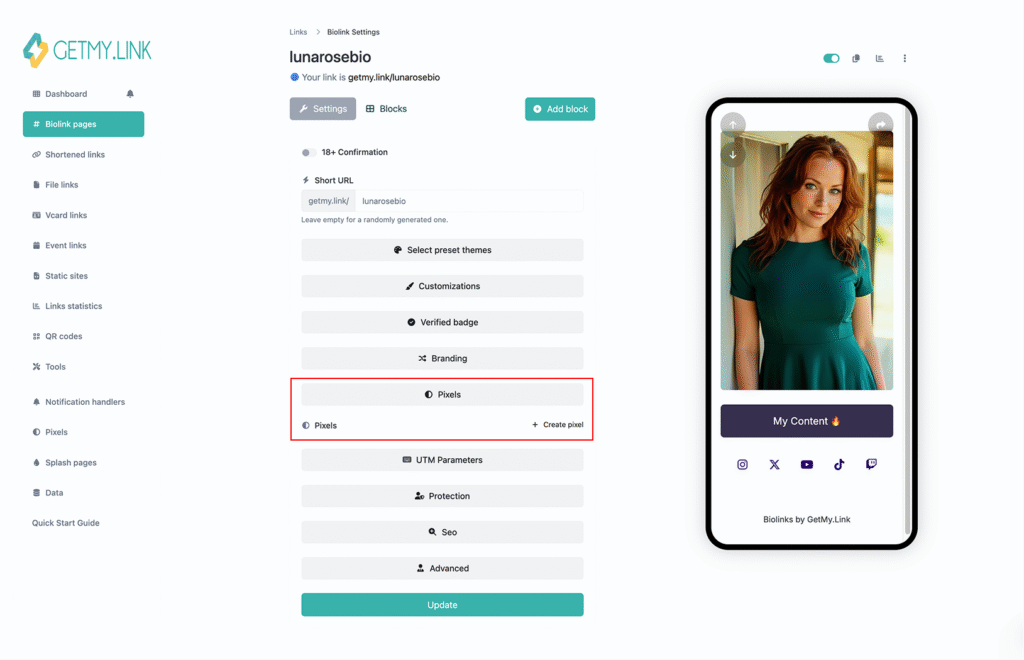
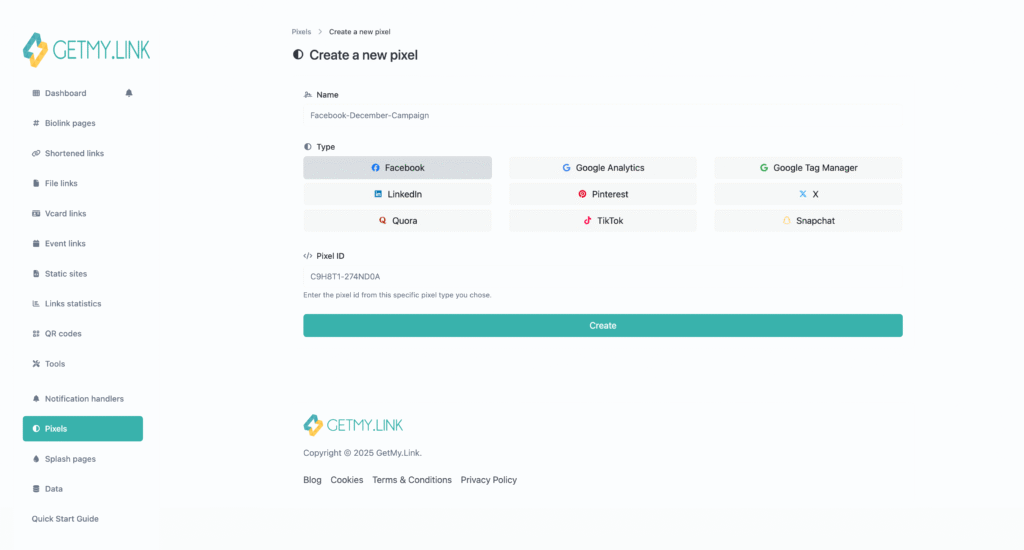
That’s it. The pixel is now stored in your account and ready to be used.
From there, pixels are attached at the link level. When you edit any link – a short link, a bio page, a file link, or a campaign URL – you’ll see a Pixels option in the settings. Select one or multiple pixels, save the link, and you’re done.
No page rebuilds.
No redirects to manage manually.
No changes for the fan.
The link looks the same on the outside, but now it quietly tracks interest every time someone clicks.
One important habit that helps long-term:
name your pixels and links clearly. For example, “Instagram Bio – Meta Pixel” or “Reddit Promo – TikTok Pixel”. When audiences start filling up inside ad platforms, you’ll instantly know where the traffic came from and what it was tied to.
Where Retargeting Fits into a Creator Funnel
Link retargeting works best when it’s not treated as a standalone trick, but as part of a bigger promotion flow.
Most creators already have a funnel – even if they’ve never mapped it out. A social post goes live. A link gets shared. Someone clicks. Then there’s a pause. Sometimes that click turns into a subscription. Sometimes it doesn’t. Retargeting fills the gap between interest and action.
With GetMy.Link, that flow becomes more intentional.
It starts with an entry point. A tweet on X. A Reddit comment. An Instagram Story. A Telegram post. A QR code. The goal at this stage isn’t to sell. It’s to trigger a click. Curiosity first. Commitment later.
Next comes GetMy.Link as the filter. The click passes through the link. The tracking pixel fires. Interest is captured. Even if the person doesn’t subscribe, buy, or stay – that interaction is no longer lost.
Then comes the return touchpoint. An ad. A reminder. A new offer. A different angle. At this stage, you’re no longer talking to cold traffic. You’re reconnecting with people who already raised their hand once.
Retargeting doesn’t replace organic promotion or direct sales. It amplifies them. A single strong post can keep working long after it stops getting likes, because the clicks it generated are now part of a reusable audience.
Instead of a straight line, the funnel becomes a loop:
interest → click → audience → follow-up → conversion.
That’s where retargeting stops being “ads” and starts becoming a strategy.
Real Retargeting Scenarios for Adult Creators
Retargeting starts to make sense when it’s tied to how creators actually promote content day to day. Not theory. Not “perfect funnels”. Just real traffic from real platforms.
Here’s how link retargeting with GetMy.Link fits into common adult-creator workflows.
One of the most common setups is social traffic that doesn’t convert right away. A tweet gets attention. A Reddit post pulls clicks. An Instagram Story drives curiosity. Fans click the link, scroll for a few seconds, then leave. With retargeting enabled, those clicks don’t disappear. They quietly build a custom audience you can reconnect with later – with a reminder, a promo, or a softer entry point.
Another strong use case is SFW-to-NSFW funnels. Instead of sending paid ads or risky posts directly to adult platforms, creators link to a neutral GetMy.Link page. That page might introduce the creator, offer a teaser, or simply organize links cleanly. The pixel fires on click, the experience stays compliant, and retargeting handles the follow-up. This keeps promotion flexible without sacrificing tracking.
Retargeting also works well for time-based drops. A creator announces a limited offer, private show, or content release. The link is shared across platforms. Not everyone converts in the moment – but everyone who clicked can be reminded later. A short retargeting campaign after the drop often captures sales that would otherwise be lost.
For creators who use Telegram or mass DMs, retargeting adds another layer. Links shared in private messages feel personal, but once the chat scrolls, they’re forgotten. With retargeting, every DM click becomes a reusable audience. That audience can be reactivated with ads instead of relying on constant manual outreach.
Even offline promotion can feed into this system. QR codes on merch, flyers, or event cards that point to a GetMy.Link URL still trigger pixels when scanned. What looks like a simple scan becomes an entry into a digital funnel.
In all these cases, the pattern is the same.
Clicks become audiences.
Audiences become second chances.
Second chances drive conversions.
Common Retargeting Mistakes (and How to Avoid Them)
Retargeting is powerful, but only when it’s used intentionally. Many creators turn it on, expect instant results, and get disappointed – not because the tool doesn’t work, but because of small, fixable mistakes.
One of the most common issues is tracking everything without a goal. Adding pixels to every link might sound smart, but it often creates noisy audiences. If a link leads to something random or low-intent, you’ll end up retargeting people who were never close to converting. The fix is simple: prioritize links tied to real interest – bios, promo posts, drops, or campaigns that already attract engaged clicks.
Another mistake is treating retargeted users like cold traffic. Showing generic ads to people who already clicked once wastes the advantage you’ve earned. Retargeting works best when the message acknowledges prior interest – a reminder, a continuation, or a new angle. Think “You checked this out earlier” energy, not “Hi, meet me” introductions.
Creators also often retarget too aggressively. High ad frequency, repetitive creatives, or nonstop reminders can quickly turn interest into irritation. Retargeting audiences are smaller and warmer, which means they need less pressure, not more. A short campaign window with clear intent usually performs better than endless exposure.
Another common oversight is not segmenting links. When every click goes into the same audience, you lose clarity. Traffic from Reddit behaves differently than traffic from Instagram. Using separate links – even if they lead to the same destination – keeps audiences cleaner and makes future decisions easier.
Finally, many creators forget that retargeting is a long game. It’s not always about instant sales. Sometimes it’s about staying visible, building familiarity, and catching people when timing feels right. A fan who didn’t subscribe last week might convert next month – because you stayed present without being pushy.
Avoiding these mistakes turns retargeting from a background feature into a reliable conversion engine.
Privacy, Consent, and Staying Platform-Safe
Retargeting doesn’t mean crossing privacy lines. When it’s set up correctly, it works quietly in the background without exposing personal data or disrupting the fan experience.
With GetMy.Link, tracking happens at the link level, not on the final destination. That means no access to personal profiles, no messages, no identities. Pixels collect anonymous interaction data – exactly the same way they do on regular websites.
From a creator’s point of view, this keeps things clean and low-risk.
Fans aren’t asked to log in.
Nothing new appears on their screen.
There’s no extra step or warning interrupting the click.
On the platform side, this approach also helps creators stay compliant. Social networks care far more about what your ad or public post shows than what happens after a compliant redirect. Using a neutral GetMy.Link page as the entry point keeps promotion flexible while still allowing retargeting to work behind the scenes.
That said, it’s still smart to be transparent when needed. If you already use a basic privacy notice or mention analytics tracking on your pages, retargeting fits naturally into that setup. No extra complexity required.
The goal isn’t surveillance.
It’s relevance.
Retargeting simply helps creators avoid shouting into the void and instead speak again to people who already showed interest – in a controlled, respectful way.
Final Thoughts: Turn Clicks into Long-Term Growth
Clicks are easy to get.
Conversions are harder.
Retention is where real growth happens.
Link retargeting helps creators stop treating traffic as something disposable. A click is no longer a one-time moment that vanishes after a few seconds. It becomes a signal. A starting point. A chance to reconnect when timing feels right.
With GetMy.Link, retargeting fits naturally into how creators already promote content. No complex setups. No risky redirects. No need to rely on a single platform or algorithm. Just links that quietly collect interest and give you control over what happens next.
This isn’t about pushing ads non-stop or chasing people around the internet. It’s about working smarter with the attention you already earn. Following up instead of starting from scratch. Turning momentum into something that lasts.
If retargeting is already part of your strategy, GetMy.Link makes it easier to manage and scale. And if it hasn’t been part of your setup yet, adding your first tracking pixel is a small step that can unlock a much bigger picture.Every click has potential.
The difference is whether you let it disappear – or turn it into long-term growth.
Leave a Reply