
If you’re an adult creator on platforms like OnlyFans, Fansly, LoyalFans, or anything similar, you already know the hustle. You’re sharing content, managing DMs, planning promos, keeping up with socials — and on top of that, trying to stand out in a crowded space.
At some point, it’s not just about posting. It’s about building something that lasts. Something fans remember, trust, and want more of. That’s where personal branding comes in.
Your brand is more than a logo or a cute handle. It’s how you show up online — the vibe, the voice, the experience you give your audience. And one of the most powerful tools for owning that experience is your link-in-bio page.
A biolink page like GetMy.Link lets you take control. It’s your digital home base. One link that organizes your content, looks professional, and actually reflects your style. No more random links or broken layouts — just one page that builds trust and turns clicks into subs.
In this article, we’ll walk you through how to create a strong personal brand using GetMy.Link — even if you’re not a “branding” expert. From design tips to content blocks and trust signals, you’ll learn how to build a page that looks good, feels like you, and keeps fans coming back.
Step 1: Get Clear on Your Brand
Before you start tweaking fonts or picking colors, take a minute to step back. Branding isn’t just design — it’s strategy. And your page should reflect who you are and who you’re trying to attract.
Start here:
Who are you talking to? Are your fans into soft glamour, bold cosplay, powerful domination, or offbeat fetishes? Knowing your niche helps you speak their language — visually and verbally.
Then ask:
What’s your vibe? Are you soft and modest, or unapologetically wild? A quiet escape on a hot night — or an unstoppable storm? Write down 2-3 words that describe the mood you want your page to give off. That mood should influence everything: your bio, your colors, your layout, even the tone of your buttons.
And finally:
What makes you different? It could be something in how you look — a bold hair color, a signature tattoo, a certain outfit detail like a hat. But even better? When it’s something in how you act. Your vibe. Your storytelling. The way you speak to your fans, your own slang, your expressions, your energy. That’s what sticks. Just be real. Be you.
Optional section idea for later: If you plan to use a “About Me” block or intro blurb, now’s the time to figure out what it should say. One or two lines is enough.
Step 2: Build a Look They’ll Remember
Now that you’ve got your vibe figured out, let’s make it visual.
Before you start customizing your page, here are a few branding tips to help you build a look fans instantly recognize.
Your GetMy.Link page should look like you. Not a random template, not a boring list of buttons. This is your digital front door — it needs to match the mood and style your fans already know from your content.
Start with your profile image. Use a clean, recognizable shot. It could be a close-up selfie, a logo, or a cropped teaser from your shoot — as long as it’s sharp and feels “on brand”. Try to match the same photo you use on other platforms for consistency.
Then move on to colors. Pick 2-3 brand colors you’ll stick with. Think about contrast — your links need to pop — but also about mood. Soft pastels give one vibe. Bold reds and blacks give another. Stay consistent with your aesthetic.
Next: fonts. Choose something clean and easy to read. Script fonts can be fun for headings, but don’t overdo it. Your text should feel effortless to scan, especially on mobile.
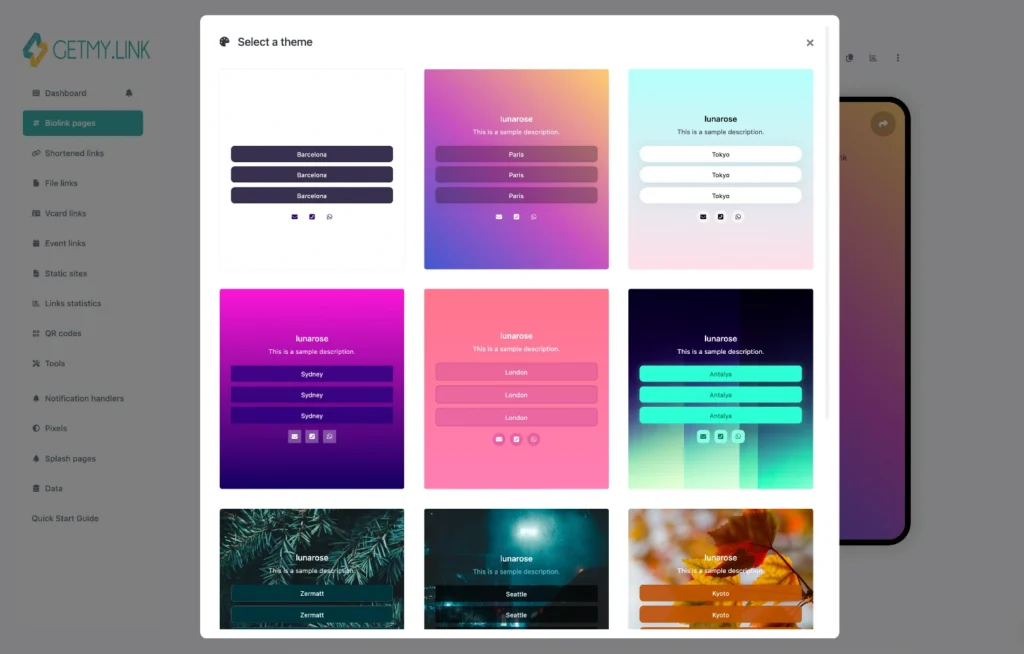
(preset themes you can apply in one click)
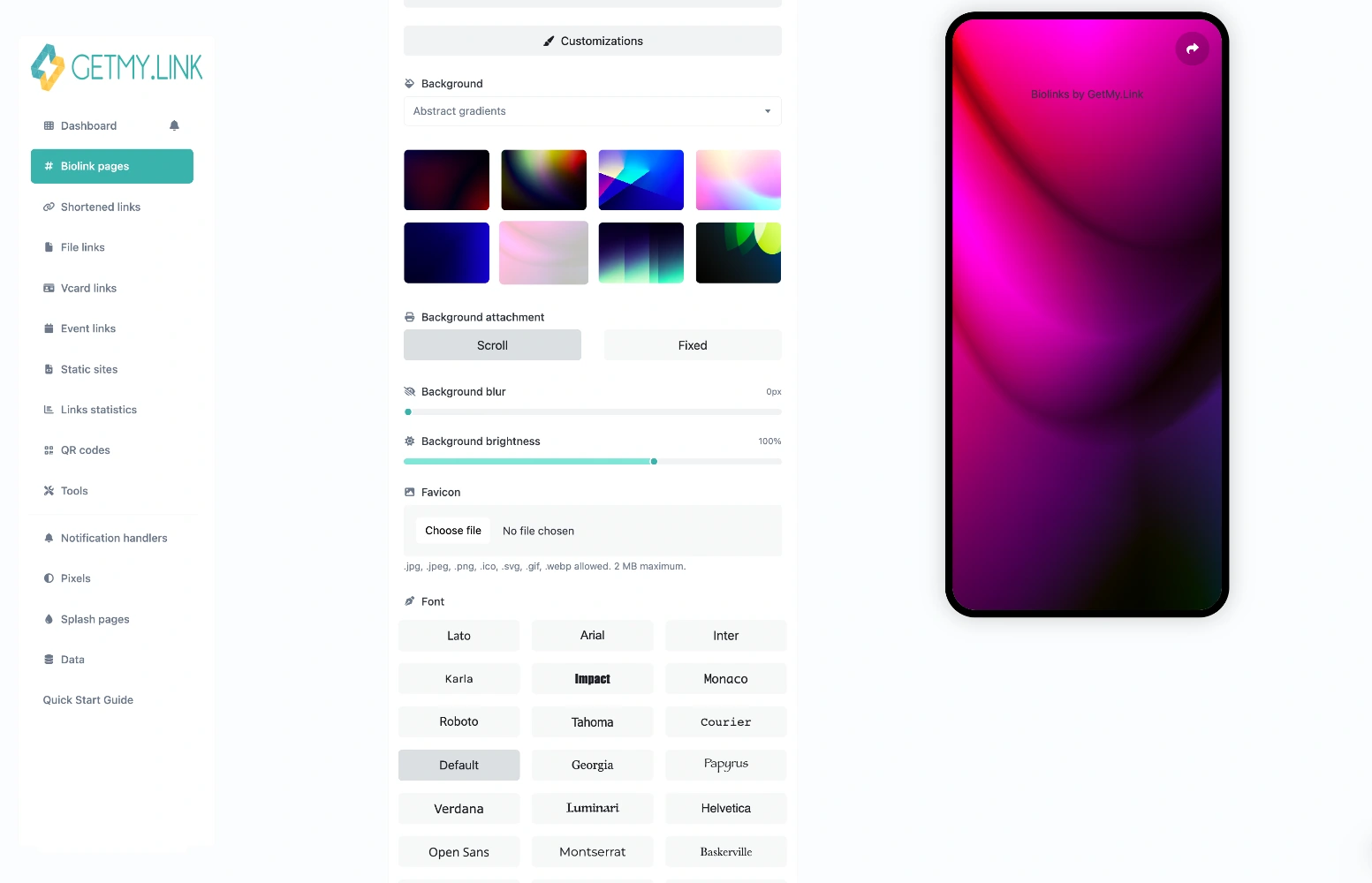
(custom styles: backgrounds, layout, favicon, fonts)
Finally, consider your background. Some creators upload a subtle texture or gradient, others go for a solid color. Just make sure your links and text still stand out — readability comes first.
This whole look — your image, your colors, your text — should work together. When someone clicks your page, they should instantly feel like they’re in your space.
Step 3: Smart Content Blocks That Drive Action
GetMy.Link pages are built with blocks — and each block is a chance to say something, show something, or make fans click.
The key here isn’t to add everything. It’s to guide your visitors. Lead them toward the actions that matter most: subscribing, tipping, booking, joining your community.
Here’s how to do it right:
Use a Clear Call to Action
Put your main link or offer right at the top. Think:
- “Subscribe on OnlyFans”
- “See the Latest Drop”
- “Book a 1-on-1”
Make it bold, short, and direct. The button color should pop but still match your brand palette.
Add a Personal Welcome
A quick text block with 1-2 sentences that say who you are and what fans can expect. Think of it like the opening line to a conversation:
“Hi babe, I’m Lexi. If you love latex, long nails, and real energy — you’re home.”
Short. Confident. Memorable.
Link Out (But Don’t Overwhelm)
Add buttons or icons for your socials, clip stores, tip links, and anything else that matters. Group them smartly — don’t just dump 12 random links.
Pro tip: Use icons for socials, and buttons for main actions.
Embed Visuals
A teaser video, image, or preview gallery can boost interest big time. Just keep it tasteful — no auto-play, and make sure it looks good on mobile.
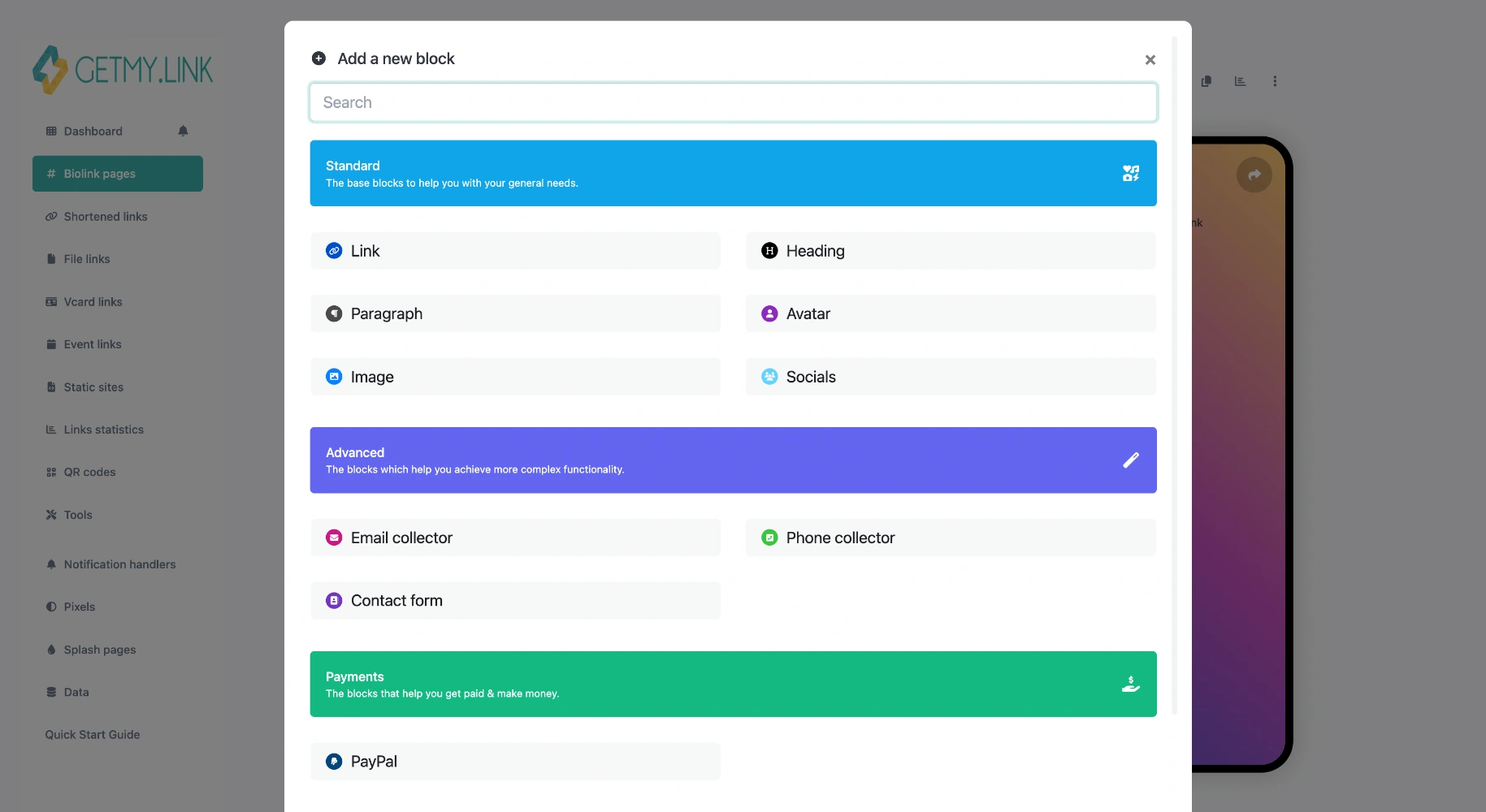
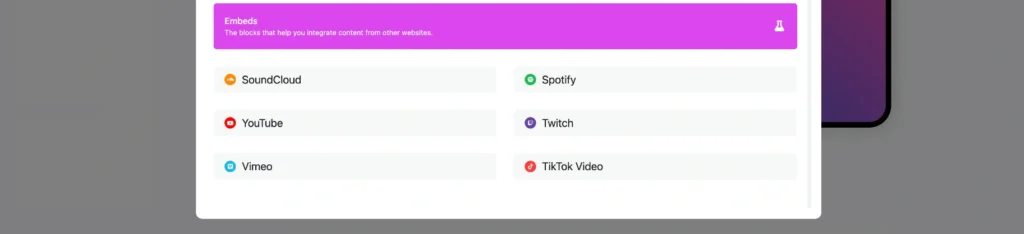
(GetMy.Link Add Block menu)
Include a Touch of Personality
Add a “fun fact”, a mood board, a behind-the-scenes blurb — something that makes fans feel like they’re meeting you, not just your content.
Step 4: Build Trust Without Saying a Word
Before anyone clicks your links — they ask themselves: “Is this real? Is this safe?”
Your page should answer that instantly, without needing to explain.
Here’s how to make your GetMy.Link feel legit, polished, and worth clicking.
Keep Your URL Clean
Use a short, recognizable GetMy.Link username — ideally your creator name or handle. Avoid numbers, symbols, or random words that don’t match your brand. The cleaner it looks, the more professional it feels.
For example: getmy.link/lunarose looks way more trustworthy than getmy.link/luna_xx_88.
Add a Bio With Personality
You don’t need a novel — just one confident sentence that sets the tone. Even something like:
“Just a girl with curves, confidence, and zero filter.”
It shows you’re a real person. Not a bot. Not spam. That matters.
Match Your Socials
Use the same name, profile photo, and tone you use on X (Twitter), Instagram, etc. That consistency builds recognition. Your fans shouldn’t have to guess if this is your page — it should feel obvious.
Show You’re Active
Update your top link regularly (“New content just dropped!”), swap in fresh visuals, or tweak your intro. A page that changes tells fans you’re active — and worth checking in with again.
Add a Small Touch of Social Proof
If you have a strong follower count, a fan quote, or a short review — use it. Even something playful like:
“Over 20,000 satisfied sinners.”
…adds a lot of credibility without being too formal.
Be Subtle With Warnings
Want to gate adult content? GetMy.Link lets you add a content warning pop-up. Or not. Totally up to you. Some creators use it for legal clarity. Others skip it to keep things smooth. Choose what fits your vibe.
Step 5: Page Layout That Works
A strong brand isn’t just colors and photos — it’s structure. The way your page is organized says a lot about you. A clean layout feels confident. GetMy.Link makes it easy to build a flow that keeps fans moving in the right direction.
Put Your Main Action First
Your top section should always push the most important thing:
- “Subscribe on OnlyFans”
- “Join the VIP Page”
- “Book a Private Video”
Fans shouldn’t scroll to figure out what you want them to do. Place your primary CTA block right under your profile photo.
Group Related Links
Cluster your blocks so they make visual sense:
- One group for premium content
- One for socials
- One for tip links or wishlists
This creates a natural rhythm. Visitors understand where to look without thinking.
Break Up the Page With Visuals
A photo teaser, an aesthetic banner, or a short video preview can make your page feel alive. Just don’t overuse media — one or two visuals are enough to keep attention without overwhelming the layout.
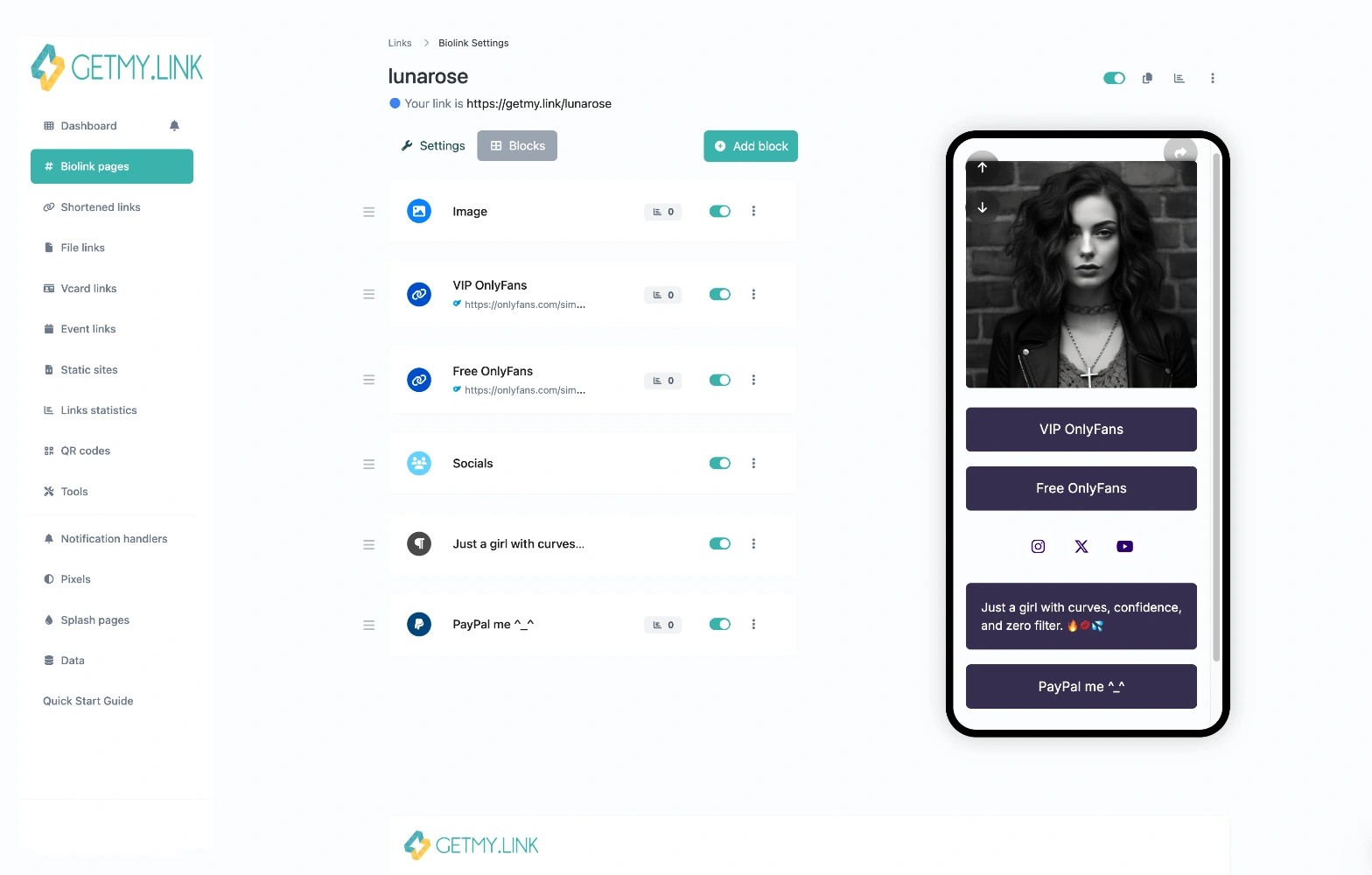
(example of how blocks look when arranged on a GetMy.Link biolink page)
Think Mobile-First
Most fans will open your page on their phones.
Test everything:
- Are buttons easy to tap?
- Does text wrap nicely?
- Are images sized right?
If it feels smooth on mobile, it’s right.
Avoid Clutter
Too many links, too many visuals, or long paragraphs kill the flow. Your page should feel like a curated experience — not a dumping ground.
A clean, simple structure doesn’t just look better. It builds trust, reduces friction, and leads to more clicks.
Step 6: Optimize With Analytics
A branded page isn’t something you set once and forget. The creators who grow fast always track what works and adjust. GetMy.Link gives you simple analytics tools that help you understand what fans click, what they ignore, and how your page performs overall.
Watch Which Links Get the Most Clicks
Inside your dashboard, you’ll see which buttons and blocks bring in traffic.
If your top link barely gets clicks, move it higher or try a different label.
If one link is pulling most of the attention, highlight it even more.
This is how you shape your page around real fan behavior — not guesses.
Use UTM Tags for Off-Platform Promos
If you share your GetMy.Link on X, Reddit, or Telegram, add UTM tags when generating the link.
They help you see which platform brings the most visitors and which promotions actually convert.
This is especially useful for adult creators who run shoutouts or paid promos.
Add Tracking Pixels (If You Promote Off-Platform)
If you spend money on ads or plan to retarget fans later, drop your pixel IDs into the Analytics Settings section.
Even basic tracking can show you how warm your audience is — and help you promote smarter.
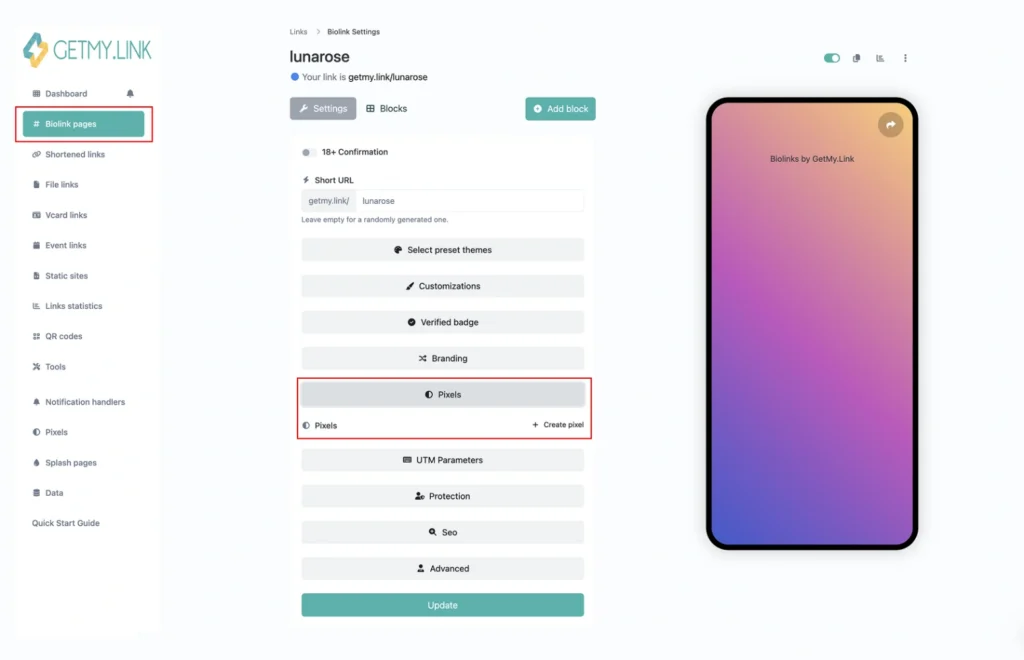
(add Pixel dropdown in GetMy.Link — for inserting custom tracking code snippets)
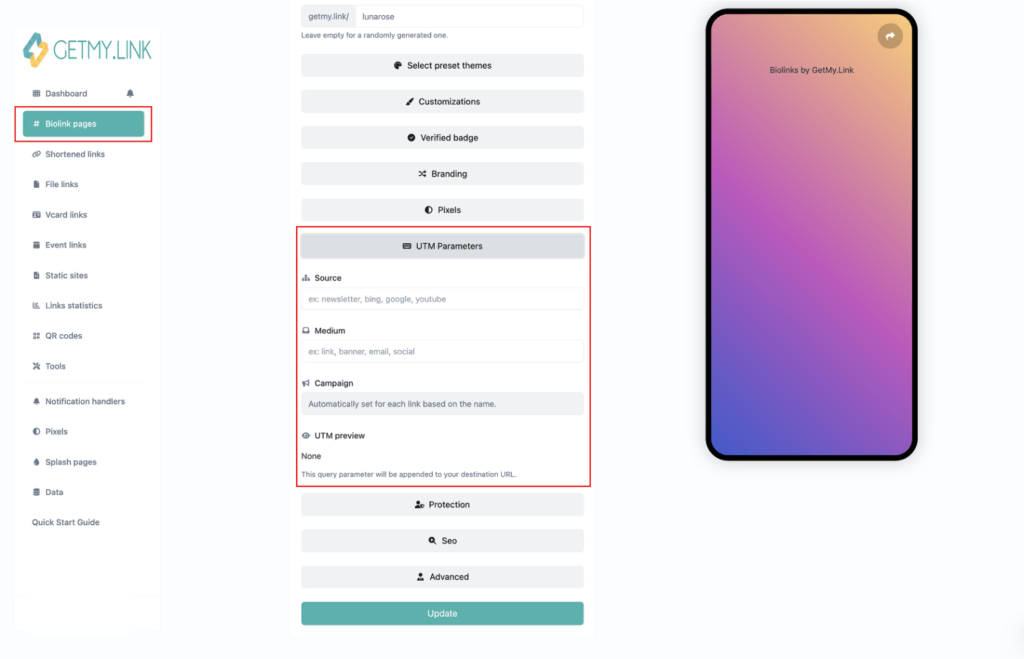
(Custom UTM parameters dropdown in GetMy.Link — to track where traffic comes from)
Keep Your Page Fresh
Small updates make a big impact.
Swap your preview photo or teaser every so often — use a fresh shot from a new photoshoot or a short clip from your latest adult video. Update your top text so it reflects what’s happening right now, not last month.
Add a new interactive moment or “game” for your fans:
- a poll for the next outfit or theme,
- “drop your fantasy ideas” prompts,
- a small tease like “part two is inside”.
Always something new — always a reason to come back. The more alive your GetMy.Link page feels, the more your fans will return to check what’s next.
Step 7: Keep Your Brand Consistent Everywhere
A strong brand isn’t just what you build on GetMy.Link — it’s how you show up across every platform your fans touch. When your look, tone, and personality stay consistent, fans recognize you instantly. That recognition builds trust, and trust turns into clicks, subs, and long-term loyalty.
Match Your Visual Style Across Platforms
Use the same profile photo, the same color palette, and the same vibe on OnlyFans, X, Instagram, Reddit, and your GetMy.Link. When a fan jumps between your profiles, nothing should feel out of place.
Stay Consistent With Your Voice
If your tone on X is playful and teasing, let your GetMy.Link intro sound the same. If your brand is calm, seductive, or chaotic-fun — stick to it. Fans connect to a personality, not random shifts in style.
Repeat Your Signature Elements
Got a signature tattoo, a bold hair color, a favorite accessory, or a specific attitude in how you move or talk? Put it front and center — everywhere. That’s what makes you recognizable, online and off.
Use Your GetMy.Link as Your “Home Base”
Whenever you post a new teaser, start a promo, or share a new video, direct fans back to your branded biolink. The more consistent the flow, the easier it is for fans to explore the rest of your world.
Sync Your Promotions
If your top link on GetMy.Link leads to a new drop, let your socials mirror that message. Don’t send fans in different directions — keep your updates aligned so everything feels cohesive and intentional.
A consistent brand doesn’t look repetitive — it looks solid. When fans know what to expect from you, they feel more comfortable engaging, clicking, and staying.
Conclusion
A strong personal brand isn’t about being perfect — it’s about being clear, consistent, and unmistakably you. Your GetMy.Link page becomes the anchor for all of that. It’s the one place where your vibe, your visuals, your voice, and your content come together without limits or platform restrictions.
When your page looks polished, feels personal, and stays updated, fans trust it. They click more. They subscribe more. And they come back because they know exactly who they’re visiting.
Use your vibe. Use your story. Use your signature look. Let your GetMy.Link page reflect the version of you your fans already love — and make it easy for them to dive deeper.
A strong brand doesn’t happen overnight, but with the right structure, the right visuals, and the right tone, it builds fast. And once it starts working, your page becomes more than a link in your bio — it becomes a place fans want to explore again and again.