
QR codes aren’t new. But when used right, they’re one of the most underrated tools for adult creators trying to grow safely and fast. One scan – that’s all it takes to get someone from a poster, sticker, or screen straight to your biolink, no typing, no searching, no awkward usernames.
With GetMy.Link, you’re not just creating a random QR code. You’re generating a custom, trackable, branded gateway to your content – one that works in clubs, at events, on merch, or even inside your own preview videos.
In this article, we’ll walk through how to create and launch a QR campaign with GetMy.Link. You’ll see how to track results, design smarter, and avoid the mistakes that make most QR codes invisible or unusable. Handing out cards at events, adding a scannable code to the corner of a full-screen YouTube video, and dozens of other creative uses – this guide is built to help you make it work.
Why QR Codes Work So Well for Adult Creators
QR codes give you something most links don’t: instant access from the real world.
Someone sees a flyer, a sticker, a print on a shirt – they scan and they’re on your biolink in seconds. No username to type. No risk of typos. No fighting algorithms or getting flagged. You’re in control.
For adult creators, that’s a game changer. You can:
- Stay visible in clubs, at events, on merch, even in places where social links are banned.
- Bypass shadowbans completely – there’s zero trace of where your traffic came from.
- Keep things discreet. A QR code can be subtle, stylish, and totally anonymous until scanned.
- Reach fans directly – they don’t need to register or be logged into any platform.
- Track what actually works, thanks to built-in analytics.
Building your brand on stage, in videos, or on the go – a QR code turns physical moments into digital followers.
Creating Your QR Code Inside GetMy.Link
Inside your GetMy.Link dashboard, there’s a full QR code builder that’s fast, flexible, and built for real campaigns.
Go to the QR Codes tab and hit + Create QR Code. You’ll see a setup window where you can:
- Choose what the QR does – most creators use it to link to their GetMy.Link biolink, but you can also set it to launch a WhatsApp message, open a location map, start a calendar event, or even accept a crypto tip. And that’s not all – you can connect your QR to almost anything: any link, any action, any file, any destination.
- Name your QR (ex: EventSticker_July, Merch_Q3, YouTubeCornerQR) so you can track performance later.
- Save and instantly get a high-res QR code ready to download and print.
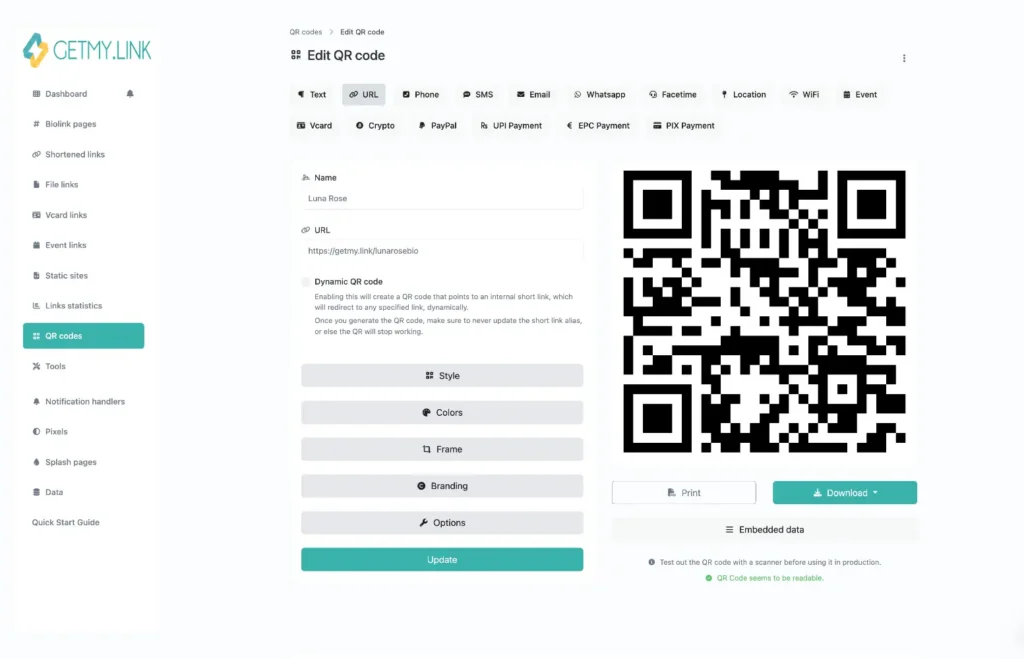
Make It Yours: Styling Your QR Code
Once your QR is created, head into the Style panel to customize how it looks. You’re not stuck with boring black-and-white squares – GetMy.Link lets you brand it your way.
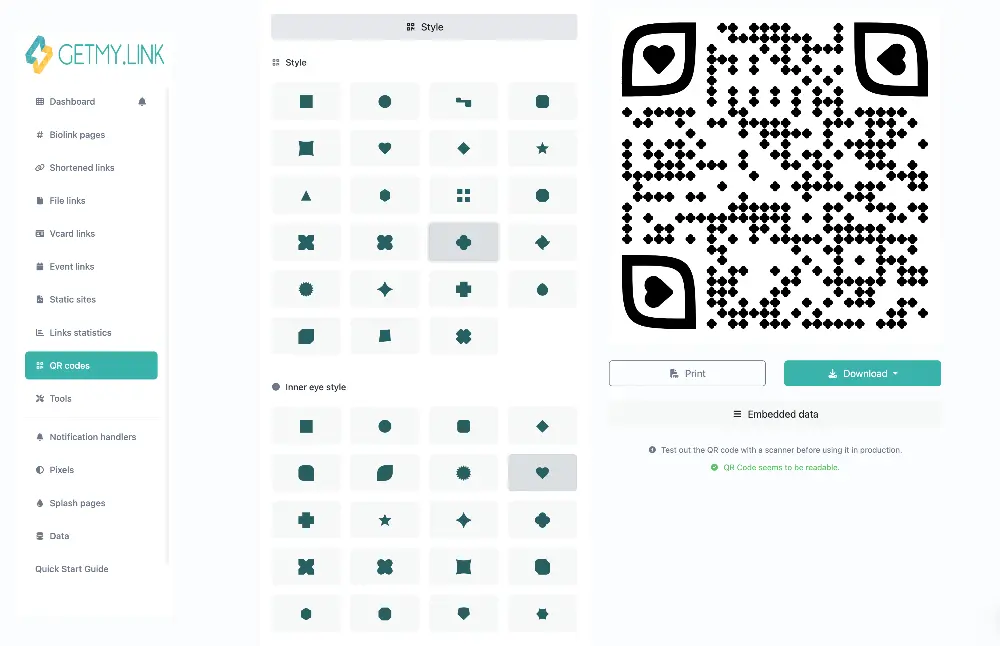
Start with the module shape. Instead of standard blocks, you can pick dots, diamonds, hearts, stars, hexagons – whatever fits your vibe. A heart-shaped QR for Valentine’s promos? Done. Something sharp and geometric for a latex-themed drop? Easy.
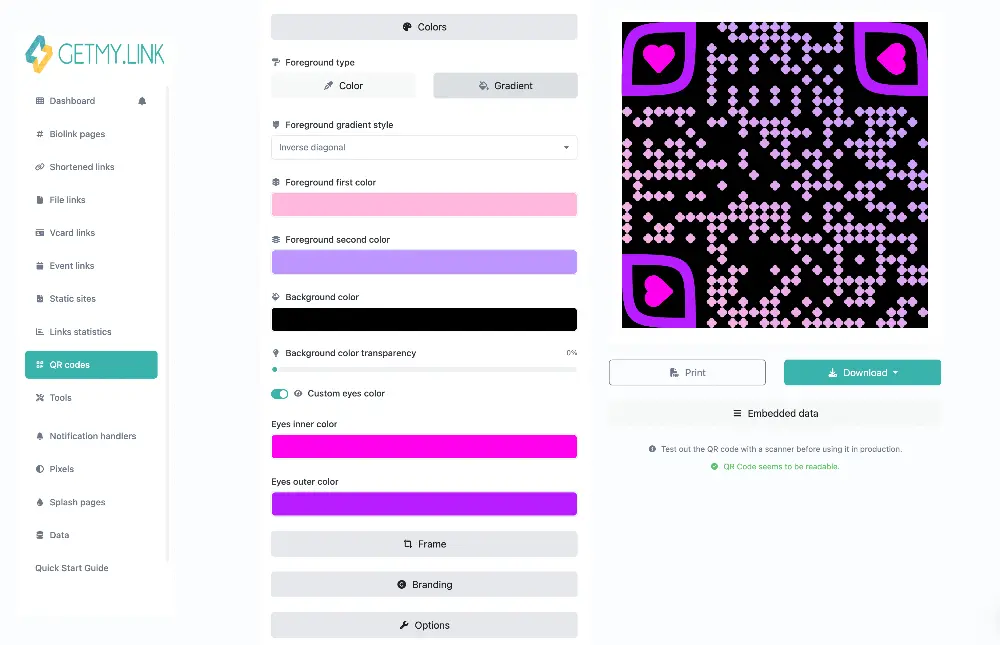
Then move to Colors. Change both the foreground (the QR itself) and the background. You can match your branding, add gradients, or go full neon if that’s your thing. Just make sure there’s strong contrast – scanners need the code to pop against whatever’s behind it.
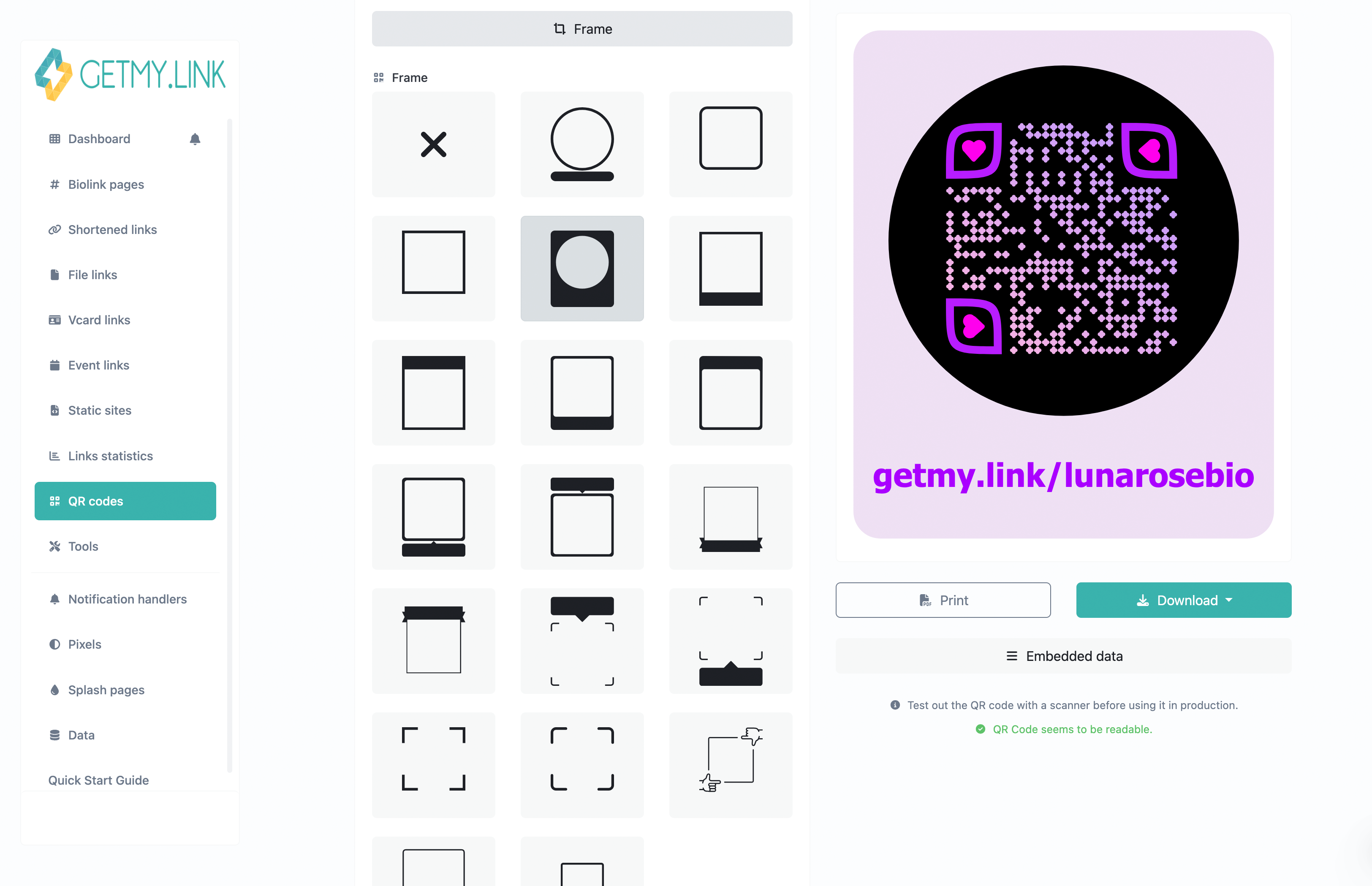
You can also add a Frame – a thin border with text like “Scan me” or “New drop inside”. It draws attention and gives fans a reason to scan. Custom text, font, size, and placement – all adjustable.
And finally, you can drop your logo or icon in the center. A small brand mark makes the QR instantly recognizable as yours – just don’t cover too much of the code, or scanning might fail.
Where to Use Your QR Code: Online and IRL
There’s no one right way to use a QR code – and that’s the point. With GetMy.Link, you can drop a scannable code into any moment, online or offline, and instantly pull fans into your world.
Online uses:
- Add it to the corner of a full-screen YouTube video – fans watching on a laptop or TV can scan it right off the screen.
- Flash it at the end of teaser clips or SFW previews.
- Use it in paid ads or swipe-up content to avoid platform filters.
- Embed it into PDFs, promo graphics, desktop backgrounds.
Offline uses:
- Stick it on event flyers, posters, and promo cards.
- Print it on merch tags, stickers, product packaging, or branded condoms.
- Use it at booths, fan meetups, club nights – anywhere your audience is physically present.
- Add it to polaroids or autographed prints for premium fans.
- Include it on business cards (printed or NFC).
- Or go bold – print it across the back of a T-shirt and take a walk. The curiosity it triggers might surprise you.
In every case, it’s instant. Someone sees it. Scans it. Lands exactly where you want them – with full control, no algorithms, and no broken links.
Tracking What Works: Built-In Analytics
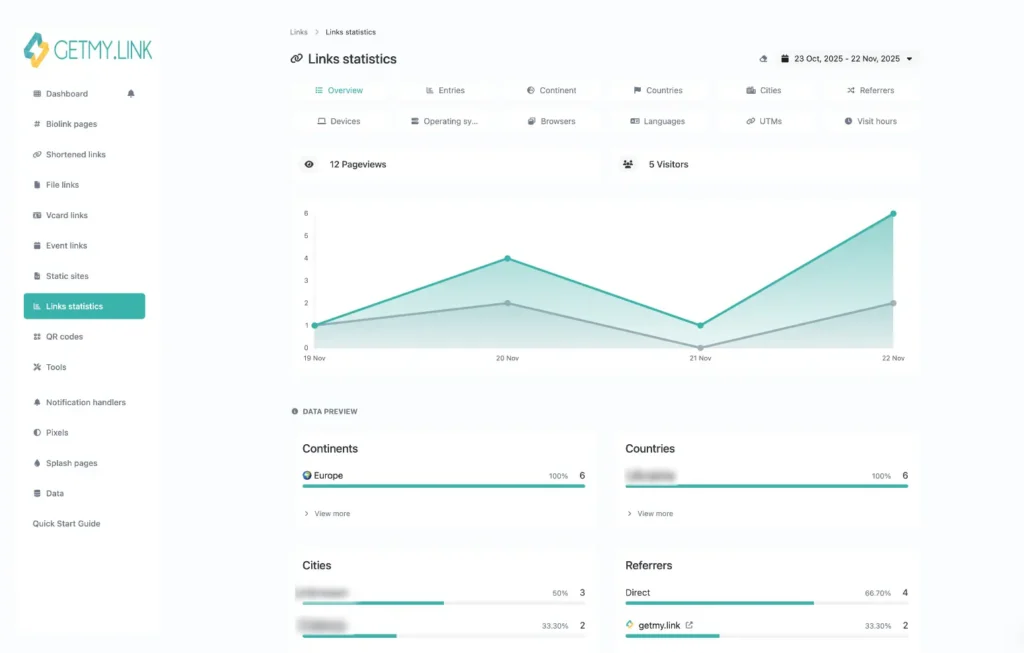
Every QR code you create in GetMy.Link comes with built-in analytics – no extra setup required.
In your dashboard, you’ll see how many times each QR has been scanned, when, where, and on what kind of device. You can break down performance by:
- Time – track scans by hour, day, or custom date ranges.
- Location – see which cities or countries your scans are coming from.
- Device type – mobile vs desktop, iOS vs Android.
- Referral links – if your QR points to a biolink with multiple buttons, you can see what they tapped next.
You’ll instantly know if your club flyer outperformed that big poster by the entrance. Or if the QR on your sold merch got more traction than the one on those free tip gifts you handed out at the event.
Want deeper insights? You can attach UTM parameters to the QR destination URL, then track campaign data inside Google Analytics or other tools. And if you’ve got pixels connected to your GetMy.Link, you can trigger retargeting or conversion events every time someone scans.
Privacy, Safety, and Staying in Control
Not every scan should lead straight to everything. With GetMy.Link, you stay in control of what opens, when, and for whom.
Each QR can link to a page with a NSFW warning – so even if a fan scans it in public, they get a heads-up before anything explicit loads. No one gets caught off guard. No one gets you flagged. It’s optional, but super useful when you want to stay discreet in mixed spaces.
You can also lock your QR destination with a password. Useful for giveaways, premium content drops, or private access at events. Just hand out the password verbally, via DM, or printed somewhere separate – and only real fans get in.
Need even more control? Set up temporary redirects or swap out the QR’s target link anytime. You don’t need to reprint anything – just edit the destination in your dashboard, and the same QR will now lead somewhere new.
Example: same QR, but during the day it leads to a SFW landing, and at night it redirects to a paid content hub. Fully dynamic, no risk.
Creative Ideas to Push Your QR Campaign Further
Once you’ve got the basics down, QR codes become way more than just links – they turn into flexible, re-usable tools you can adapt for any promo.
Here’s how adult creators are using them creatively:
- Seasonal campaigns – same QR, different destinations based on the date. Halloween scans lead to spooky bundles. Valentine’s Day takes fans to a themed gallery. One printed code, unlimited moods.
- Geo-targeting – place different QR codes in different cities or venues, then check the scan stats to see where your audience is most active. Helps plan future tours, meetups, or drop zones.
- Limited-time offers – redirect your QR to a discount page that expires after 24h. Then switch it back to regular content. Great for events, birthday promos, or flash giveaways.
- QR scavenger hunts – hide different codes in your content, each one unlocking a bonus or secret link. Fans love the game – and you drive deeper engagement.
- Collab drops – generate a QR with your branding and your partner’s, both pointing to a shared landing page. Use it on dual merch or shoutouts.
- Dynamic daily drops – update your QR’s destination every morning with that day’s exclusive post. Fans can bookmark the QR and keep checking back.
You don’t need to reprint or redesign anything. Just edit the target URL in your dashboard. That same QR lives forever – it just changes what it delivers.
FAQ: QR Codes, Campaigns, and Smart Promotion with GetMy.Link
What’s the difference between a static and dynamic QR code?
Static QR codes are locked – once created, you can’t change what they point to. Dynamic QR codes (like the ones on GetMy.Link) let you update the destination anytime without changing the actual code. That means you can re-use printed codes for different campaigns, seasons, or drops.
Can I change where my QR code points after printing it?
Yes – if you used a dynamic QR code (which GetMy.Link provides by default), you can update its destination at any time from your dashboard. No need to reprint.
How do I track who scanned my QR code?
GetMy.Link shows you how many scans you’ve had, when and where they happened, and what kind of device was used. You won’t see personal identities, but you’ll get solid data to understand what’s working.
Can I use QR codes to link to my OnlyFans, Fansly, Pornhub, ManyVids, etc.?
Yes – you can link to any adult platform. QR code images posted on socials that are strict about NSFW content (like Instagram, TikTok, or YouTube) aren’t scanned by bots, so they won’t get auto-flagged. That makes them a discreet way to move traffic.
If you’re using the QR in adult-friendly spaces – clubs, events, merch, printed cards – linking directly to adult platforms is totally fine.
For certain offline contexts where you still want to be cautious (like public spaces, printed materials in mixed settings), you can consider adding a NSFW warning screen before the content opens – just to give viewers a heads-up.
How do I set up a NSFW warning before my content loads?
GetMy.Link lets you toggle an optional NSFW warning for any link. When it’s enabled, users see a soft warning screen before your content loads – useful for public scans or social sharing.
Are QR codes safe to use on Instagram?
Yes – posting a QR code image (in Stories, Highlights, Reels, or feed) doesn’t violate Instagram’s link rules. Since the QR can’t be “read” by moderation bots, it’s a discreet way to move traffic.
How big should I print a QR code for it to scan properly?
As a rule of thumb: at least 2.5-3 cm (1 inch) square for close-range use, and larger if it’s meant to be scanned from afar. Always test it yourself before final printing – especially in low light or glossy materials.
Can I customize the look of my QR code to match my branding?
Yes – inside GetMy.Link, you can change shape, colors, gradient, frames, CTA text, and even add your logo. Just make sure there’s enough contrast.
Will QR codes work if someone screenshots them?
Yes – QR codes can be scanned from a screen, photo, screenshot, or even video. Just make sure the image isn’t blurry or distorted.
What happens if someone scans my QR code in a place with bad internet?
If their connection is slow or broken, the link may fail to load – just like any online action. If you’re sending fans to a large file or video, try hosting it on a fast-loading page or show a lightweight preview first.
Can I disable or delete a QR code after it’s been shared?
Yes – in your GetMy.Link dashboard, you can turn off a QR code, change its destination, or delete it entirely. Perfect for limited-time offers or content that should expire.
Can I use a QR code to send someone to a password-protected page?
Yes – just link the QR to a GetMy.Link destination that has password protection enabled. Only people with the password will be able to access the content.
Will my QR code still work if I update my GetMy.Link bio?
Yes – if your QR points to your biolink page, it will always reflect your current layout and links. You can update your buttons, appearance, and everything else – the QR won’t break.
Do QR codes from GetMy.Link expire?
No – your QR codes don’t expire as long as your account is active. You can update or redirect them anytime, but they stay live unless you delete or disable them.
Can I link a QR code to a downloadable file?
Yes – GetMy.Link lets you upload files directly to your account and then link a QR code to that file. It works as a built-in file host, so you don’t need Dropbox or Google Drive unless you prefer them.
Once scanned, the file will open or download automatically, depending on the user’s device and settings.
Can I generate a QR code that triggers a WhatsApp message?
Yes – GetMy.Link supports action-based QR codes, including WhatsApp. You can pre-fill a message so when someone scans, their WhatsApp opens with your text ready to send.
Do I need to install any extra apps to scan a QR code?
No – modern smartphones have QR scanning built into the default camera app. Just point and scan.
If the camera doesn’t recognize it (on some older models), users can also open Google Search, tap the camera icon, and scan the code directly from there – no extra app needed.
Can I connect Facebook Pixel or TikTok Pixel to QR campaigns?
Yes – if your QR links to a biolink or landing page on GetMy.Link, you can attach Facebook, TikTok, or other pixel tracking to that page. Perfect for retargeting or conversion analytics.
Is it possible to run multiple QR campaigns at once?
Absolutely – each QR code can have its own name, destination, and analytics. You can run parallel tests, compare cities, channels, or formats all from one dashboard.
Can I preview my QR code before making it live?
Yes – the QR code preview updates in real time as you customize it. You can test-scan it on your phone before publishing or printing anything.
How can I A/B test different QR codes?
Create two (or more) QR codes with slightly different designs, placements, or destinations. Label them clearly, and compare their scan stats in your dashboard to see which performs better.
Can I use QR codes to drive traffic to different links depending on time of day?
Yes – with GetMy.Link’s redirect scheduling, you can change destinations based on day, time, or campaign windows. Great for switching from teaser to drop automatically.
Can I redirect traffic from QR codes based on country or language?
Yes – geo-targeting lets you send users to different pages based on their location or browser language. Ideal for creators with global audiences or local offers.
Leave a Reply