
When your success depends on perfect timing, you can’t afford to manually update links, forget to remove expired offers, or scramble before a big launch. That’s where link scheduling comes in.
With GetMy.Link, you can plan your promotions ahead of time – from limited-time discounts to exclusive drops – and have everything go live (or expire) automatically. No last-minute edits. No broken links. Just a smooth, hands-free campaign.
Flash sales, content launches, and multi-platform promos all benefit from scheduled links that appear exactly when they should. And because GetMy.Link is free, adult-friendly, and packed with pro-level tools, it’s become a go-to platform for creators across all industries – from adult content to mainstream audiences on Instagram, TikTok, YouTube, and beyond.
What Is Link Scheduling (and Why It Matters)
Link scheduling means you can set your links to go live – and expire – automatically at specific dates and times. Instead of manually turning promos on and off, you prepare them in advance and let the system handle the timing.
This feature is especially useful for:
- Time-sensitive offers like flash sales, discounts, or preorders
- Content releases such as videos, photo sets, digital products, or teaser drops
- Live events or streams with a clear start and end window
- Cross-platform coordination when you’re linking out from Instagram, TikTok, YouTube, or fan platforms like OnlyFans and Fansly
- Keeping bio links fresh by automatically replacing expired campaigns with new ones
Example: Want to launch a 48-hour special offer? Schedule the promo link to go live Friday at noon and expire Sunday night. Add a redirect after the deadline – like a “missed out?” message or upsell – so your fans never hit a dead end.
Scheduled links help you:
- Build urgency
- Eliminate outdated promos
- Simplify your workflow
- Automate your launch calendar
By using this feature inside GetMy.Link, creators keep their audience engaged with real-time content – even when they’re offline.
How Link Scheduling Works in GetMy.Link
Scheduling in GetMy.Link is simple but powerful – and it works with nearly every link type: short links, file links, event pages, static microsites, even QR codes. You don’t need a paid plan or external tools – everything is built in and available for free.
To schedule a link:
- Create a new short link, file link, or event link
- Scroll to the Temporary URL section in the link settings
- Toggle Schedule and set your desired start and end date/time
- (Optional) Set an expiration redirect – where visitors should land after the time window closes
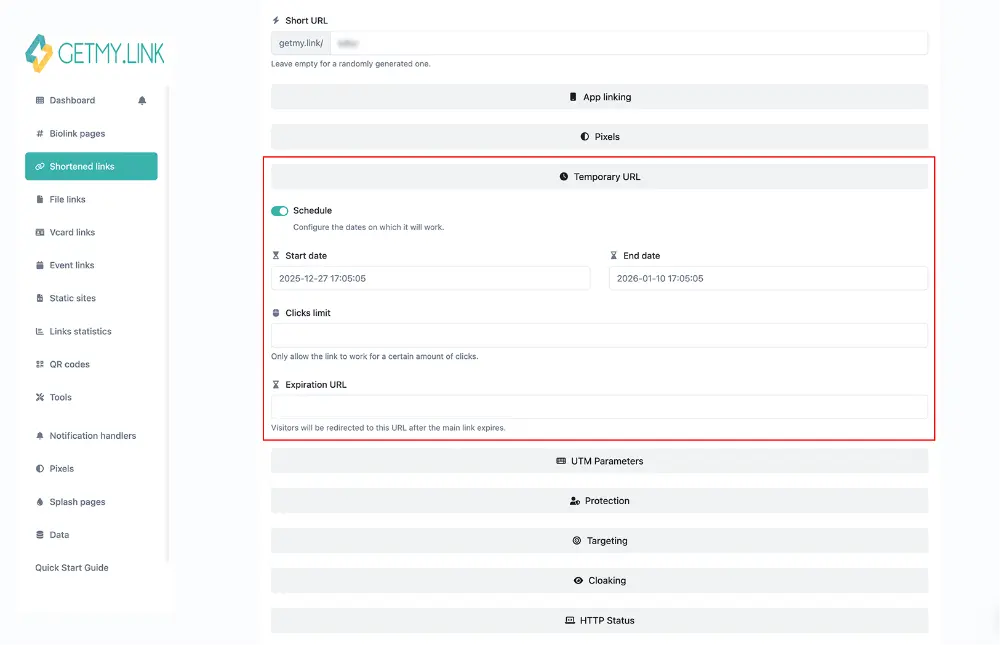
🟢 When the schedule starts, your link becomes active
🔴 When the schedule ends, your link becomes inactive – or redirects elsewhere
Pro tip: You can also limit clicks or add password protection for extra control over who sees what, and when.
What Can You Schedule? 5 Real Examples Creators Use Every Day
GetMy.Link lets you set links to go live – and expire – exactly when you want. This works for regular short links, files, event pages, even QR codes. Here are five easy ways creators are using link scheduling every day:
1. Flash Sales and Limited-Time Offers
Want to run a weekend-only promo? Create a short link to your special offer and set it to go live Friday at 6 PM and turn off Monday at midnight.
When the sale ends, the link can stop working or redirect to a “promo expired” page automatically – no manual edits needed.
Pro tip: Use a custom redirect page with a message like “Missed the deal?” and offer an alternative – such as a smaller discount, a waitlist, or an upsell. That way, every visitor still has a chance to take action.
2. Freebies With a Deadline
Give away exclusive content like a teaser clip, behind-the-scenes notes, or photo set – but only for a short time. Just upload the file in GetMy.Link and schedule it:
- Fans can download it for 24 or 48 hours
- After that, the link disappears or shows a new message
This is great for building urgency or collecting email subscribers.
3. Timed Content Launches
Got a new video, drop, or update going live? Schedule your bio page or link block to activate at the exact time your content goes live.
4. Events and Livestreams
Running a livestream, meet-up, or one-day event? Create a special event page or short link that only works during the event window.
Afterward, the link can show a recap, thank-you message, or redirect fans to the next thing.
5. Cross-Platform Campaigns
Promoting your content on Instagram, TikTok, YouTube, or anywhere else? You don’t have to manually update your links every time something new goes live.
- Use one universal GetMy.Link page and change what it shows based on your schedule
(For example: show a teaser Friday to Sunday, then auto-switch to your full offer on Monday – you control exactly what appears and when)
Either way, your fans always land on the right content – at the right time – with no extra work on your end.
Pro Tools That Make Scheduled Campaigns Even Smarter
GetMy.Link gives you more than just a timer – it’s packed with tools that help you customize what happens before, during, and after your scheduled campaign.
Set an “After” Redirect
Once your scheduled link expires, you can automatically send visitors to another page – like a “sale ended, but here’s something just for you” message, a waitlist sign-up, or your regular full-price offer.
This way, you never lose traffic – and you can still turn missed clicks into extra sales.
Group Your Campaign in a Project
Use Projects to organize multiple links into one campaign (like a product launch or seasonal sale).
Each Project gets its own shareable link – and inside it, you can schedule each piece individually.
Example: A “Spring Launch” project might include 3 different links: teaser → preorder → main offer. Each one goes live at its own time, but all live under one link.
QR Codes With Timed Content
Every link or Project in GetMy.Link has a built-in QR code.
If the linked content is scheduled, the QR only works during that time window – perfect for events, flyers, posters, or merch drops.
Tease Your Launch with Scheduled Previews
Want to build hype? Schedule a teaser message or preview block to appear before your drop – like “New drop goes live Monday” – and then automatically switch to the full content when the time comes.
It’s a simple way to warm up your audience without manual edits.
Works with Files, Pages, Events, and More
Scheduling isn’t just for short links – it also works with:
- File drops
- Static microsites
- Event links
- Even your vCard
Track Every Click and Improve Every Campaign
When you schedule links, timing is only part of the picture – you also want to know what worked, when, and where your clicks came from. GetMy.Link makes this easy.
Add UTM Tags for Deeper Insights
Each link in GetMy.Link supports UTM parameters – simple tags that help you see which platform or post drove the traffic.
You can label your link with things like:
- source=instagram
- medium=story
- campaign=summer_drop
This makes your campaign fully trackable in tools like Google Analytics – or just inside your GetMy.Link dashboard.
Use Pixels to Retarget Visitors
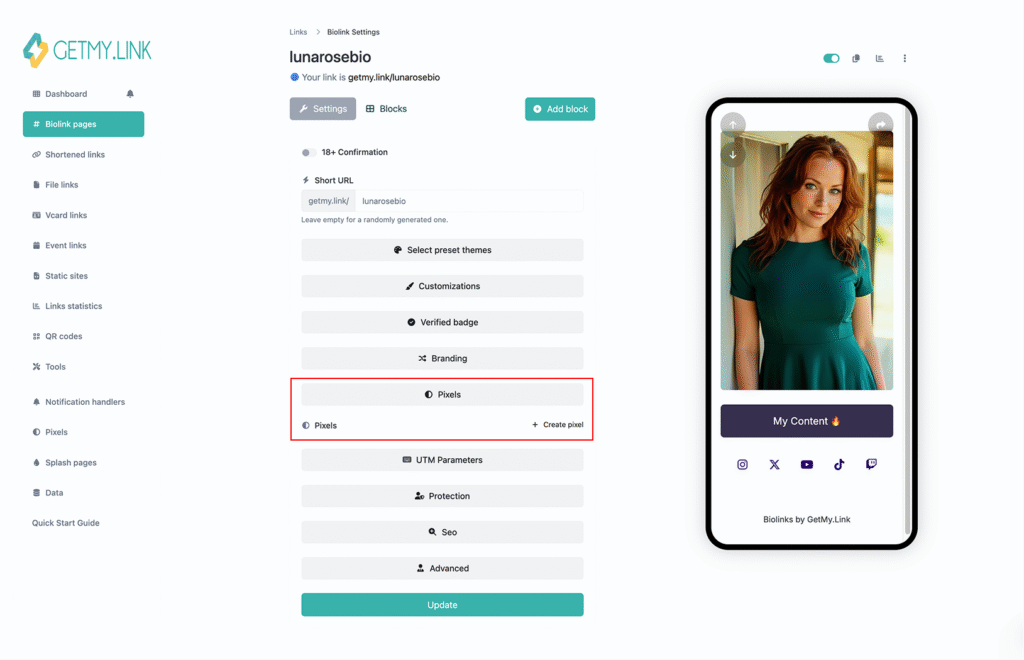
Want to run ads on Facebook, TikTok, or Google later? You can add tracking pixels to your scheduled links.
That way, even if someone didn’t buy right away, you can show them ads later – based on when they clicked your promo.
Use the Data to Refine Timing
Did more people click in the morning or evening? Did the first 24 hours bring the most conversions?
With scheduled links + analytics, you’ll get real answers. Over time, you’ll learn exactly when your audience is most active – and schedule future links for maximum impact.
Tip: You can also compare performance between platforms by giving each one its own link (with its own UTM tags and schedule). Then see which audience responds best.
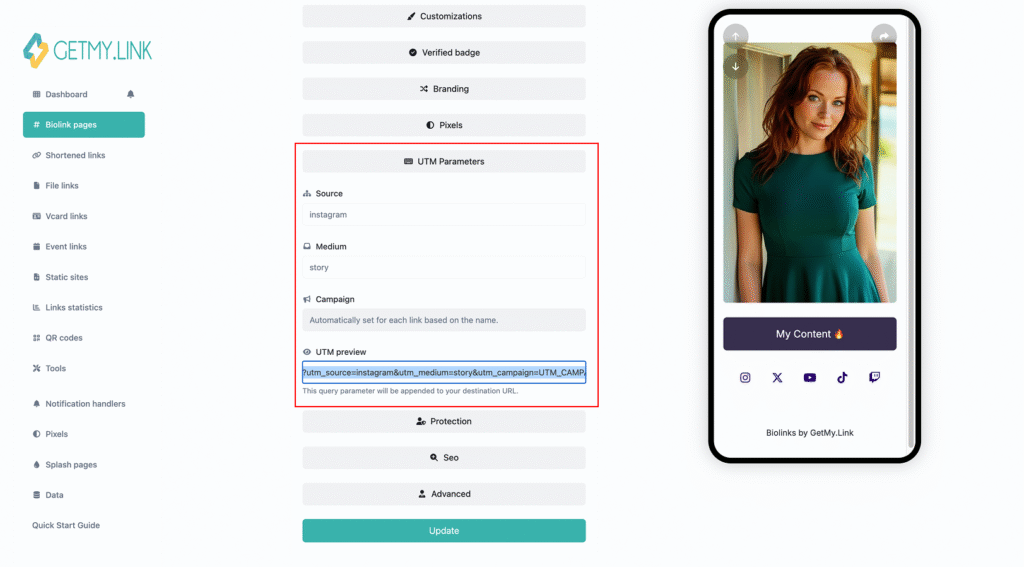
(Screenshots: Where to configure UTM tags and add tracking pixels to your Biolink page in GetMy.Link)
Turn Clicks Into Revenue – Automatically
Scheduled links aren’t just about timing – they’re also about making more money with less effort. When fans click during a limited window, they’re more likely to act fast. GetMy.Link gives you the tools to turn that urgency into real revenue.
Time-Limited Offers That Convert
Create a sense of urgency with offers that only last 24-72 hours. Use a clean, focused layout and schedule your links to activate and expire automatically.
Add Tip or Payment Buttons
Want to accept tips, donations, or one-click payments? Add a PayPal Tip Me button directly to your page – no middlemen, no platform cut.
You can schedule the link to appear during a special push (e.g. “Tip Drive Friday”) and disappear after.
Tease Freebies, Then Upsell
Offer a teaser file – like a free photo or short video – that’s available for a limited time. After that, redirect visitors to the full content or a paid upgrade.
Example:
“Free teaser ends in 24 hours → join the waitlist for the full version” – and schedule the full version to go live right after the freebie closes.
Set Smart Redirects After a Deadline
Don’t let traffic go to waste. When your offer ends, automatically send visitors to:
- a waitlist
- your full-price product
- a “special for latecomers” offer
Even missed clicks can turn into sales with the right redirect.
Big picture: With scheduling + smart monetization tools, your GetMy.Link page becomes more than just a list of links – it becomes a 24/7 conversion machine.
Ready to Make Your Links Work Smarter?
With GetMy.Link, scheduling links isn’t complicated – it’s a built-in superpower. You can launch offers on autopilot, keep content fresh across all platforms, and turn clicks into real results.
Start scheduling smarter today – it’s free, creator-friendly, and takes just minutes to set up.
Leave a Reply