
Limited-time offers work because they create urgency.
When people know a link won’t be available forever, they are far more likely to click, subscribe, or buy right away.
This is where GetMy.Link limited-time offers become especially useful for creators who want more control over timing and access. They allow creators to control when an offer is available and what happens once that time runs out – automatically, without manual edits or last-minute fixes.
GetMy.Link includes built-in tools for creating time-sensitive links.
These links can expire on a specific date, after a set number of clicks, or redirect visitors once an offer ends. This makes them ideal for flash sales, exclusive content drops, limited discounts, free trials, and private access offers.
In this article, you’ll learn how expiring links work inside GetMy.Link and how to use them effectively.
We’ll cover practical examples for different types of creators – from general content creators to adult creators working with platforms like OnlyFans. You’ll also see when expiring links make sense, how they support urgency marketing, and how to avoid common mistakes.
No complex setup.
No full technical guide.
Just clear explanations and real use cases you can apply right away.
What Are Expiring Links and How They Work on GetMy.Link
An expiring link is a link that stops working after a specific condition is met.
That condition can be time-based, click-based, or both.
On GetMy.Link, expiring links are not a separate tool.
They are a built-in option available for short links, file links, and other link types. You create a regular link and then add expiration rules to it.
There are two main ways an expiring link can work:
First, the link can expire on a specific date and time.
For example, a discount link can stay active for 24 hours or until the end of a weekend. Once that time is reached, the link automatically stops opening the original content.
Second, the link can expire after a certain number of clicks.
This is useful for offers like “first 50 fans only” or “limited access for early supporters”. When the click limit is reached, the link becomes inactive for everyone else.
GetMy.Link also allows you to decide what happens after a link expires.
After a link expires, visitors can be sent to a clean fallback page – like a regular offer, a signup form, or a short ‘promotion ended’ note.
This approach helps creators avoid outdated promotions.
Old links shared on social media, in bios, or in messages don’t need to be deleted manually. Once expired, they simply stop working as an offer and move visitors to the next relevant step.
Expiring links – also referred to as link expiration – are especially useful for creators who run frequent campaigns.
They reduce mistakes, save time, and make urgency-based promotions predictable and controlled.
Why Expiring Links Work for Limited-Time Offers
Expiring links work because they remove hesitation.
When an offer has no clear deadline, people postpone the decision. When the deadline is visible and real, action happens faster.
A limited-time link creates urgency without extra pressure.
The link itself enforces the rule. There’s no need to repeat “last chance” everywhere or manually close access later. Visitors simply know the offer won’t be available forever.
This is especially effective in online environments where attention is short.
Creators compete with dozens of tabs, notifications, and distractions. An expiring link gives a clear reason to act now instead of “later”.
Another important factor is trust.
When a link actually expires on time, the audience learns that the creator follows through. Future limited offers feel more credible because people know the deadline is real, not artificial.
Expiring links also reduce friction for creators.
There’s no need to remember to delete old links, update bios, or replace URLs across multiple platforms. Once expiration rules are set, everything works automatically.
For sales and access-based offers, this matters a lot.
Expired discounts don’t leak. Free trials don’t stay open longer than intended. Exclusive content stays exclusive.
For fans, the experience stays clean so people don’t land on outdated promos or wrong pricing. This balance is what makes expiring links effective.
They create urgency for the audience and control for the creator, without adding complexity to either side.
Common Use Cases for Expiring Links
Expiring links are most effective when they are tied to a clear action and a clear deadline.
Below are the most common scenarios where they work especially well – both for general creators and for adult creators.
Flash Sales and Limited Discounts
This is one of the simplest and strongest use cases.
A discount link is active for a fixed period – for example, 24 or 48 hours – and then automatically expires.
Creators often use this for:
- weekend sales
- holiday discounts
- short promo campaigns after a post or stream
When a sale ends, the same short link can switch from the discount page to standard pricing automatically. This prevents confusion and protects pricing without manual updates.
Exclusive Content Drops
Expiring links are perfect for content that is meant to feel rare.
This can be a video, a photo set, a downloadable file, or access to a private page.
For general creators, this might be:
- a bonus tutorial
- a behind-the-scenes video
- early access to a release
For adult creators, this often includes:
- limited-access photo or video drops
- free previews available for a few hours
- temporary access to paid content
The short availability window increases engagement. Fans know they need to open the link quickly or miss it.
Free Trials and Temporary Access
Expiring links are commonly used to control access to free trials.
Instead of leaving a trial link open indefinitely, creators can limit it by time or number of clicks.
This works well for:
- free subscription trials
- temporary access to premium pages
- early supporter rewards
Adult creators often use this method for short free trials to subscription platforms. Once the link expires, new visitors are redirected to the regular subscription page.
“First X People Only” Offers
Click-based expiration allows creators to reward early action.
The link stays active until it reaches a defined number of clicks.
This is useful for:
- first 50 fans get a bonus
- limited spots for private sessions
- early-access invitations
Once the click limit is reached, the link expires automatically. No manual tracking is needed, and the offer remains fair and transparent.
Event-Based Promotions
Expiring links are also useful for time-bound events.
These include live streams, private shows, webinars, or scheduled launches.
A single link can:
- open access during the event
- expire when the event ends
- redirect to a replay, summary, or next offer
This keeps old event links from circulating long after they’re relevant, while still giving late visitors a useful destination.
How to Create an Expiring Link on GetMy.Link
Creating an expiring link on GetMy.Link doesn’t require a separate tool or special setup.
Expiration rules are applied directly to a regular link during creation or editing.
First, a creator creates a link as usual.
This can be a short link, a file link, or another supported link type, depending on the offer.
After the link is created, expiration settings are added in the link options.
Here, the creator can define when the link should start working and when it should stop.
There are two primary expiration controls:
Time-based expiration allows the link to remain active until a specific date and time.
This is commonly used for flash sales, weekend promotions, and limited-time access offers.
Click-based expiration limits how many times the link can be opened.
Once the click limit is reached, the link automatically expires and no longer grants access.
GetMy.Link also allows creators to define what happens after expiration. An expired link can also redirect to a small ‘consolation’ offer – a low-cost bonus, teaser, or entry-level option – so the click still has value.
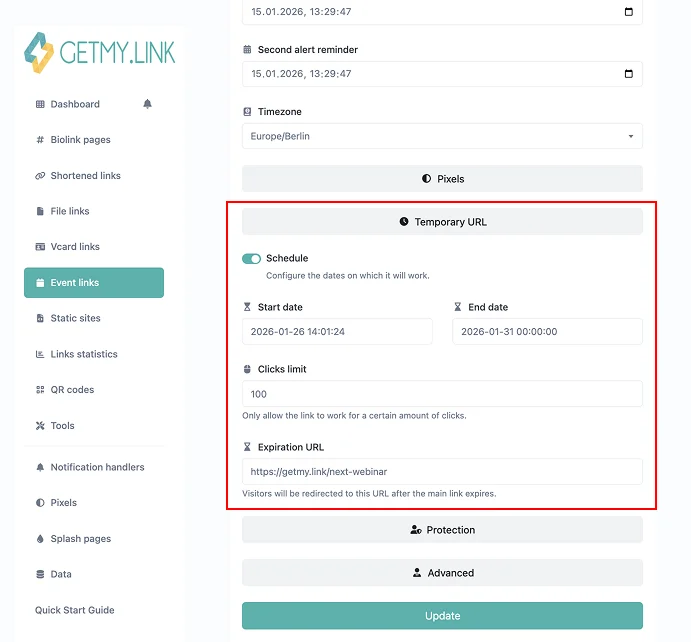
(Temporary URL Settings for Link Expiration on GetMy.Link)
Best Practices for Using Expiring Links Effectively
Expiring links work best when they are part of a clear and intentional campaign.
Simply adding an expiration date is not enough. How the link is presented and where it leads matters just as much.
One of the most important practices is clarity.
The audience should understand that the offer is limited. If the link expires silently without context, urgency is lost. Clear messaging around timing helps people decide faster.
Expiration timing should match the value of the offer.
Short windows work well for bonuses and spontaneous drops. Longer windows are better for discounts or access that requires more consideration. Artificially short deadlines for high-commitment offers often reduce trust.
Redirect behavior after expiration is critical.
An expired link should never feel like a dead end. When an offer ends, the redirect can lead to a low-cost ‘consolation’ option – a small paid bonus, teaser content, or entry-level offer. The main deal is over, but the intent is still there.
Click-based limits should feel fair.
Using “first X people only” works when the reward is meaningful and the number is realistic. Very low limits can create disappointment if most visitors arrive too late. Transparency helps set expectations.
Consistency builds credibility.
When an expiring link actually expires on time, future campaigns feel more real. Audiences learn that deadlines matter and respond faster the next time.
Testing before publishing prevents mistakes.
Checking time zones, expiration behavior, and redirect destinations avoids situations where links expire too early or stay active longer than intended.
How to Communicate Limited-Time Offers to Your Audience
An expiring link only creates urgency if people understand what’s happening.
Clear communication is what turns a technical feature into a working promotion.
The first rule is to state the limitation directly.
Instead of vague language, it’s better to mention time or availability clearly. People respond faster when they know why they shouldn’t wait.
Timing works best when it’s simple.
“Available for 24 hours”, “Ends tonight”, or “Valid until Sunday” is easier to process than exact timestamps. When possible, keep the message short and obvious.
Placement also matters.
Limited-time links perform better when they are placed where attention is already high – bios, pinned posts, stories, broadcast messages, or description sections under content. The link should feel like the natural next step, not an extra click hidden at the bottom.
For adult creators, context is especially important.
Fans should understand whether the link leads to free access, a preview, or paid content. Clear expectations reduce hesitation and prevent frustration after the click.
Avoid overusing urgency language.
If every post feels like an emergency, urgency stops working. Expiring links are most effective when used occasionally and tied to genuinely special offers.
After expiration, communication shouldn’t stop.
If people arrive late, they should still see something useful. A short message explaining that the offer has ended, combined with a current alternative, keeps the experience positive.
Good communication makes expiring links feel helpful rather than pushy.
The goal is not pressure, but clarity – helping people act at the right moment without confusion.
Common Mistakes to Avoid When Using Expiring Links
Expiring links are simple to use, but small mistakes can reduce their effectiveness or confuse the audience.
Most problems don’t come from the tool itself, but from how it’s applied.
One common mistake is unclear timing.
If people don’t know when an offer ends, urgency disappears. Even worse, visitors may feel misled if a link expires without any warning in the message or caption.
Another issue is forgetting about time zones.
Creators with an international audience sometimes set expiration times based on their local zone, while fans assume a different one. This can cause links to expire earlier than expected for part of the audience. When possible, keep timing simple and relative.
Dead-end expired links are another frequent problem.
Letting a link expire without a redirect leads to frustration. Visitors click, see nothing useful, and leave. A simple redirect to a current offer or explanation page keeps the experience clean.
Overusing expiring links weakens their impact.
When every post feels urgent, urgency stops working. Expiring links are most effective when tied to genuinely limited offers, not everyday content.
Click limits that are too low can also backfire.
If most fans arrive after the limit is reached, the campaign may feel disappointing rather than exciting. Setting realistic limits helps maintain trust.
Skipping testing is risky.
A link that expires too early, too late, or doesn’t redirect correctly can break a campaign. A quick test before sharing saves time and prevents mistakes.
Avoiding these issues keeps expiring links effective.
Used thoughtfully, they create urgency without pressure and structure without friction.
When Expiring Links Make the Most Sense
Expiring links are most effective when timing is part of the value itself.
They work best in situations where acting later truly means missing out.
Short-term promotions are a natural fit.
Flash sales, weekend discounts, and holiday offers benefit from clear start and end points. Expiring links make those boundaries visible and enforce them automatically.
They also make sense for exclusive or bonus content.
When access is intentionally limited, expiration supports the idea of rarity. Fans understand that the content was available only for a specific moment.
Free trials and temporary access are another strong use case.
Expiring links help control who gets access and for how long, without manual cleanup or follow-up work.
Event-based content benefits as well.
Live shows, private streams, and launches often have a narrow relevance window. Expiring links ensure that old event links don’t circulate long after the moment has passed.
Expiring links are less useful for evergreen content.
If an offer is always available, adding artificial urgency can reduce trust. In these cases, standard links are a better choice.
The strongest results come from intentional use.
When expiration supports the logic of the offer, the audience responds naturally. When it feels forced, urgency loses meaning.Used selectively, expiring links become a reliable tool.
They help creators manage time-sensitive campaigns, protect offers, and guide visitors smoothly – before and after expiration.
Conclusion
Expiring links are one of the simplest ways to run clean, time-sensitive promotions without extra manual work. They help creators control access, protect limited offers, and keep campaigns structured – even when links get reshared days later.
With GetMy.Link, link expiration can be applied to regular short links in just a few settings. A link can expire by time, by click limit, or both. After that, it can redirect visitors to a fallback page so the traffic still leads somewhere useful.
Used intentionally, expiring links support urgency. They make limited drops feel real, discounts feel credible, and exclusive access feel properly controlled. For creators running frequent promos, they also reduce mistakes and keep everything organized in one place.
Leave a Reply