
TikTok has become one of the strongest traffic sources available to OnlyFans creators. A single video can generate thousands – sometimes millions – of views in days. But visibility alone doesn’t translate into subscribers. The real conversion point isn’t the video. It’s the link in your bio.
TikTok allows only one clickable website link in your profile. That single URL determines how efficiently your traffic turns into paying fans. If you drop a raw OnlyFans link there, you’re leaving tracking, routing control, and conversion structure on the table – and potentially increasing moderation risk at the same time.
This is where GetMy.Link becomes more than a “link in bio” tool. It acts as a controlled traffic hub between TikTok and your monetized platforms. It lets you structure your funnel, layer your links strategically, track performance, and adjust your routing without constantly editing your TikTok profile.
In this guide, we’ll break down exactly how OnlyFans creators should use GetMy.Link inside TikTok – from setup to optimization – so your bio link becomes an asset, not just a placeholder.
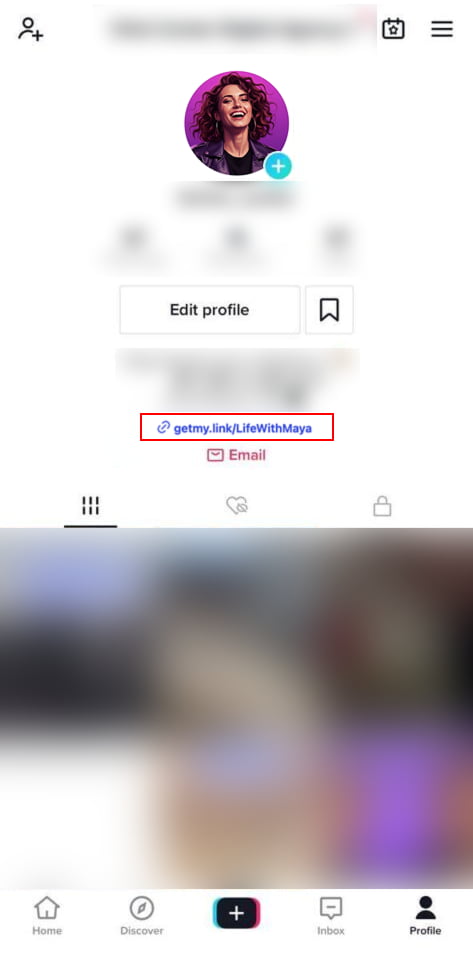
Why You Should Not Link OnlyFans Directly on TikTok
At first glance, placing your OnlyFans URL directly in your TikTok bio seems logical. You create content. People get curious. They click. They subscribe.
In reality, the process is rarely that clean.
You Lose Funnel Control
A direct OnlyFans link sends users straight to your subscription page. There’s no structure, no warm-up layer, and no opportunity to guide them. Every viewer – casual, curious, or highly interested – lands on the same destination.
That removes flexibility.
You can’t:
- Highlight limited promotions
- Route traffic differently during campaigns
- A/B test messaging
- Layer safer platforms first
- Adjust positioning without editing your TikTok profile itself
You’re locked into a single static destination.
You Get No Real Traffic Intelligence
If you drop a raw OnlyFans link into TikTok, you don’t see meaningful data about:
- How many people clicked from TikTok specifically
- Which videos drove the most bio clicks
- What percentage of users drop off before subscribing
- What countries or devices your traffic comes from
You’re guessing.
And guessing slows growth.
Without structured tracking, it’s impossible to optimize content based on performance. You might think one style of TikTok converts better – but you won’t have data to prove it.
You Increase Platform Sensitivity Risk
TikTok does not position itself as an adult-friendly platform. While creators operate successfully within guidelines, directly linking to subscription-based adult platforms can increase scrutiny.
Even if your content follows policy, linking behavior can still affect:
- Profile visibility
- Reach distribution
- Moderation review frequency
A neutral routing layer between TikTok and OnlyFans reduces exposure. It creates separation and flexibility if you ever need to adjust destinations without losing your bio link placement.
You Miss Conversion Optimization Opportunities
A direct OnlyFans link forces an immediate subscription decision.
But many TikTok viewers aren’t ready to subscribe instantly. They may want:
- A preview platform
- Social proof
- Secondary content
- A softer entry point
- A limited offer explanation
Without a structured landing layer, those users leave.
And once they leave, they rarely come back.
The takeaway is simple:
TikTok generates attention.
But attention without structure doesn’t convert efficiently.
That structure is what GetMy.Link provides.
What GetMy.Link Actually Does for TikTok-Driven OnlyFans Traffic
GetMy.Link isn’t just a place to stack multiple URLs. For OnlyFans creators using TikTok as a traffic source, it functions as a control layer between discovery and monetization.
Instead of sending viewers directly to OnlyFans, you send them to a structured landing hub that you fully control.
Here’s what that changes.
It Turns One Bio Link Into a Conversion Page
TikTok gives you one clickable website field. GetMy.Link transforms that single URL into a customizable landing page where you can:
- Position OnlyFans as your primary offer
- Add secondary platforms (Instagram, X, Snapchat)
- Highlight limited promotions
- Add content previews or menu downloads
- Display clear CTAs instead of raw URLs
This creates intentional flow.
Rather than forcing an instant subscription decision, you guide the visitor. The layout, button order, and messaging can be structured to move traffic naturally toward your paid platform.
It Gives You Routing Control
With GetMy.Link, you can change destinations at any time without touching your TikTok profile.
That means you can:
- Run limited-time promotions
- Redirect traffic during campaigns
- Swap primary links when needed
- Temporarily route traffic to safer platforms
- Pause a destination without breaking your TikTok bio
This flexibility is critical when working on a platform with evolving moderation rules.Your TikTok link stays the same.
The destination logic behind it can change whenever you need it to.
It Allows Click Tracking and Analytics
Unlike a direct OnlyFans link, GetMy.Link includes built-in analytics. You can track:
- Total clicks
- Click timing
- Referrer data
- Device types
- Geographic distribution
This turns TikTok traffic from a guessing game into measurable performance.
When you see which days, videos, or campaigns generate more clicks, you can double down on what works instead of relying on assumptions.
It Supports Pixels and UTM Tracking
GetMy.Link allows creators to install tracking pixels and use UTM parameters on links.
For TikTok-driven traffic, that means you can:
- Track performance from specific campaigns
- Understand which video themes generate higher click-through rates
- Build retargeting audiences for future ads
- Separate organic traffic from paid traffic
This is where your TikTok strategy becomes data-driven instead of reactive.
It Adds a Neutral Buffer Layer
Using a routing page instead of a direct adult platform link creates separation between TikTok and OnlyFans.
That separation:
- Reduces direct platform exposure
- Allows safer presentation
- Provides a content warning layer if needed
- Gives you flexibility if moderation policies shift
You’re not removing risk entirely. But you are adding structural protection.
At this point, the difference becomes clear:Direct OnlyFans link = static destination.
GetMy.Link = controlled conversion system.
Step-by-Step: How to Set Up GetMy.Link for TikTok as an OnlyFans Creator
Now we move from theory to implementation.
The goal isn’t just to create a bio page. It’s to build a structured bridge between TikTok traffic and your monetized platform.
Follow these steps carefully.
Step 1: Create Your GetMy.Link Biolink Page
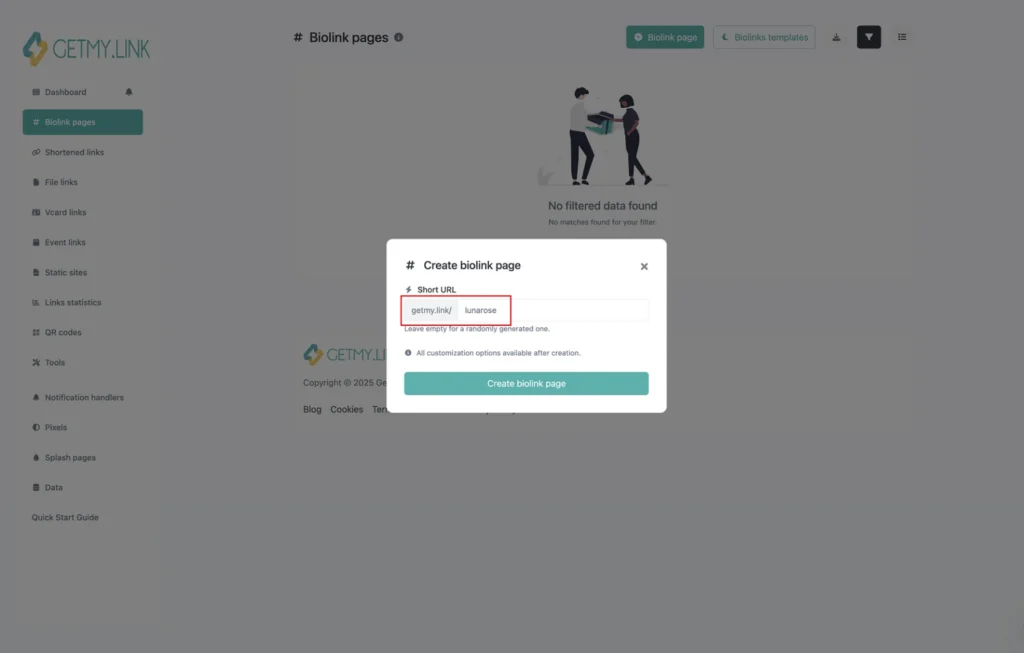
After logging into GetMy.Link, create a new Biolink Page.
This will become the central hub for your TikTok traffic.
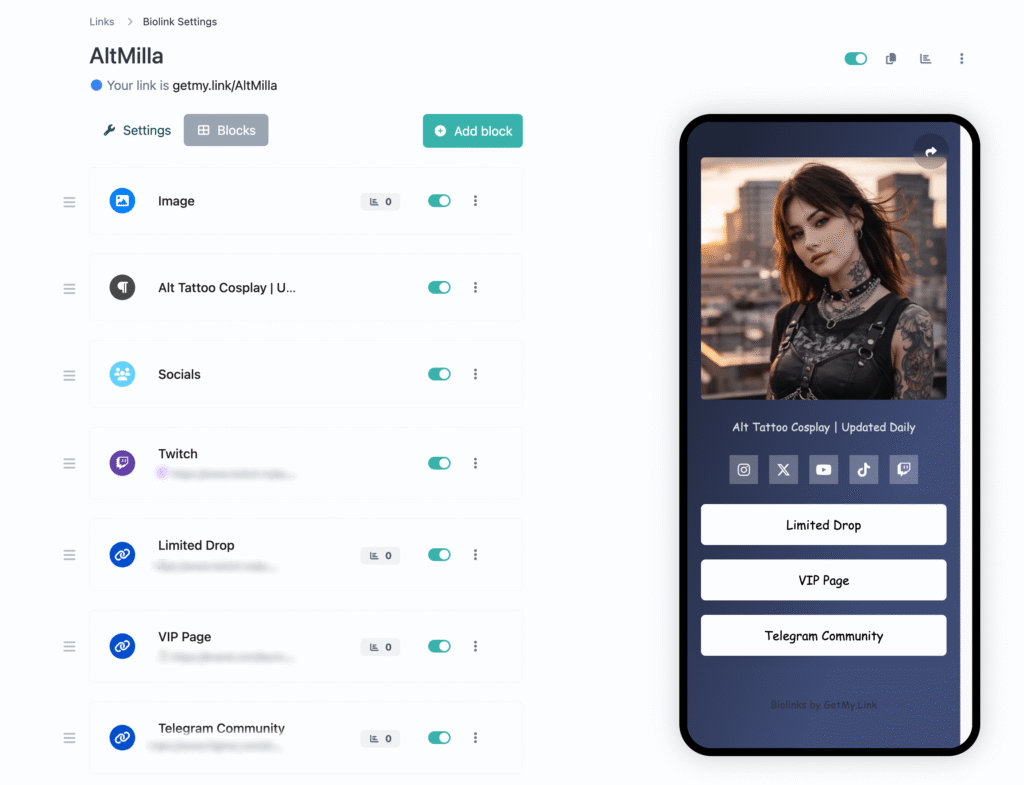
Keep the layout clean. Avoid adding every platform you use. Your TikTok audience needs clarity, not overload.
Start with:
- Primary CTA button → OnlyFans
- Secondary platform (Instagram or X)
- Optional preview or menu download
Your OnlyFans button should be visually dominant and clearly labeled.
Avoid generic wording like:
“Click here”
Instead use:
- “Exclusive Content on OnlyFans”
- “Unlock Full Access”
- “Subscribe for Full Sets”
This small adjustment improves conversion psychology.
Step 2: Structure the Button Order Intentionally
Button order matters.
TikTok viewers scan quickly. The first visible button should represent your monetized offer.
Recommended order:
- OnlyFans (primary)
- Secondary social proof platform
- Optional limited promotion
- Optional contact or email capture
Do not stack five or six equal-weight links. That reduces clarity and increases drop-off.
Your bio page should feel like a guided path – not a directory.
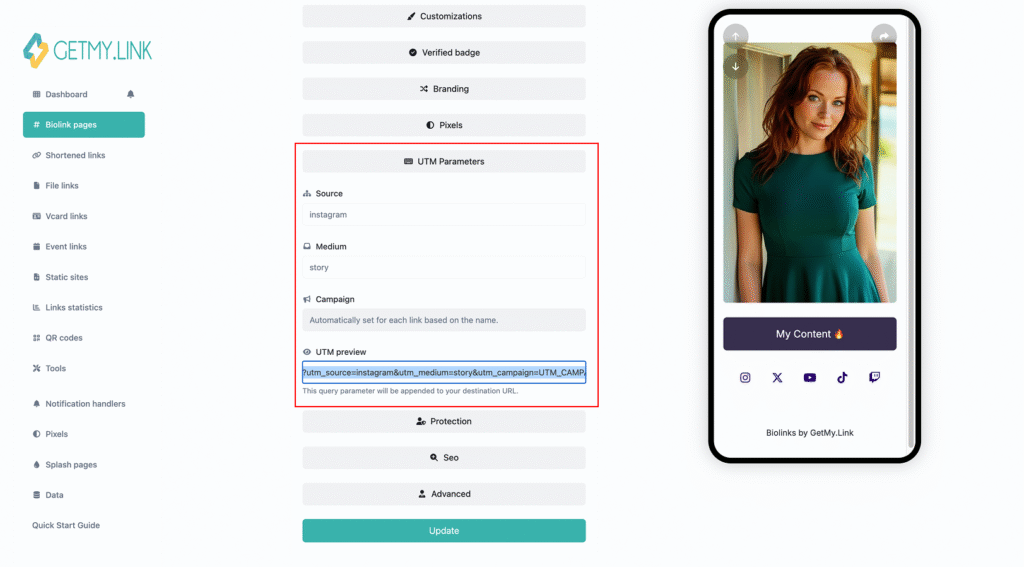
Step 3: Add Tracking Before You Publish
Before copying the link into TikTok, set up tracking properly.
Inside GetMy.Link, you can:
- Enable built-in click analytics
- Add UTM parameters to your OnlyFans link
- Install TikTok pixel (if running ads or planning retargeting)
For example, your OnlyFans link might include:
?utm_source=tiktok&utm_medium=bio&utm_campaign=organic_traffic
This allows you to separate TikTok traffic from other sources later.
Without this step, you lose valuable performance data.
Step 4: Copy Your GetMy.Link URL
Once your page is ready and tracking is enabled:
- Copy your GetMy.Link URL
- Open TikTok
- Go to Profile → Edit Profile
- Paste the link into the Website field
Your TikTok bio now routes traffic through your controlled landing system.
Step 5: Align Your TikTok Bio Messaging
Your profile description must support your link strategy.
Instead of vague lines, use directional CTAs:
- “Full content in bio”
- “Exclusive access below”
- “All platforms in link”
- “Behind-the-scenes access ↓”
Every TikTok video should verbally and visually reinforce this instruction.TikTok content creates attention.
Your bio link captures intent.
Your structural setup is now complete.
But setup alone doesn’t guarantee conversion.
Optimization is what turns a functional bio page into a revenue-generating system. A clean layout helps – but placement, messaging, urgency, and tracking determine whether TikTok traffic actually becomes paying subscribers.
Now it’s time to focus on refining performance.
How to Structure Your GetMy.Link Page for Maximum Conversion from TikTok Traffic
Building a biolink page takes minutes. Turning it into a conversion tool takes strategy.
TikTok traffic behaves differently from Instagram or X. Viewers move fast. Attention is short. Curiosity is high – but commitment is low. Your GetMy.Link page must reduce friction and guide decisions immediately.
Here’s how to structure it correctly.
Control What Appears “Above the Fold”
When someone clicks your TikTok bio, they decide within seconds whether to continue.
The first visible section of your GetMy.Link page – before scrolling – is critical.
What should be visible immediately:
- Clear profile image
- Short, direct description
- Primary CTA button (OnlyFans)
Avoid long bios or multiple equal-weight buttons at the top. The page should feel focused.
Bad structure:
Five buttons stacked with equal importance.
Optimized structure:
One clear primary action.
Your OnlyFans button should visually dominate the layout. That doesn’t mean aggressive wording – it means clarity.
Avoid generic labels like:
“Click Here”
Instead, use value-driven wording such as:
- “Exclusive Content on OnlyFans”
- “Unlock Full Access”
- “Premium Sets & Private Content”
The goal isn’t hype. It’s clarity. Visitors should immediately understand what happens when they tap.
Use Layered Link Logic – Not Link Overload
Many creators treat biolink pages like directories.
That reduces conversion.
TikTok users do not want to choose between six options. They want direction.
A simple conversion hierarchy works best:
Primary: OnlyFans
Secondary: Social proof (Instagram or X)
Optional: Limited offer or promotion
Optional: Contact/email capture
That’s it.
Each additional link increases cognitive load. More choices lead to lower action rates.
If you want to include additional platforms, place them lower on the page so they don’t compete with your monetized link.
Use Neutral Positioning for Platform Safety
Even if your TikTok content is compliant, your bio presentation matters.
Avoid aggressive or explicit language on your GetMy.Link page if TikTok is your main traffic source.
Keep messaging suggestive but controlled.
For example:
Instead of:
“Explicit Videos”
Use:
“Exclusive Access”
“Private Content”
“Full Experience”
This keeps the page professional while still driving curiosity.
You can always adjust messaging later – that’s one of the benefits of routing through GetMy.Link instead of linking directly.
Highlight Time-Sensitive Offers Strategically
If you’re running:
- Discount promotions
- Free trial campaigns
- Limited bundles
- New content drops
Feature them as a separate button near the top – but below your main OnlyFans CTA.
This creates urgency without distracting from your core subscription offer.
Because you’re using GetMy.Link, you can update this button anytime without editing your TikTok profile.
That flexibility is valuable.
Keep Visual Design Clean and Consistent
Conversion isn’t just about text.
It’s about clarity.
Use:
- Minimal color palette
- Clear button spacing
- High contrast between background and CTA buttons
- Consistent branding with your TikTok visuals
Avoid:
- Overly bright flashing colors
- Too many font styles
- Long paragraphs of description
Your page should feel like a landing page, not a social media feed.
Think Like a Funnel – Not a Profile
The purpose of your GetMy.Link page isn’t to showcase everything you do.
Its purpose is to move TikTok traffic toward monetization.
Ask yourself:
What is the single action I want from this click?
If the answer is OnlyFans subscription, everything else on the page should support that outcome – not compete with it.
Structure creates momentum.
Momentum increases conversion.
When structured correctly, your GetMy.Link page becomes a controlled transition layer between short-form attention and paid commitment.
Tracking TikTok Traffic the Smart Way
Getting clicks is only half the equation.
If you don’t know where those clicks are coming from – or what they do next – you can’t improve performance. TikTok gives you views and engagement metrics, but it doesn’t tell you what happens after someone taps your bio link.
That’s where GetMy.Link becomes critical.
Use Built-In Click Analytics
Inside your GetMy.Link dashboard, you can monitor:
- Total clicks
- Click timing (day and hour trends)
- Geographic location
- Device type
- Referrer data
This allows you to identify patterns.
For example:
- Do evening posts drive more bio clicks?
- Does a certain content theme create higher click-through rates?
- Are most visitors coming from mobile (almost always yes on TikTok)?
Instead of guessing what works, you start seeing traffic behavior clearly.
Add UTM Parameters to Separate Campaigns
If you create different types of TikTok content – for example:
- Teaser videos
- Lifestyle clips
- Direct promotion posts
- Trend-based viral content
You should tag your links differently.
Using UTM parameters allows you to separate traffic by campaign.
Example:
?utm_source=tiktok&utm_medium=bio&utm_campaign=teaser_series
Now you can compare which style of TikTok actually sends higher-quality traffic.
Without this separation, everything blends together – and optimization becomes impossible.
Install TikTok Pixel (If You Plan to Scale)
If you plan to run ads or retarget visitors in the future, installing a TikTok Pixel through GetMy.Link gives you another layer of intelligence.
With pixel tracking, you can:
- Build retargeting audiences
- Measure behavior beyond the click
- Analyze conversion trends
- Separate organic from paid traffic
Even if you’re not running ads now, installing tracking early builds long-term data.
Creators who scale treat traffic as infrastructure – not as random bursts of visibility.
Watch Trends, Not Just Numbers
A single spike doesn’t define performance.
Look for patterns:
- Which type of TikTok consistently drives bio clicks?
- What days produce stronger engagement?
- Does engagement translate into traffic – or just views?
TikTok metrics can look impressive while conversion remains low. Tracking helps you distinguish attention from intent.
That difference determines revenue growth.
Tracking isn’t complicated. It’s structured awareness.
When you combine TikTok visibility with measurable routing through GetMy.Link, you move from hoping content converts to understanding why it does.
TikTok Bio Link Issues That Limit Subscriber Growth
Even strong TikTok creators lose revenue because of simple structural mistakes. The content performs – but the link strategy doesn’t.
Here are the most common issues.
- Using a raw OnlyFans link only
Dropping a direct subscription link into your bio removes control, tracking, and routing flexibility. It turns your funnel into a single static destination with no optimization layer. - Not setting up tracking
Without analytics, UTMs, or pixel tracking, you’re guessing which videos convert. Growth becomes reactive instead of data-driven. - No clear CTA inside videos
If you don’t consistently tell viewers to “check the link in bio”, many won’t. TikTok does not automatically translate engagement into clicks – direction matters. - Letting the bio page go stale
Promotions change. Content drops evolve. If your GetMy.Link page isn’t updated to reflect current offers, you lose urgency and relevance. - Ignoring expiration or campaign links
Running limited promotions without removing them later creates confusion and weakens trust.
Small adjustments fix these issues – but ignoring them compounds lost conversions over time.
Conclusion
TikTok is a discovery engine. It creates attention quickly, at scale, and often unpredictably. But attention alone does not generate revenue. The conversion point is always the link in your bio.
If that link is unstructured, untracked, and unmanaged, you’re relying on momentum instead of strategy.
GetMy.Link turns that single bio field into controlled infrastructure. It allows you to layer your platforms intelligently, adjust routing without editing your TikTok profile, track performance, and refine your funnel over time. Instead of sending traffic directly into a static page, you guide it through a structured transition.
For OnlyFans creators, this difference matters.
When your link becomes a conversion system – not just a destination – TikTok stops being random exposure and starts becoming a measurable growth channel.The platform brings the visibility.
Your link determines the outcome.
Leave a Reply