
Instagram is a visibility engine. Reels reach new audiences. Stories maintain engagement. Feed posts build brand identity. For OnlyFans creators, it’s one of the most powerful discovery platforms available.
But discovery alone doesn’t generate revenue.
The real conversion point on Instagram isn’t your content – it’s the link in your bio. That single section determines whether profile visits turn into paying subscribers or disappear after a few seconds of scrolling.
Instagram now allows multiple native links in your profile. On the surface, that seems convenient. In practice, it functions more like a list than a structured funnel. There’s no routing control, no advanced tracking, and no flexibility to shift campaigns without constantly editing your profile.
That’s where GetMy.Link becomes strategic.
Instead of treating your bio link as a simple directory, GetMy.Link turns it into a controlled transition layer between Instagram and your monetized platforms. It allows you to structure your links intentionally, track performance, adjust promotions, and guide traffic with purpose.
For OnlyFans creators, that difference matters.
How Instagram Linking Works (And Its Limitations)
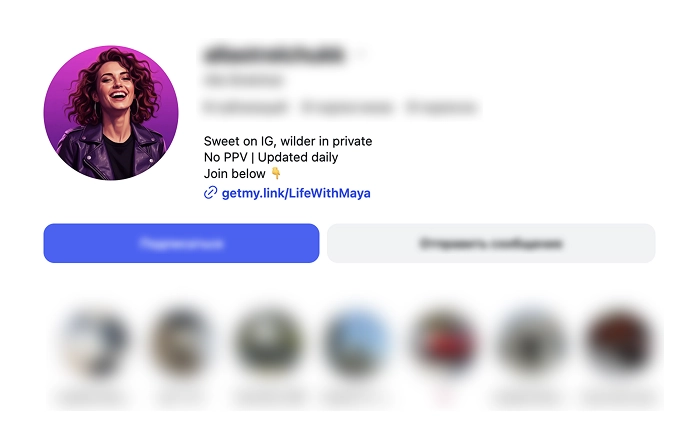
Instagram gives creators one dedicated place for external traffic: the link section in your profile.
When someone visits your page, they see your content first – profile image, bio text, highlights, grid. The only clickable external destination appears directly under your bio. That placement makes it critical. It’s the transition point between engagement and monetization.
Instagram now allows multiple links inside this section. You can add several URLs, and they’ll appear as a small expandable list under your profile description. On the surface, this solves the “one link only” problem.
But structurally, it still has limitations.
First, Instagram does not provide advanced click tracking inside the link section. You won’t see detailed data like device breakdown, geographic distribution, referral behavior, or campaign comparison beyond basic profile insights.
Second, there’s no routing flexibility. If you want to change your primary offer, rotate promotions, or test different conversion paths, you have to manually edit your profile links each time.
Third, there’s no campaign-level switching. You can’t dynamically redirect traffic without updating your bio.
Finally, Instagram remains sensitive to adult-adjacent platforms. Directly linking to OnlyFans may not violate policy outright, but repeated visibility signals can increase moderation scrutiny.
Native links provide access.
They don’t provide infrastructure.
What GetMy.Link Actually Changes for Instagram Creators
GetMy.Link doesn’t replace Instagram’s link section – it restructures what happens after the click.
Instead of sending followers directly to OnlyFans or stacking multiple raw URLs in your bio, GetMy.Link creates a controlled landing layer between Instagram and your monetized platforms.
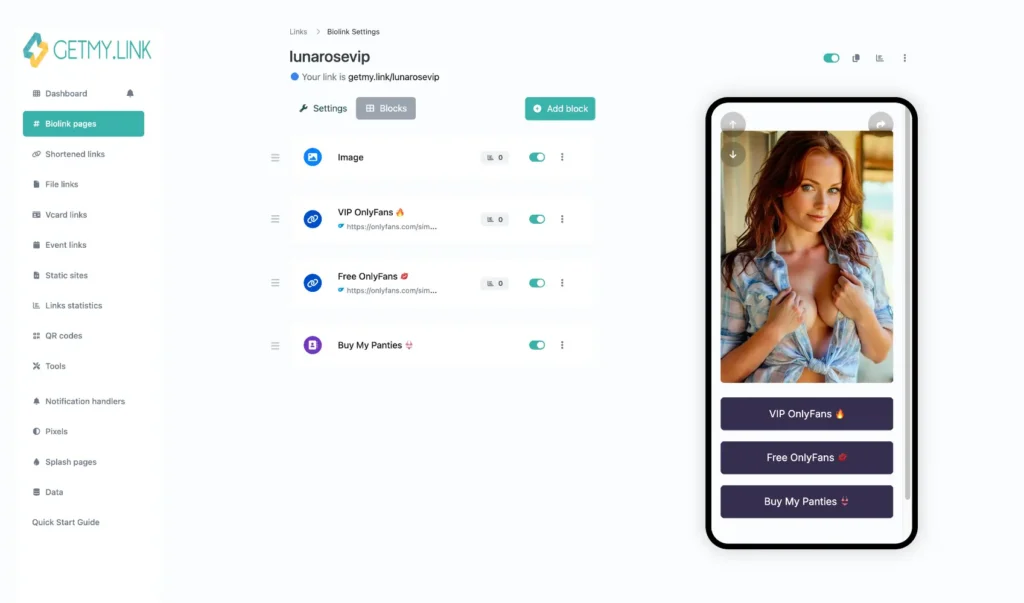
At its core is a customizable biolink page builder. You can design a structured page where your OnlyFans link sits as the primary action, supported by secondary platforms, limited promotions, or preview content. This turns a simple link into a guided transition.
Beyond layout, GetMy.Link introduces functionality Instagram doesn’t offer.
You can create short links for specific campaigns, track how individual promotions perform, and route traffic strategically. If you’re running a limited discount or testing a new content angle, you don’t need to constantly edit your Instagram profile. You update the destination inside GetMy.Link instead.
Tracking is where the difference becomes clear.
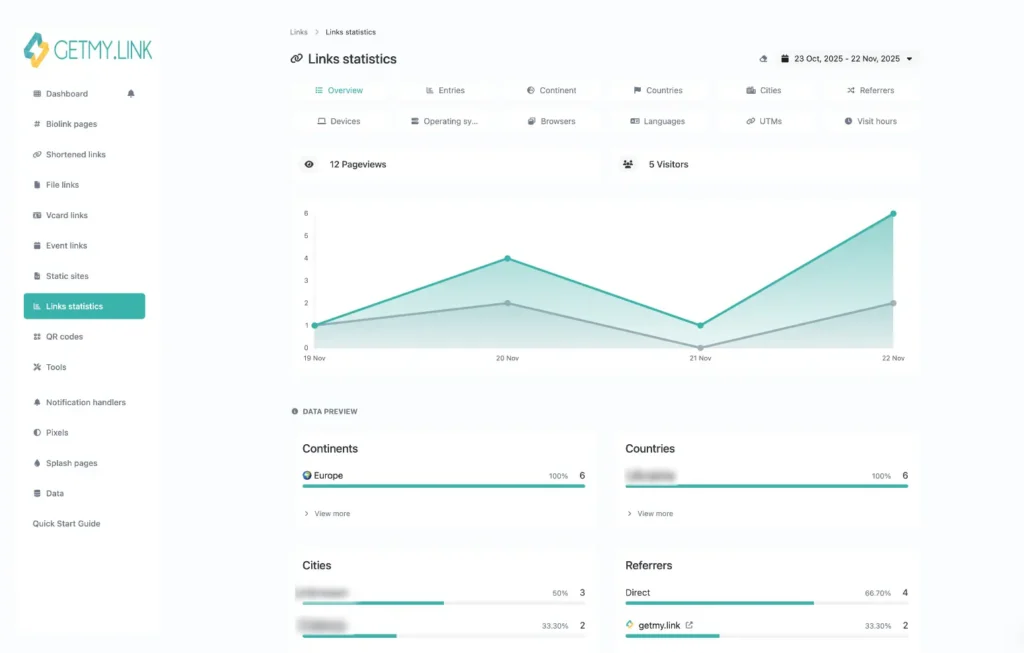
With built-in analytics, you can monitor click volume, timing patterns, geographic data, and device usage. Add UTM parameters or install tracking pixels to measure performance across campaigns. This gives you insight into what content drives intent – not just engagement.
Most importantly, GetMy.Link creates a buffer layer between Instagram and OnlyFans. Instead of directly exposing your monetized platform, you introduce a neutral routing page. That added separation provides flexibility and structural control if policies shift or campaigns change.
Instagram gives you attention.
GetMy.Link gives you leverage over what happens next.
Step-by-Step: Setting Up GetMy.Link for Instagram
A GetMy.Link page only works if it’s built with Instagram behavior in mind. Instagram users often arrive through Reels, Stories, or profile taps. They skim quickly. They decide fast. Your setup needs to reduce friction and make the next step obvious.
Here’s the clean process.
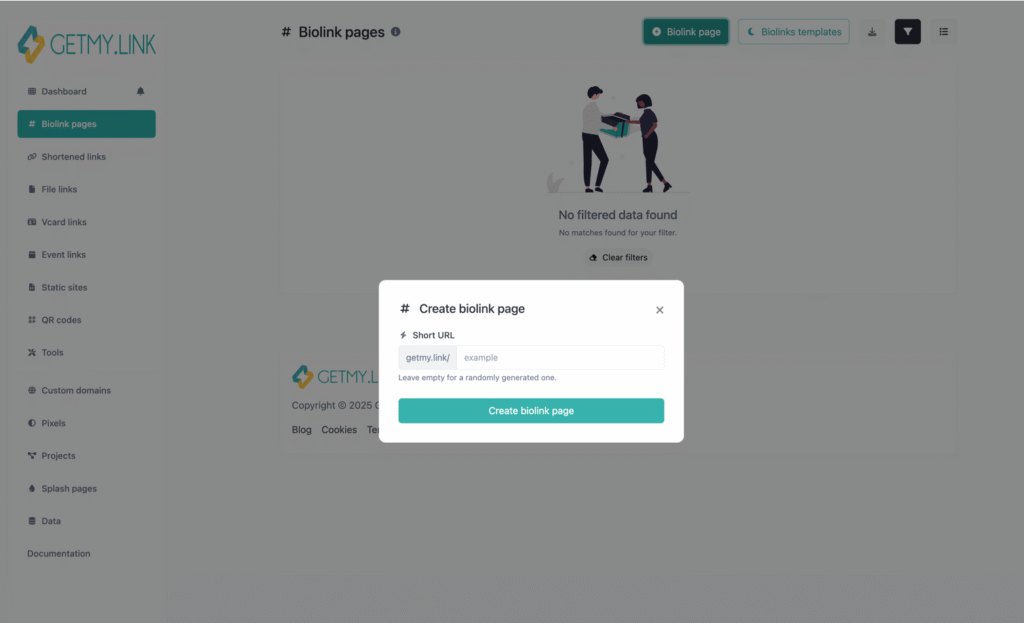
Step 1: Create a Biolink Page in GetMy.Link
Log into your GetMy.Link account and create a new Biolink Page. This becomes the destination Instagram traffic hits first. Treat it like a landing page, not a list of links.
Step 2: Add OnlyFans as Your Primary CTA
Your monetized platform should be the first and most visible action on the page. Avoid vague labels. Use clear wording that explains what the click leads to.
Examples that convert well:
- “Exclusive Content on OnlyFans”
- “Unlock Full Access”
- “VIP Content & Full Sets”
Keep it direct. Don’t overload the visitor with choices at the top.
Step 3: Add Secondary Links Strategically
Secondary links are helpful – but only if they support conversion.
Good secondary options:
- Instagram backup page (if you run multiple accounts)
- X (for stronger link tolerance and promo flexibility)
- Snapchat (if it’s part of your funnel)
- A “Menu” or “Start Here” page if you offer structured content
Place these below the main CTA so they don’t compete with it.
Step 4: Customize Design for Brand Consistency
Instagram traffic responds to familiarity. Match your GetMy.Link design to your Instagram aesthetic.
Focus on:
- Clean layout
- High contrast buttons
- Minimal text above the fold
- A short bio line that matches your Instagram tone
Avoid clutter. A page that looks busy tends to convert worse.
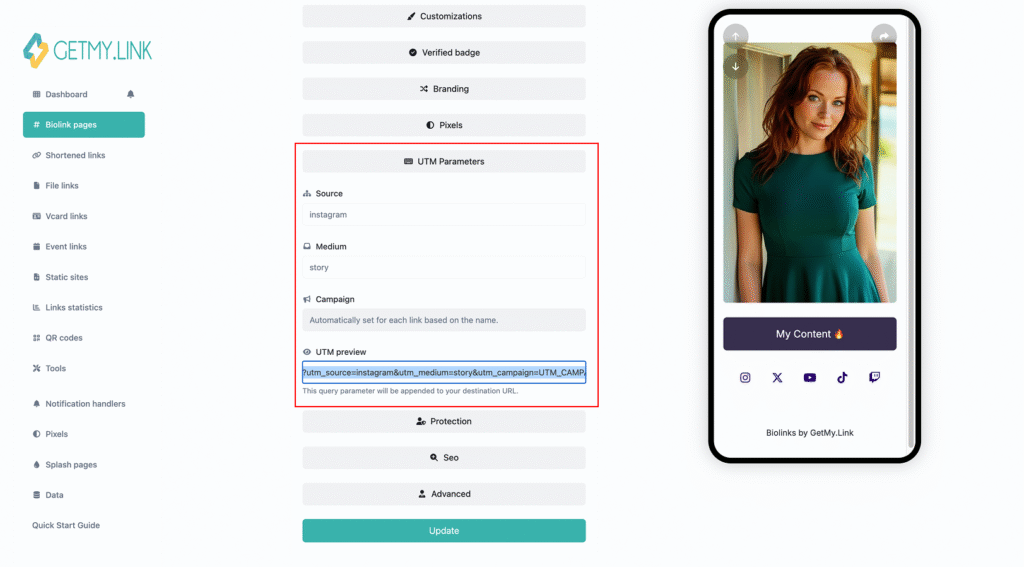
Step 5: Add Tracking and UTM Parameters
Before you publish, add tracking.
Use UTMs so you can measure where clicks come from. For example:
?utm_source=instagram&utm_medium=bio&utm_campaign=profile_traffic
If you run ads or plan retargeting, install the relevant tracking pixel inside GetMy.Link.
Step 6: Copy the Link into Your Instagram Profile
Go to Instagram → Edit Profile → Links → Add external link. Paste your GetMy.Link URL and save.
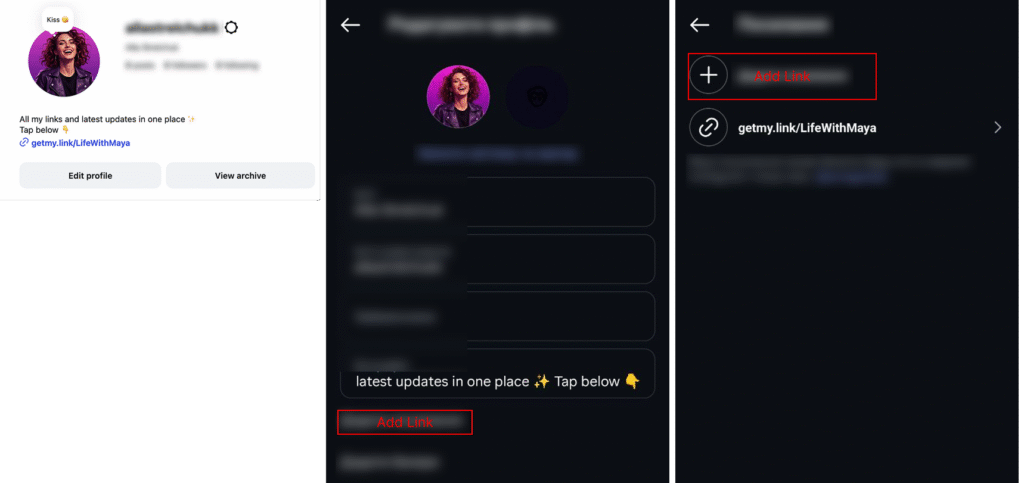
Once your link is live, the setup is complete. Now the real work begins: structuring your page for conversion and tracking what performs.
How to Structure Your Bio Page for Instagram Conversion
Instagram traffic behaves differently from TikTok. Users often arrive after viewing multiple posts, Stories, or Reels. They’ve already seen your aesthetic. They’ve formed a first impression. When they tap your bio link, they’re looking for confirmation – not exploration.
That’s why structure matters.
Above-the-Fold Clarity
The first visible section of your GetMy.Link page should contain:
- A recognizable profile image
- A short, clear description
- One primary call-to-action
Your OnlyFans button must be visible without scrolling. If visitors need to search for it, you’ve introduced friction.
Button Hierarchy
Hierarchy drives action.
Primary button: OnlyFans
Secondary buttons: Support platforms (X, backup Instagram, Snapchat)
Optional button: Limited promotion or “Start Here” page
Avoid placing multiple equal-weight buttons at the top. Instagram users move quickly. Too many choices reduce decision speed.
Soft Language vs Explicit Wording
Instagram remains sensitive to adult positioning. Your bio page should reflect that awareness.
Instead of aggressive wording, use suggestive but neutral phrasing:
- “Exclusive Access”
- “Private Content”
- “VIP Page”
You can be clear without being explicit. This reduces friction while keeping intent obvious.
Reinforce With Story Highlights
Your link doesn’t work alone.
Use Story Highlights labeled:
- “VIP”
- “Join”
- “Access”
- “Content”
These reinforce the direction and condition your audience before they ever tap your bio link.
Maintain Visual Consistency
Your GetMy.Link page should feel like an extension of your Instagram brand.
Match:
- Color palette
- Typography style
- Tone of voice
- Profile image
Consistency builds trust. Trust improves conversion.
Tracking Instagram Traffic the Smart Way
Instagram shows you reach, impressions, and engagement. It does not show you what happens after someone taps your bio link.
If you want to improve conversions, you need visibility beyond likes and views.
Use UTM Parameters to Separate Traffic
Start by adding UTM parameters to your OnlyFans link inside GetMy.Link.
For example:
?utm_source=instagram&utm_medium=bio&utm_campaign=reels_traffic
You can create different tags for:
- Reels campaigns
- Feed promotions
- Story-driven traffic
- Limited-time discounts
This allows you to compare performance across content formats instead of lumping all Instagram traffic together.
Monitor Built-In Analytics
GetMy.Link provides click-level analytics, including:
- Total clicks
- Click timing
- Location data
- Device breakdown
When you notice spikes, look back at what you posted that day. Over time, patterns emerge.
High engagement does not always equal high intent. Tracking reveals the difference.
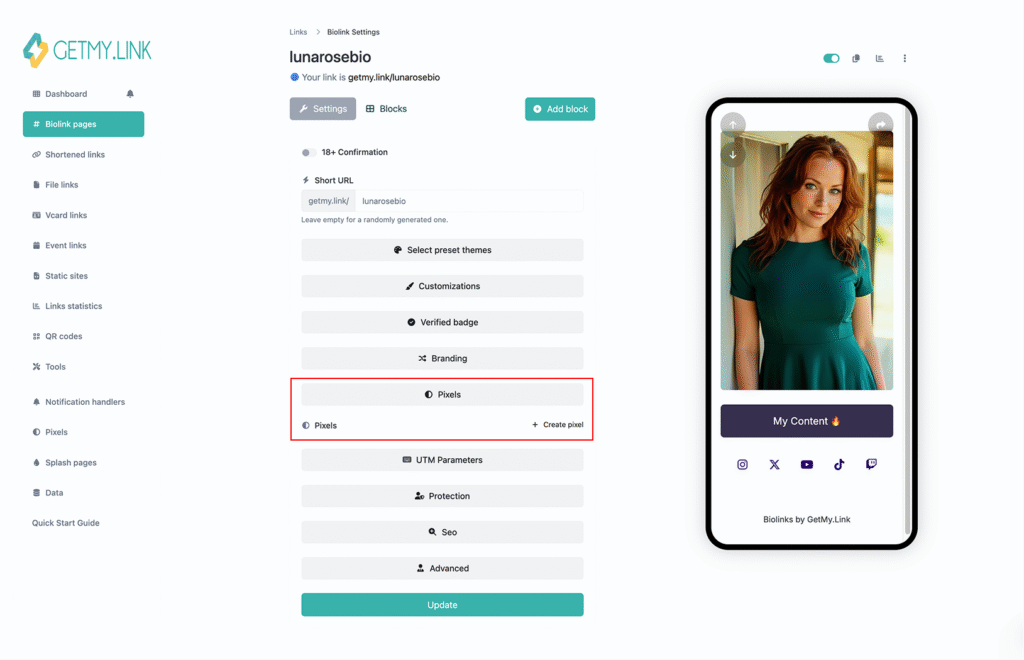
Install Pixels for Long-Term Growth
If you plan to scale with paid ads or retargeting, install the appropriate pixel inside GetMy.Link.
Pixel tracking allows you to:
- Build retargeting audiences
- Measure campaign performance
- Compare organic and paid traffic
Even if you aren’t running ads now, setting this up early builds data you can use later.
Compare Reels vs Feed vs Stories
Not all Instagram traffic behaves the same.
Reels often drive discovery.
Stories drive warm traffic.
Feed posts build brand depth.
By tagging links properly, you can see which format generates the most bio clicks – and adjust your content strategy accordingly.
Traffic without measurement is noise.
Traffic with tracking becomes a strategy.
Common Mistakes OnlyFans Creators Make with Instagram Links
Even strong Instagram pages underperform because of simple link mistakes. The content works. The funnel doesn’t.
Here are the most common issues.
1. Using a raw OnlyFans link
Dropping a direct subscription URL into your bio removes structure and tracking. There’s no transition layer, no campaign control, and no performance data beyond surface-level insights.
It can also increase moderation sensitivity. Instagram does not openly prohibit linking to OnlyFans, but direct adult-platform links may contribute to reduced visibility, content suppression, or what creators often describe as “shadow banning”. Routing traffic through a neutral link layer adds flexibility and reduces direct exposure.
2. Link overload
Adding too many equal-weight links creates hesitation. When everything looks important, nothing feels prioritized. Clear hierarchy increases action.
3. No CTA in captions or Stories
Instagram does not automatically push users to your bio. If you don’t consistently direct followers to “check the link in bio”, many won’t take the next step.
4. Not updating promotional links
Running a discount or special bundle without updating your bio page weakens urgency. Outdated promotions reduce trust.
5. Ignoring analytics
Clicks are measurable. If you’re not reviewing data, you’re optimizing blindly.
Small adjustments fix these issues. Ignoring them quietly limits growth.
Conclusion
Instagram is a discovery platform. It helps you build visibility, attract new followers, and stay top of mind through consistent content. But discovery alone doesn’t create predictable income.
The real leverage point is your bio link.
When that link is treated casually, growth becomes inconsistent. When it’s structured intentionally, it becomes a conversion engine.
GetMy.Link adds that structure. It turns a simple profile link into a controlled transition layer between Instagram and OnlyFans. It allows you to adjust campaigns without editing your profile, measure traffic instead of guessing, and guide followers with purpose instead of hoping they click the right option.
Infrastructure always outperforms randomness.
For OnlyFans creators using Instagram as a growth channel, your bio link isn’t just a placeholder. It’s an asset. When managed strategically, it becomes the bridge between attention and revenue – and one of the most important tools in your monetization system.
Leave a Reply