
Facebook is one of the largest social platforms in the world. It has reach, traffic, and built-in discovery through profiles, pages, groups, and ads.
But for OnlyFans creators, it’s also one of the most restrictive environments to promote adult content.
Direct OnlyFans links often get suppressed. Posts containing explicit wording lose reach. In some cases, links are removed entirely. Even when content doesn’t violate policy directly, Facebook’s algorithm tends to deprioritize anything that clearly signals adult monetization.
That creates a problem:
You can build attention on Facebook – but you can’t safely send traffic where it actually converts.
This is where GetMy.Link becomes strategic.
Instead of linking directly to OnlyFans, you use a neutral, customizable link hub. It acts as a safe entry point. Facebook sees a clean, professional page. Your audience sees structured access to all of your platforms. And you maintain tracking, analytics, and control over traffic.
In this guide, we’ll break down:
- Why direct OnlyFans links struggle on Facebook
- How to structure your GetMy.Link page for compliance
- Where to place your link inside Facebook
- How to avoid throttling
- How to use tracking pixels and retargeting
- How to build a Facebook → GetMy.Link → OnlyFans funnel
By the end, you’ll understand how to turn Facebook into a traffic source – without risking your account or reach.
Why Direct OnlyFans Links Don’t Work on Facebook
At first glance, it seems simple:
You post your OnlyFans link. People click. They subscribe.
In reality, it rarely works that smoothly on Facebook.
The platform operates under strict advertising and community guidelines. Even if you’re not running paid ads, Facebook’s algorithm still scans outbound links and post language. Direct links to adult subscription platforms often fall into a gray zone. They may not trigger an immediate ban – but they frequently trigger reduced distribution.
Here’s what typically happens when creators post direct OnlyFans links:
- The post receives lower reach than usual.
- The link preview fails to load properly.
- The post doesn’t appear in followers’ feeds consistently.
- Engagement drops without explanation.
- In some cases, the link is blocked entirely.
Facebook does not publicly confirm every filtering mechanism. But creators consistently report throttling when using explicit domain names like onlyfans.com in posts or bios.
This isn’t necessarily a manual punishment. It’s algorithmic filtering.
And the algorithm reacts to:
- Domain reputation
- Content category
- Repeated outbound linking behavior
- Trigger words in captions
- User reports
When Facebook detects repeated traffic pushing toward adult monetization platforms, distribution can quietly shrink.
That’s the core issue.
You can build visibility on Facebook – but direct monetization links often weaken that visibility over time.
The Shadow Suppression Problem
One of the biggest risks isn’t a ban. It’s reduced visibility.
Your posts still appear to you.
Your account looks normal.
But reach quietly drops.
This is sometimes referred to as “shadow suppression”. Facebook doesn’t notify you. There’s no warning message. Your posts just stop performing the way they used to.
Creators often misinterpret this as audience fatigue. In many cases, it’s outbound link filtering.
If every promotional post contains:
- “OnlyFans” in the caption
- Direct explicit language
- The OnlyFans domain
… the algorithm begins categorizing your content accordingly.
And once categorized, recovery can take time.
Why Neutral Link Hubs Perform Better
Facebook prefers neutral domains.
A clean link hub like GetMy.Link:
- Doesn’t immediately signal adult content.
- Doesn’t contain explicit keywords in the URL.
- Can be branded and customized.
- Looks similar to mainstream bio-link tools.
That makes it safer as a public-facing destination.
Facebook sees a neutral landing page.
Your audience sees structured access to your paid content.
You control what appears on that page.
This separation reduces risk.
Instead of:
Facebook → OnlyFans
You create:
Facebook → GetMy.Link → OnlyFans
That extra layer is strategic.
How to Set Up Your GetMy.Link Page for Facebook Traffic
If Facebook is strict about adult links, your GetMy.Link page must be structured with intention.
The goal is simple:
Make the page look clean enough for Facebook’s algorithm – while still converting visitors into subscribers.
This section walks you through exactly how to build that.
Step 1 – Create or Optimize Your Bio Link Page
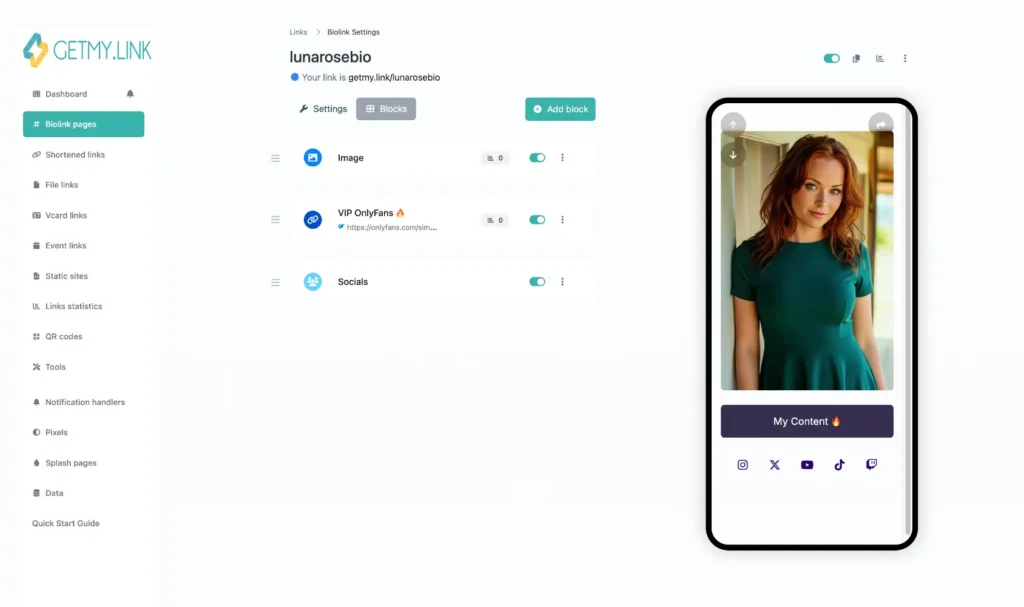
Inside your GetMy.Link dashboard, go to Bio Link Pages and create a new page (or edit your existing one).
This page will be your primary Facebook-facing link.
Your structure should include:
- A professional profile image
- A short neutral headline
- Clean button layout
- No explicit thumbnails
- No aggressive adult language in visible text
Think of it as a public storefront – not your private content.
Instead of writing:
“Watch my nude content here 🔥”
Use:
“Exclusive content & private access”
Subtle wording performs better on Facebook.
Step 2 – Structure Your Buttons Strategically
Don’t place your OnlyFans button at the very top with explicit wording.
Instead:
- Start with neutral links:
- Instagram
- Telegram
- X (Twitter)
- “Free Content”
- Instagram
- Then include:
- “Premium Access”
- “Private Content”
- “VIP Page”
- “Premium Access”
Your OnlyFans link can sit behind one of those neutral button labels.
This creates a layered experience:
Facebook sees a link hub.
Visitors explore naturally.
Conversion happens after intent is established.
This reduces algorithmic suspicion and improves trust.
Step 3 – Keep Visuals Safe for Preview Crawling
When Facebook generates a preview for your GetMy.Link URL, it pulls:
- Page title
- Description
- Preview image
If your page contains explicit thumbnails at the top, the preview may break – or worse, get flagged.
Inside GetMy.Link:
- Choose a clean banner image.
- Use a neutral profile photo.
- Avoid nudity in the header section.
Explicit content can exist deeper behind links – just not on the public preview layer.
Step 4 – Customize Your URL Slug
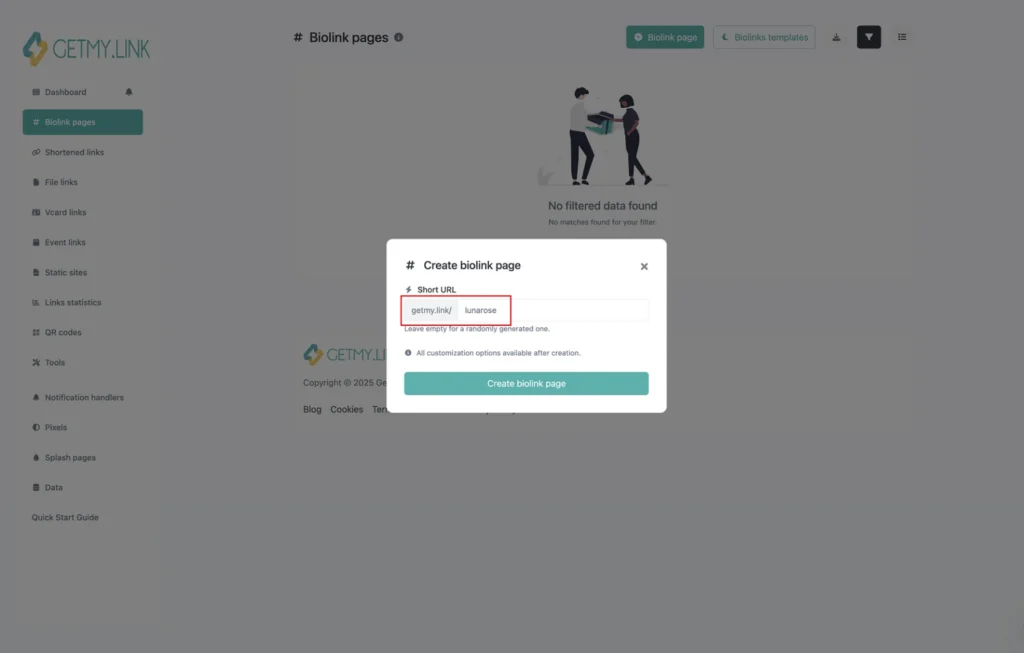
Instead of:
getmy.link/onlyfans-hot-model-18
Use:
getmy.link/YourName
Keep it simple. Branded. Professional.
Facebook’s link trust systems evaluate URLs. Clean, brand-based slugs look safer than adult-optimized ones.
Step 5 – Add Facebook Pixel (Optional but Powerful)
If you’re serious about traffic tracking, this is critical.
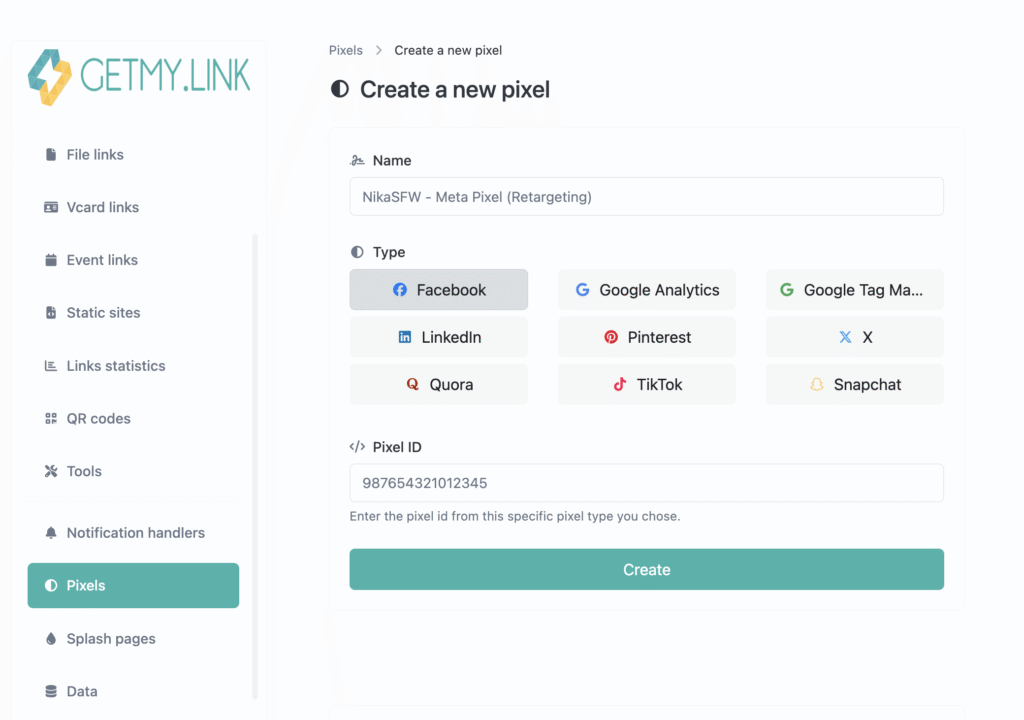
Inside GetMy.Link, go to Pixels or tracking settings.
Add your Facebook Pixel ID.
Now when someone clicks your link from Facebook:
- The visit is recorded.
- You can build custom audiences.
- You can retarget visitors later (through compliant campaigns).
Even if you never run adult ads, you can:
- Promote a safe lead magnet.
- Retarget traffic through Messenger funnels.
- Build lookalike audiences.
This turns Facebook into a data source – not just traffic.
The Resulting Funnel
Once setup is complete, your traffic flow becomes:
Facebook Post
↓
GetMy.Link (neutral hub)
↓
OnlyFans (conversion)
Clean. Trackable. Controlled.No direct domain exposure.
No repeated explicit linking.
Lower suppression risk.
Where to Place Your GetMy.Link on Facebook for Maximum Reach
Setting up your GetMy.Link page correctly is only half the strategy.
Placement inside Facebook determines visibility.
Not all link placements are treated equally by the algorithm. Some areas get more reach. Some are safer. Some are ignored almost entirely.
Here’s how to use each one strategically.
Your Facebook Profile – The Foundation Layer
Your personal profile typically gets more organic visibility than a Facebook Page.
Facebook often gives personal accounts stronger baseline reach compared to business Pages. That makes your profile a powerful traffic source.
Where to place your link:
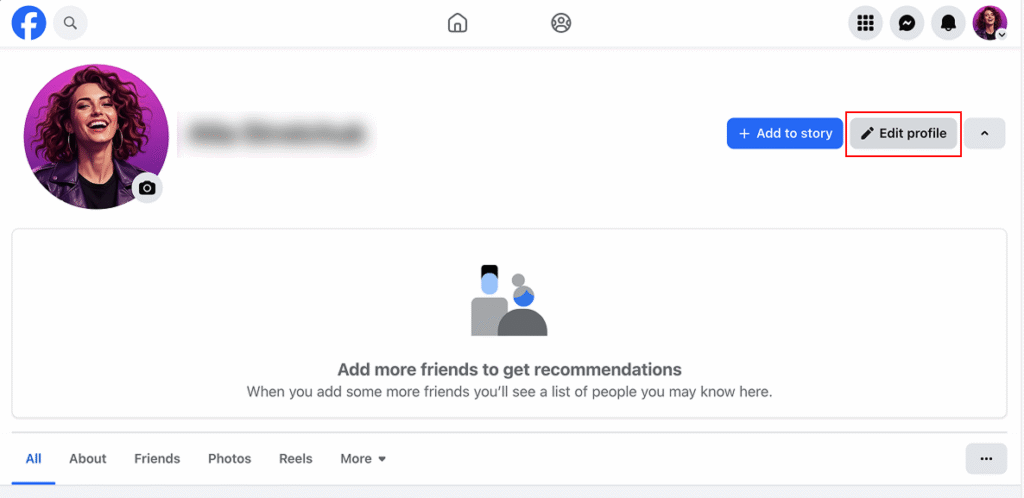
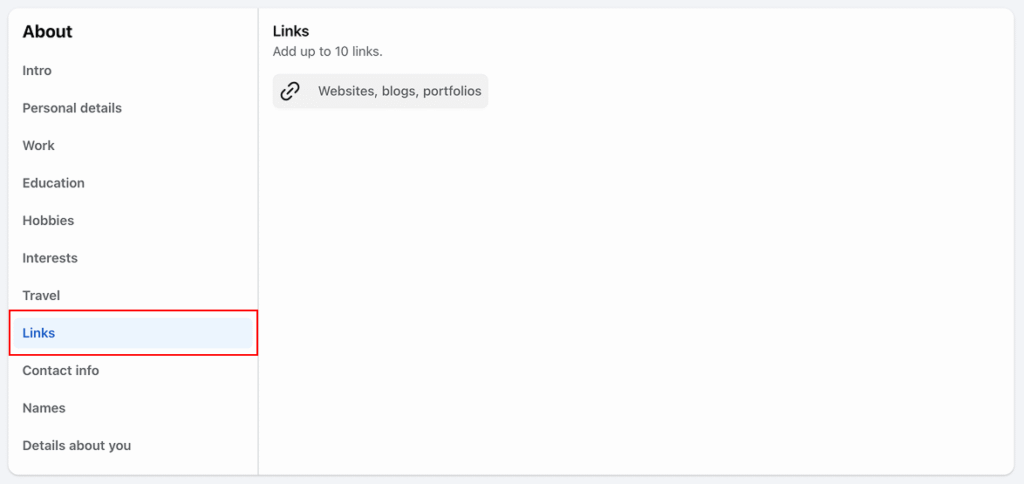
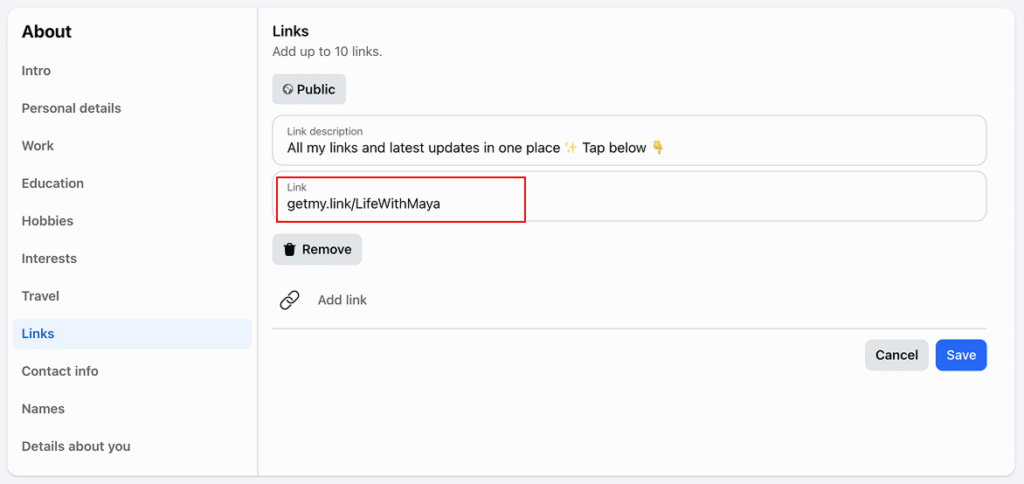
Go to:
Profile → Edit Profile → Contact & Basic Info → Website
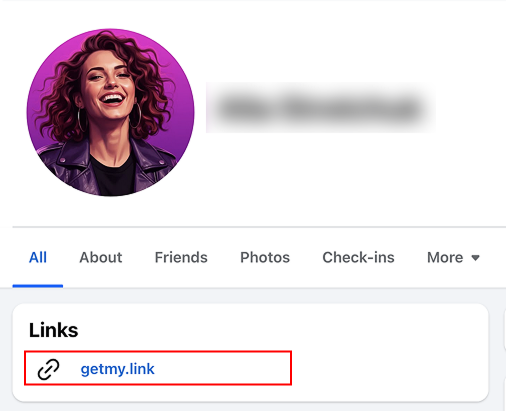
Paste your GetMy.Link URL there.
This placement is stable. It doesn’t reduce feed reach. And it doesn’t look promotional.
Keep the bio text neutral:
Instead of:
“Subscribe to my OnlyFans 🔥”
Use:
“All my official links here”
“Private access & updates”
Subtle language reduces flags.
Pinned Post Strategy (Controlled Promotion)
A pinned post allows you to promote without repeatedly posting links.
Here’s how to structure it:
- Create a safe-for-work post.
- Clean photo.
- Neutral caption.
- Clean photo.
- Add your GetMy.Link URL at the end.
- Pin it to the top of your profile.
Now visitors always see your main link – without you constantly reposting it.
Repeated link posting increases suppression risk. A pinned post centralizes promotion.
Keep caption examples clean:
“All my latest updates and exclusive platforms are here: [link]”
Avoid adult keywords in the caption.
Comment Drop Technique (Lower Algorithm Weight)
Facebook assigns different weight to links in posts versus links in comments.
Links in comments often face less distribution throttling.
Strategy:
- Post safe content without a link.
- Wait 1-2 minutes.
- Add your GetMy.Link in the first comment.
This approach:
- Keeps the main post “clean”.
- Avoids immediate link scanning.
- Preserves reach.
It’s subtle – but effective.Use sparingly. Don’t do it under every post.
Facebook Stories (Soft Funnel Entry)
Stories are underutilized by creators.
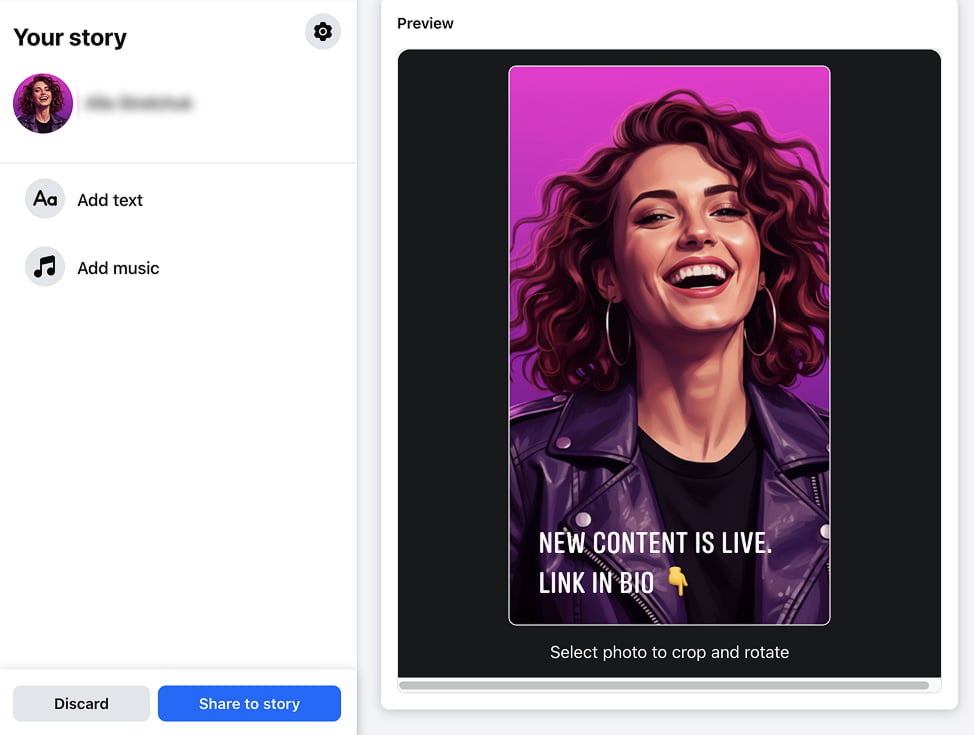
You can:
- Add your GetMy.Link in Story text.
- Mention “Link in bio”.
- Use swipe-up if available (for larger accounts).
Stories disappear after 24 hours. That makes them lower-risk for promotional content.
Keep it simple:
“New content live. Link in profile”.
No explicit wording.
Facebook Groups (High Risk, High Reward)
Groups can drive traffic – but only if rules allow it.
Before posting:
- Read group rules.
- Avoid spam behavior.
- Contribute value first.
Never drop links without context.
Instead:
- Post engaging content.
- Build presence.
- Add your link subtly in your profile.
- Occasionally mention “All links in bio”.
Groups punish aggressive link spam quickly.
Think relationship-building, not blasting.
Facebook Page vs Personal Profile
If you use a Facebook Page:
- Organic reach is lower.
- Links are more scrutinized.
- Promotion appears more commercial.
If using a Page:
- Focus on soft funneling.
- Use lead magnets.
- Drive to GetMy.Link, not directly to OnlyFans.
- Avoid repeated outbound linking.
Many creators use:
Personal profile → Traffic
Page → Branding
Separation reduces risk.
Posting Frequency & Link Behavior
One common mistake:
Every post includes a link.
Facebook flags repetitive outbound linking behavior.
Better strategy:
Content-only posts: 70-80%
Link posts: 20-30%
This ratio maintains healthy distribution.
Rotate wording. Avoid repeating identical captions with links.
Consistency without duplication is key.
The Core Principle
Your objective isn’t to blast your link everywhere.
It’s to make it accessible everywhere – without triggering suppression.
That means:
Stable link in profile.
Pinned promotional post.
Occasional strategic comment drops.
Stories for soft reminders.
Groups with caution.
And always – neutral presentation.
How to Avoid Facebook Throttling and Shadow Suppression
Most creators don’t get banned.
They get quietly limited.
That’s the real danger on Facebook.
You don’t receive a notification.
Your account still looks normal.
But your posts stop performing.
Reach drops.
Engagement slows.
Traffic declines.
This is algorithmic throttling.
And it often happens because of repeated outbound link behavior combined with adult signals.
Let’s break down what actually triggers suppression – and how to prevent it.
Stop Repeating the Same Link Behavior
If every promotional post looks like this:
- Teaser photo
- “Subscribe to my OnlyFans”
- Direct link
The system categorizes your account.
Repetitive structure = predictable pattern.
Predictable pattern + adult monetization domain = lower distribution priority.
Instead, rotate your format.
Examples:
Post 1:
No link. “New content live. Details in bio”.
Post 2:
Soft caption + link in comments.
Post 3:
Story mention only.
Post 4:
Pinned post reminder.
Variation keeps your account from looking automated or purely monetization-focused.
Avoid Explicit Trigger Words in Public Captions
Even if your GetMy.Link page is neutral, your caption can still trigger filtering.
High-risk words include:
- “nude”
- “XXX”
- “18+”
- “porn”
- “explicit”
- aggressive emoji combinations 🔥🍑💦
This doesn’t mean you can’t imply adult content.
It means you should reframe wording.
Instead of:
“Watch my uncensored nude content”
Use:
“Private content available”
“Exclusive access”
Subtle language performs better long-term.
Don’t Over-Optimize Your Link Slug
This is often overlooked.
Bad example:
getmy.link/hot-nude-onlyfans-18-model
Better:
getmy.link/YourName
Facebook’s systems evaluate URLs as part of risk scoring.
Keyword-stuffed slugs look spammy.
Branded slugs look legitimate.
Keep it clean.
Reduce Link Frequency Per Session
Posting multiple link-containing posts within a short window can trigger lower visibility.
Spacing matters.
If you share a promotional link:
Wait at least 24 hours before repeating a similar post.
Give the algorithm content-only engagement in between.
Remember: Facebook prioritizes content that keeps users on the platform – not content that sends them away.
If your account constantly pushes outbound traffic, distribution naturally shrinks.
Avoid Mass Posting Across Groups
Dropping the same link in:
10 groups
Within 15 minutes
Is one of the fastest ways to get limited.
Facebook detects copy-paste behavior quickly.
If you use groups:
- Change captions.
- Avoid identical phrasing.
- Contribute value first.
- Limit promotional frequency.
Spam detection is behavioral, not just textual.
Keep Your GetMy.Link Page Clean on Top
If Facebook crawls your GetMy.Link page and sees:
- Explicit banner
- Nude thumbnails
- Sexual headlines at the top
Your preview may break.
Or worse – link trust score drops.
Best practice:
Top of page:
- Neutral profile photo
- Simple description
- Clean layout
Explicit content can live deeper behind buttons – not in the header section.
This preserves preview safety.
Watch Your Engagement Signals
Sudden reach drops usually follow:
- Repeated link blasts
- Explicit captions
- Rapid group posting
- High outbound link ratio
If you notice suppression:
Pause promotional links for 7-10 days.
Post only content without links.
Rebuild engagement organically.
Then reintroduce links gradually.
Algorithm trust can recover – but only with behavioral change.
Diversify Your Funnel
Facebook should not be your only traffic source.
Healthy creators use:
Instagram
X (Twitter)
Telegram
Reddit
TikTok (indirectly)
GetMy.Link becomes the central hub.
When traffic is diversified, Facebook suppression hurts less.
The Core Protection Strategy
Think like this:
You are not promoting OnlyFans.
You are building a brand presence.
Your GetMy.Link page is your official hub.
Facebook sees a creator.
Your audience sees access.
That difference matters.
Using Facebook Pixel & Retargeting with GetMy.Link
Most creators use Facebook only for surface-level traffic.
They post.
They drop a link.
They hope for clicks.
But if you’re serious about growth, Facebook should be more than traffic.
It should be a data engine.
This is where GetMy.Link becomes powerful.
Why Pixel Tracking Matters for OnlyFans Creators
When someone clicks your GetMy.Link page from Facebook, that visit has value – even if they don’t subscribe immediately.
Without tracking:
You lose that visitor forever.
With tracking:
You build an audience database.
Facebook Pixel allows you to:
- Track who clicked your link.
- Build custom audiences.
- Create lookalike audiences.
- Retarget visitors later.
- Measure traffic quality.
Even if you never run explicit ads, pixel data gives you insight.
And GetMy.Link allows you to embed tracking pixels directly inside your link page.
Step-by-Step: Adding Facebook Pixel to GetMy.Link
Inside your GetMy.Link dashboard:
- Go to Pixels or tracking settings.
- Click Create Pixel.
- Choose Facebook (Meta) Pixel.
- Paste your Pixel ID.
- Save changes.
- Attach the pixel to your Bio Link page.
Now every visitor from Facebook triggers the pixel when they land on your page.
Important: The pixel fires before they click through to OnlyFans.
That means you collect traffic data without sending pixel events to OnlyFans itself.
This keeps your funnel compliant.
What You Can Do With That Data
Once traffic starts flowing, you can create:
1. Custom Audience of Visitors
In Meta Ads Manager, create a custom audience based on:
“People who visited your website”.
That website = your GetMy.Link page.
Now you have an audience of:
People who showed interest
People who clicked
People who considered subscribing
Even if they didn’t convert.
2. Retargeting Campaigns (Compliant Funnel)
You cannot run adult ads on Facebook.
But you can:
- Promote a safe freebie.
- Promote a newsletter signup.
- Promote a SFW teaser landing page.
- Promote a brand-building post.
Retarget only people who visited your GetMy.Link.
That means your ads are shown to warm traffic – not cold strangers.
Warm audiences convert higher.
3. Build Lookalike Audiences
Facebook can analyze your pixel audience and create lookalikes.
This means:
Facebook finds people similar to your link visitors.
You can then run compliant ads to:
- Grow your brand page.
- Promote safe content.
- Grow email list.
- Build Telegram funnel.
GetMy.Link becomes the bridge between adult monetization and compliant traffic growth.
The Advanced Funnel Model
Here’s what a structured funnel looks like:
Facebook Content
↓
GetMy.Link
↓
OnlyFans
Plus:
Facebook Pixel
↓
Custom Audience
↓
Retargeting / Lookalike Ads
↓
More traffic
This turns Facebook into a controlled ecosystem instead of random posting.
Why This Is Safer Than Direct Promotion
If you run ads directly mentioning OnlyFans:
High risk.
Policy violation.
Account restrictions possible.
If you run ads to:
Your branded GetMy.Link
Or a safe content landing page
Lower risk.
Brand-building focus.
Data collection compliant.
The separation matters.
Facebook sees a neutral domain.
Your monetization happens one step deeper.
Important Compliance Reminder
Never:
- Mention explicit content in ads.
- Use adult thumbnails in promoted posts.
- Directly advertise OnlyFans subscriptions.
Always:
- Use neutral branding.
- Focus on personality, lifestyle, or safe content.
- Keep adult monetization behind GetMy.Link buttons.
This layered approach protects accounts long-term.
When Pixel Tracking Is Worth It
Pixel tracking is most useful if:
- You have consistent traffic.
- You plan to scale.
- You want data-driven decisions.
- You’re testing different captions or placements.
- You care about audience ownership.
If you’re posting casually, it may not matter.
If you’re building a brand, it absolutely does.
Building a Facebook → GetMy.Link → OnlyFans Funnel That Converts
Traffic alone doesn’t generate revenue.
Clicks don’t generate revenue.
Structure generates revenue.
If someone clicks from Facebook and lands on your GetMy.Link page, that moment is critical. You have a few seconds to guide them.
This is where most creators lose potential subscribers.
They send traffic – but don’t structure the path.
Let’s fix that.
Step 1 – Understand Facebook Traffic Psychology
Facebook traffic behaves differently from X (Twitter) or Reddit traffic.
Facebook users:
- Scroll casually.
- Click out of curiosity.
- Are not always ready to subscribe immediately.
- Often need soft escalation.
That means your funnel must guide them gradually.
If your GetMy.Link page immediately screams:
“Subscribe now 🔥”
You’ll lose a percentage of warm but hesitant visitors.
Instead, create stages.
Step 2 – Use a Two-Layer Button Strategy
Layer 1: Soft Entry
Layer 2: Monetization
Example structure:
Top buttons:
- “Latest Updates”
- “Free Content”
- “My Official Platforms”
- “VIP Access”
Then below:
- “Private Content”
- “Premium Access”
- “Exclusive Page”
Your OnlyFans link sits behind a neutral label.
This reduces friction.People don’t feel pushed.
They feel guided.
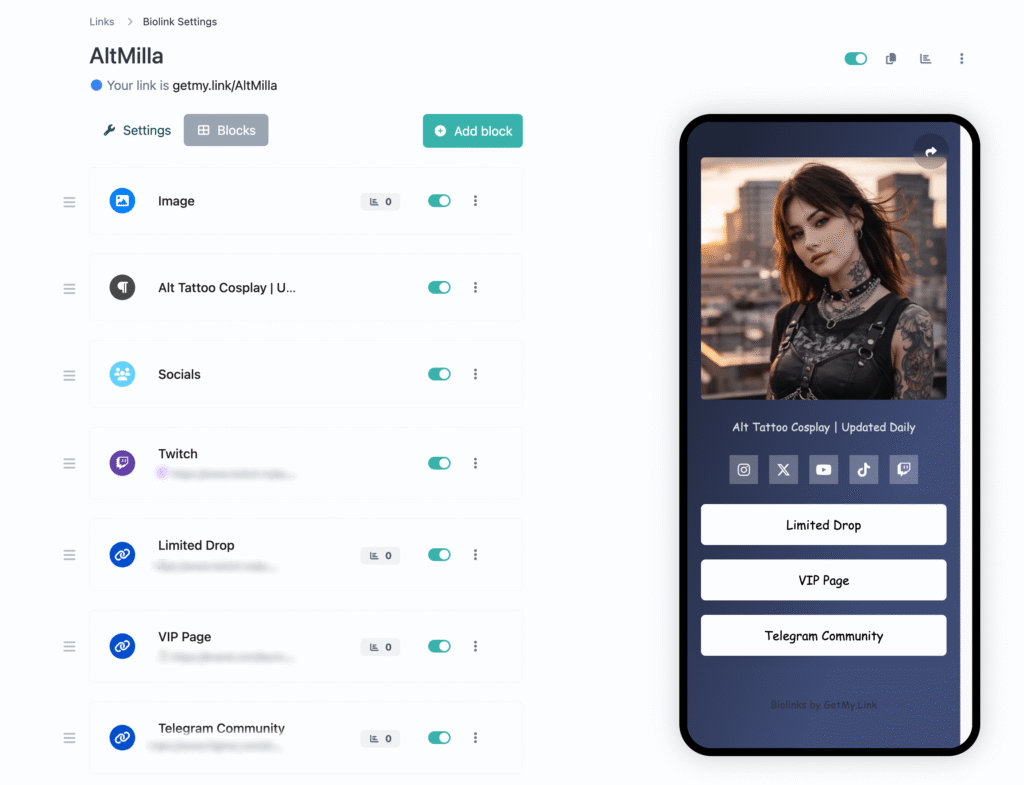
Step 3 – Optimize Your First Visible Text Block
The first visible text on your GetMy.Link page should:
- Be neutral.
- Reinforce branding.
- Build trust.
- Avoid explicit wording.
Example:
“Welcome. All official platforms and exclusive access are listed below”.
Not:
“Click for nude content”.
Trust increases conversion.
Especially for Facebook visitors who may worry about security or legitimacy.
Step 4 – Reduce Decision Overload
Too many buttons reduce conversion.
If your page has:
- 12 links
- 4 duplicate offers
- 3 variations of the same platform
Users hesitate.
Clean structure converts better.
Ideal range:
5-8 buttons maximum.
Make your monetization link clear – but not overwhelming.
Step 5 – Add Social Proof (Subtle, Not Aggressive)
You can include:
- “100K+ followers across platforms”
- “Updated daily”
- “Exclusive content inside”
Avoid fake urgency or exaggerated claims.
Facebook traffic tends to be more trust-sensitive than X traffic.
Professional tone increases conversions.
Step 6 – Use Visual Hierarchy Correctly
The eye scans from top to bottom.
Your layout should look like this:
Profile photo
Short headline
Soft intro
Neutral buttons
Monetization button
Optional tip/support button
Don’t bury your premium link too deep.
But don’t put it as the only visible option either.
Balance.
Step 7 – Mobile Optimization Is Critical
Most Facebook traffic is mobile.
That means:
- Buttons must be large.
- Text must be readable.
- No clutter.
- No heavy images that slow load time.
If your page loads slowly, users bounce before clicking.
Speed equals conversion.
Step 8 – CTA Language That Works on Facebook Traffic
Instead of aggressive adult CTAs, use:
- “Unlock full access”
- “See everything”
- “Join privately”
- “Enter VIP”
- “Exclusive access”
Subtle phrasing maintains compliance and reduces friction.
Remember: Facebook users didn’t come from an adult platform mindset. Ease them in.
Step 9 – The Conversion Flow
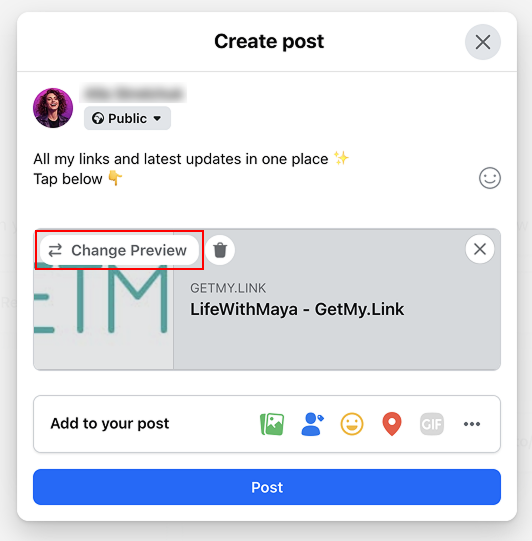
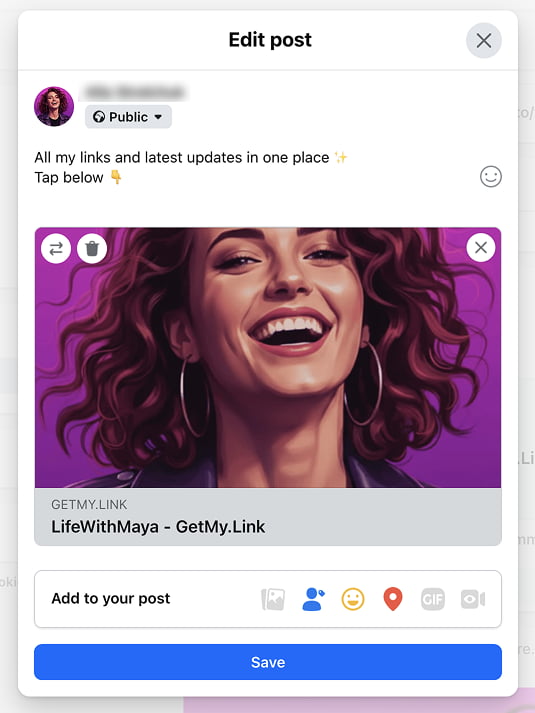
Here’s what a clean funnel looks like:
Facebook Post (Safe Teaser)
↓
GetMy.Link (Neutral Hub)
↓
Clear Premium Button
↓
OnlyFans Page
↓
Subscribe
Every step should feel natural.
No shock transitions.
No explicit landing preview.
No clutter.
Step 10 – Track Which Button Gets Clicked
Inside GetMy.Link analytics, review:
- Which buttons get clicks.
- Which links convert traffic.
- Which posts send the most visitors.
If your top button gets most clicks, but OnlyFans button gets few:
Your structure needs adjustment.
Test:
- Button position.
- Button color.
- Button wording.
- Order of links.
Small changes increase revenue.
The Big Mistake Most Creators Make
They treat GetMy.Link as just a “link list”.
It’s not.
It’s your landing page.
Landing pages require structure.
And structure determines conversion.
Facebook traffic can convert extremely well – if you guide it correctly.
Conclusion
Facebook is not an adult platform.
It was never designed to promote subscription-based explicit content. Its systems prioritize neutral engagement, platform retention, and brand-safe environments. For OnlyFans creators, that creates friction.
Direct linking doesn’t scale.
Repeated promotion reduces reach.
Explicit captions weaken visibility.
But that doesn’t mean Facebook is useless.
It means it requires structure.
GetMy.Link gives you that structure.
Instead of pushing traffic directly to OnlyFans, you create a controlled entry point. A neutral, branded hub that protects your reach, tracks your visitors, and separates public presence from monetized content.
Used correctly, the model looks like this:
Facebook builds attention.
GetMy.Link organizes access.
OnlyFans converts.
That separation is what makes the strategy sustainable.
With proper setup you can:
- Maintain algorithm health.
- Avoid shadow suppression.
- Track traffic through pixels.
- Build retargeting audiences.
- Improve conversion through structure.
- Scale without risking your account.
Facebook is not about aggressive selling.
It’s about controlled positioning.
GetMy.Link allows you to operate inside Facebook’s ecosystem without fighting it – while still directing traffic where it matters.
If you treat it as just a link, you limit its potential.
If you treat it as your landing page and traffic control system, it becomes one of the most powerful tools in your funnel.
The creators who scale are not the ones who post the most links.
They’re the ones who structure their flow.
Facebook → GetMy.Link → OnlyFans.
Clean. Layered. Trackable. Sustainable.
Leave a Reply